
GPT Image 2Prompt de IA

Anime Romance VN Screenshot — Faceless Heroine Night City Office

Create a cinematic dating sim game screenshot with a faceless heroine, neon city skyline, Japanese dialogue UI, and interactive choice buttons for authentic visual novel immersion.
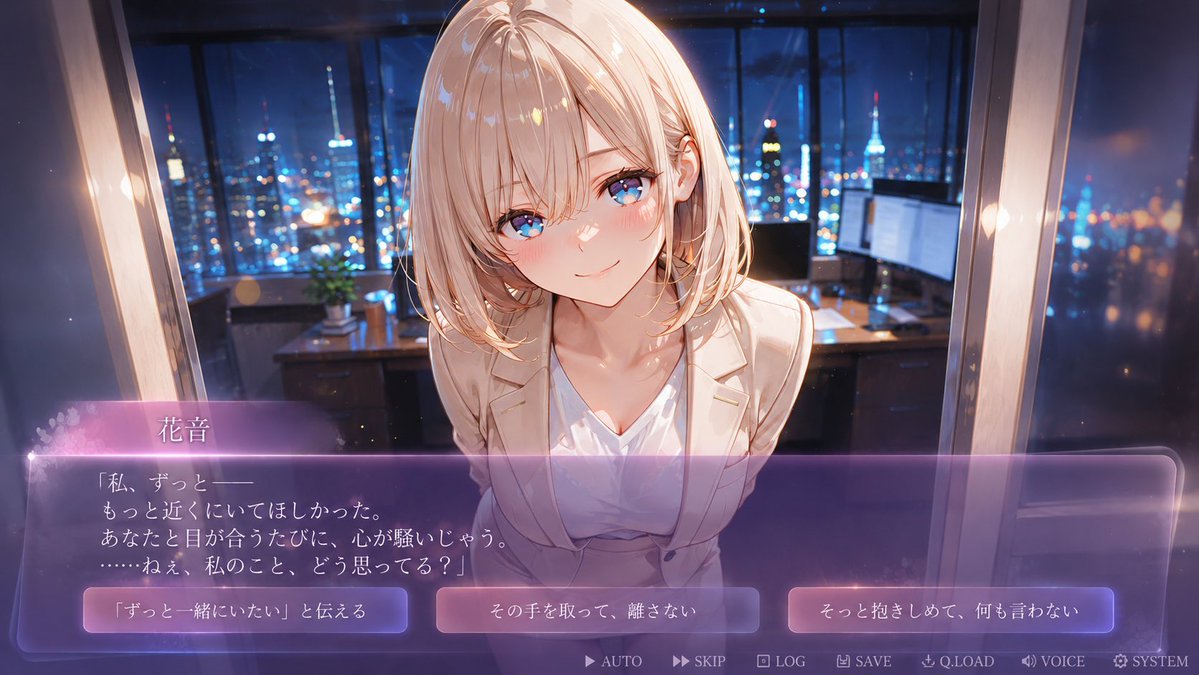
Anime Romance VN Screenshot — Faceless Heroine Night City Office
PROMPT · EN
type
动漫视觉小说恋爱游戏截图
format
16:9 宽屏 CG,带有交互式对话 UI
scene
setting
深夜豪华高层办公室,落地窗,窗外是闪烁的城市天际线和塔楼灯光,背景中有显示器和小型盆栽的办公桌,柔和的焦外成像,电影级景深
mood
亲密的告白场景,情感丰富,梦幻,高级恋爱模拟游戏氛围
camera
第一人称玩家视角,近景中景,角色隔着办公桌向观众倾身,轻微广角透视
character
name
{argument name="character name" default="花音"}
appearance
年轻的动漫女性,齐肩淡金色短发,柔和的层次感波波头,白皙皮肤,优雅纤细的身材,身穿白色 V 领衬衫外搭米色西装外套,精致的职场女性造型
pose
身体前倾,双肩微收,脸部非常靠近观众,肢体语言温柔且脆弱
face
无脸设计,在原本应有五官的位置呈现平滑的肤色椭圆,刻意保持空白且带有神秘感,同时保留头发、耳朵、颈部和身体细节
lighting_and_style
style
高质量日本动漫游戏 CG,精致的视觉小说画风,光泽高光,柔和光晕,浪漫的紫蓝色夜间灯光,头发和西装外套上的暖色轮廓光,细腻的绘画风格背景
color_palette
深海军蓝与钴蓝色的城市灯光,与温暖的象牙色服装及半透明紫色 UI 形成对比
ui
dialogue_box
position
屏幕下三分之一处
style
大型半透明圆角矩形,紫色磨砂玻璃质感渐变,顶部带有发光的粉紫色边缘,细长的发光边框,左侧有柔和的闪光和花瓣颗粒
speaker_name
{argument name="speaker name" default="花音"}
dialogue_text
{argument name="dialogue text" default="「私、ずっと——\nもっと近くにいてほしかった。\nあなたと目が合うたびに、心が騒いじゃう。\n……ねぇ、私のこと、どう思ってる?」"}
choice_buttons
count
3
position
对话区域下部,从左到右均匀分布
style
三个发光的圆角矩形按钮,带有紫粉色渐变和白色日语文字
labels
item 1
{argument name="left choice text" default="「ずっと一緒にいたい」と伝える"}
item 2
その手を取って、離さない
item 3
そっと抱きしめて、何も言わない
bottom_menu
count
7
position
最底部边缘,小型浅色图标和标签
labels
item 1
AUTO
item 2
SKIP
item 3
LOG
item 4
SAVE
item 5
Q.LOAD
item 6
VOICE
item 7
SYSTEM
composition
将角色置于中心并放大,上半身占据画面中部,对话 UI 覆盖在下三分之一处,透过界面上方可以看到城市办公室背景。使图像看起来像真实的恋爱视觉小说游戏截图,而非海报。

Sobre este prompt

Create a cinematic dating sim game screenshot with a faceless heroine, neon city skyline, Japanese dialogue UI, and interactive choice buttons for authentic visual novel immersion. Use it as a Arte Conceitual starting point for GPT Image 2: keep the visual structure and style constraints intact, then swap in your own subject, brand, or scene.

This prompt is organized as structured JSON with fields such as type, format, scene, character, lighting and style, ui, and composition. Keeping that hierarchy helps the model separate the subject, layout, interface elements, and detail constraints.

Start with small changes to subject, scene, camera, and color, then generate a few variations to compare composition and detail without turning the page copy into keyword stuffing.

Como usar este prompt

  1. Copy the entire prompt JSON and paste it into a compatible Sora 2 or similar AI image generator.
  2. Select an anime or illustration model (e.g., Stable Diffusion with an anime checkpoint) for best results.
  3. Customize variables like character name, dialogue text, and choice labels to personalize the scene.
  4. Generate the image at 16:9 widescreen resolution to preserve the cinematic composition.
  5. Refine by adjusting lighting, color palette, or UI details in subsequent generations.

FAQ

Mais de GPT Image 2

Ver tudo

Crie mais rápido com prompts Sora2Hub.

Use páginas de prompts curadas como entradas pesquisáveis e pule direto para geração com o contexto certo do modelo.

Explorar prompts

