Sora2 Hub
Sora2 Hub
  • Biblioteca de Prompts
  • Preços
  • Vitrine
Sora2 Hub
Sora2 Hub
Sora2 Hub

Sora2 Hub

Plataforma de criação profissional de IA impulsionada por Sora 2, Veo 3.1 e Nano Banana Pro. Crie vídeos impressionantes e imagens de qualidade de estúdio com controle avançado, qualidade HD e sem marcas d'água.

Email:support@sora2hub.org

Gerador de Vídeo IA

  • Texto para Vídeo
  • Imagem para Vídeo
  • Veo 3.1
  • Sora 2
  • Kling 3.0
  • Kling 2.6
  • Kling 2.5
  • Runway
  • Wan 2.6
  • Seedance 2.0
  • Hailuo 2.3
  • Grok Imagine
  • HappyHorse-1.0

Gerador de Imagens IA

  • Texto para Imagem
  • Imagem para Imagem
  • Nano Banana Pro
  • Nano Banana
  • 4o Image
  • Flux Kontext
  • Z Image
  • Seedream 4.5
  • Seedream 5.0 Lite
  • Nano Banana 2
  • GPT Image 2
  • Ampliador de Imagem IA

Efeitos IA

  • Filtro de Idade IA
  • Troca de Gênero IA
  • Beijo IA
  • Abraço IA
  • Imagem Ghibli
  • Filtro Sereia IA
  • Tremor Corporal IA
  • Filtro de Sorriso
  • Gordo IA
  • Boneco de Ação

Produto

  • Recursos
  • Vitrines
  • Preços

Empresa

  • Sobre
  • Contato

© 2025 • Sora2 Hub ORG Todos os direitos reservados.

  • Política de Privacidade
  • Termos de Serviço
  • Política de Reembolso
  1. Início
  2. /
  3. Prompts
  4. /
  5. GPT Image 2
  6. /
  7. Cinema Lens & Aperture Infographic — Sora 2 Prompt
GPT Image 2Prompt de IA

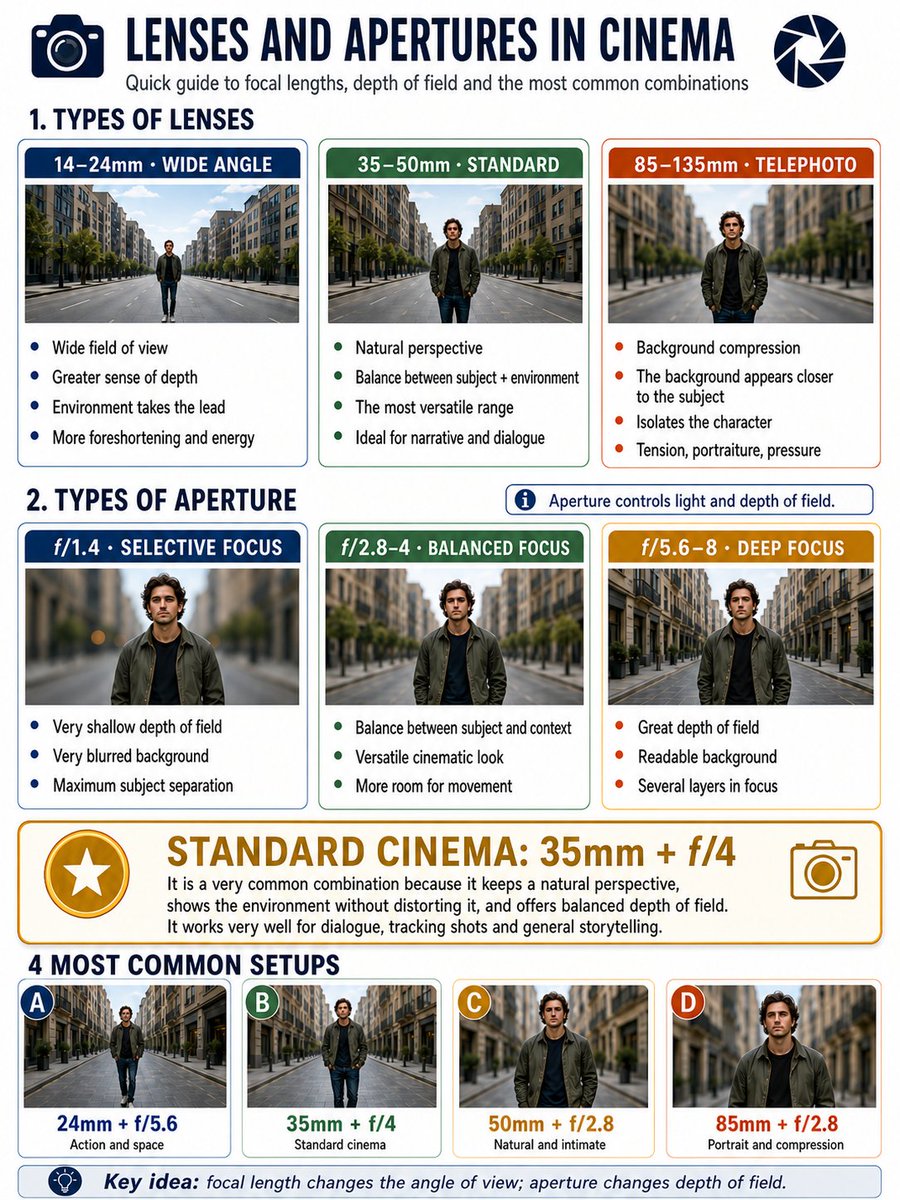
Cinema Lens & Aperture Infographic — Sora 2 Prompt

Generate a detailed 3:4 infographic comparing lens focal lengths, aperture settings, and cinematic blur examples with visual side-by-side references.
Cinema Lens & Aperture Infographic — Sora 2 Prompt
PROMPT · EN
Make a 3:4 format infographic about argtopic: camera lenses and apertures in cinema. I want an area with classifications of lenses: argfocal lengths: 14–24, 35–50mm, 85–135 (3 categories). And then another area with apertures: argaperture values: 1.4, 2.8–4, and 5.6–8 (3 categories). Put below each type of aperture an example to see the background blur, and below each type of lens an example to see the perspective. They would be: 3 types of lenses, three types of focal lengths + golden standard in cinema (most common used setup). And at the very bottom, examples of the 4 most used configurations.

Sobre este prompt

Generate a detailed 3:4 infographic comparing lens focal lengths, aperture settings, and cinematic blur examples with visual side-by-side references. Use it as a Arte Conceitual starting point for GPT Image 2: keep the visual structure and style constraints intact, then swap in your own subject, brand, or scene.

Start by replacing topic, focal lengths, and aperture values, then keep the camera, composition, and material cues in the same order. This makes the output easier to compare across variations.

Como usar este prompt

  1. Copy the full prompt and paste it into your preferred AI image generator (e.g. Sora 2, DALL·E, Midjourney).
  2. Edit the {topic} variable if you want a different subject beyond camera lenses and apertures.
  3. Adjust the {focal lengths} and {aperture values} variables to match your preferred range or gear.
  4. Generate the image and review—tweak prompt wording or variable values for improved layout or clarity.
  5. Export or upscale the final infographic for use in presentations, blogs, or social media.

FAQ

VoxelPlot

@voxelplot→

Publicado
15 de mai. de 2026
Idioma original
EN
Modelo
GPT Image 2
Categoria
Arte Conceitual
GPT Image 2Arte Conceitualgpt-image-2twitter
Visualizações
320
Cópias
41
Curtidas
8

Compartilhar

Mais de GPT Image 2

Ver tudo
Gothic Anime Girl with Hidden Face — Sora 2 Prompt

Gothic Anime Girl with Hidden Face — Sora 2 Prompt

@hoshi122221
8-Panel Romantic Manga: Shy Maid Robot & Master — Sora 2 Prompt

8-Panel Romantic Manga: Shy Maid Robot & Master — Sora 2 Prompt

@yume00112211
Minimalist Japanese Electric Nail Clipper Product Landing Page — Sora 2 Prompt

Minimalist Japanese Electric Nail Clipper Product Landing Page — Sora 2 Prompt

@eisho_m

Crie mais rápido com prompts Sora2Hub.

Use páginas de prompts curadas como entradas pesquisáveis e pule direto para geração com o contexto certo do modelo.

Explorar prompts