
GPT Image 2Prompt de IA
Cinematic Museum Robot Art Duel — Sora 2 Prompt
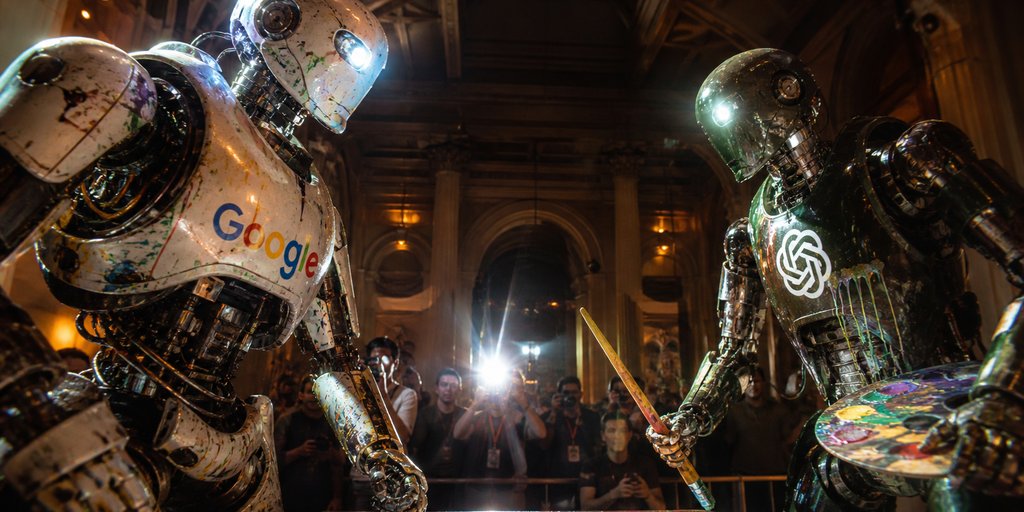
Generate a photoreal, blockbuster-style scene of two giant, branded painting robots facing off in a grand museum gallery at night.
PROMPT · EN
Create a cinematic ultra-realistic wide-angle photo of two giant humanoid painting robots facing off in an ornate, dimly lit museum gallery at night. On the left, a battered white chrome robot with peeling paint, exposed mechanical joints, splattered pigments, a glowing blue eye, and the multicolored argleft robot logo: Google wordmark across its chest leans forward aggressively. On the right, a darker gunmetal chrome robot with glossy black mechanical limbs, paint stains, a bright white eye light, and a glowing argright robot logo: OpenAI knot logo emblem on its chest holds a wooden paintbrush like a sword in one hand and a colorful artist palette in the other. The robots should look enormous, scratched, dented, wet with reflective paint, and illuminated by dramatic warm museum lighting mixed with cold blue robot lights. Behind them, show a crowd of photographers and spectators behind a barrier, with one intense camera flash bursting in the center background; faces are slightly blurred for realism. The setting is a grand classical interior with tall columns, arched doorways, dark wood ceiling beams, gilded wall sconces, and deep shadows. Use strong perspective, low camera angle, 2.39:1 cinematic aspect ratio, shallow depth of field, high contrast, lens flare, gritty photorealism, blockbuster robot duel atmosphere, no captions or extra text beyond the chest logos.
Sobre este prompt
Generate a photoreal, blockbuster-style scene of two giant, branded painting robots facing off in a grand museum gallery at night. Use it as a Arte Conceitual starting point for GPT Image 2: keep the visual structure and style constraints intact, then swap in your own subject, brand, or scene.
Start by replacing left robot logo and right robot logo, then keep the camera, composition, and material cues in the same order. This makes the output easier to compare across variations.
Como usar este prompt
- Copy the entire prompt text above.
- Choose an AI video or image model like Sora 2 or a similar text-to-image generator.
- Paste the prompt into the input field. You can change the brand names in the
{left robot logo}and{right robot logo}arguments to customize the robots' chest emblems. - Generate the image. For best results, use the model's highest quality or cinematic settings if available.
- Review and regenerate, or use the output as a base for further editing in a video editor or image tool.


