
GPT Image 2Prompt de IA

GTA-Style Police Chase HUD Prompt

Generate a cinematic video game screenshot of a high-speed coastal chase, complete with customizable HUD, minimap, and subtitles.
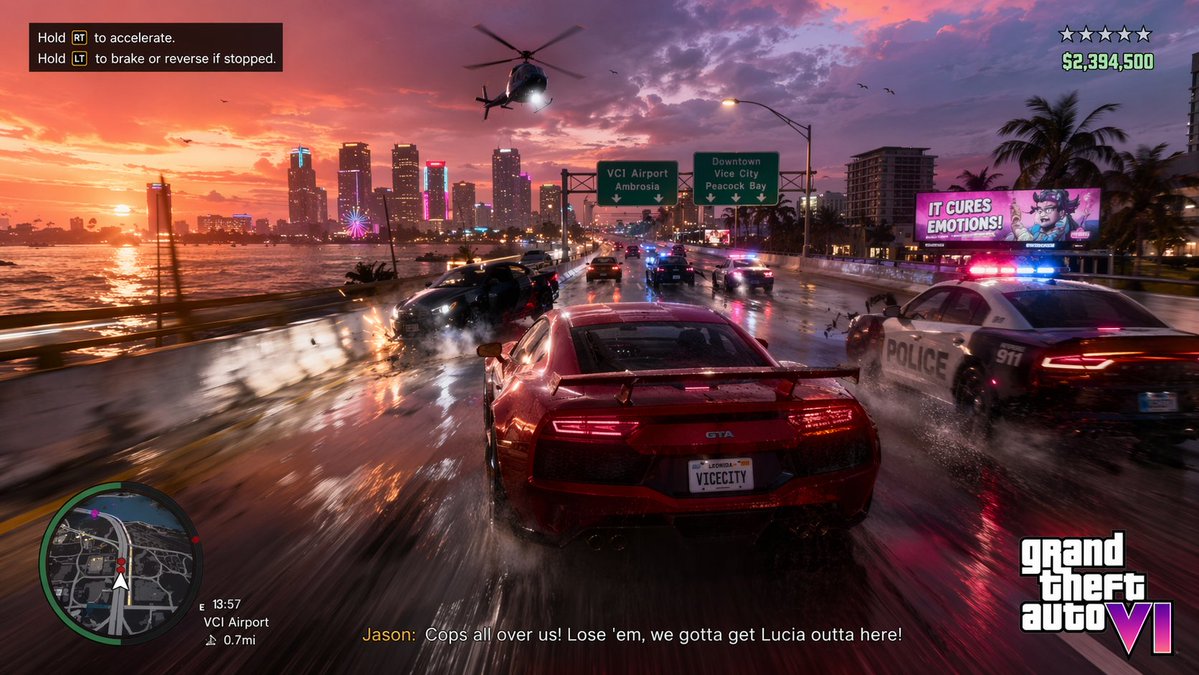
GTA-Style Police Chase HUD Prompt
PROMPT · EN
type
video game gameplay screenshot
scene
setting
wet coastal highway bridge at sunset, distant neon city skyline
action
high-speed police chase with motion blur and sparks
vehicles
item 1
1 red sports car with spoiler, license plate {argument name="license plate" default="VICECITY"}
item 2
1 police car crashing on the right
item 3
1 black car crashing on the left
item 4
1 police helicopter with spotlight overhead
environment_signs
item 1
green highway sign: VCI Airport Ambrosia
item 2
green highway sign: Downtown Vice City Peacock Bay
item 3
pink billboard: IT CURES EMOTIONS!
layout
sections
item 1
title
controls tutorial
position
top-left
count
2
labels
item 1
Hold RT to accelerate.
item 2
Hold LT to brake or reverse if stopped.
item 2
title
player status
position
top-right
count
2
labels
item 1
5 hollow stars
item 2
{argument name="money amount" default="$2,394,500"}
item 3
title
navigation
position
bottom-left
count
4
labels
item 1
circular minimap
item 2
E 13:57
item 3
VCI Airport
item 4
0.7mi
item 4
title
subtitles
position
bottom-center
count
1
labels
item 1
{argument name="subtitle text" default="Jason: Cops all over us! Lose 'em, we gotta get Lucia outta here!"}
item 5
title
watermark
position
bottom-right
count
1
labels
item 1
{argument name="game logo" default="Grand Theft Auto VI"}

Sobre este prompt

Generate a cinematic video game screenshot of a high-speed coastal chase, complete with customizable HUD, minimap, and subtitles. Use it as a Arte Conceitual starting point for GPT Image 2: keep the visual structure and style constraints intact, then swap in your own subject, brand, or scene.

This prompt is organized as structured JSON with fields such as type, scene, and layout. Keeping that hierarchy helps the model separate the subject, layout, interface elements, and detail constraints.

Start with small changes to subject, scene, camera, and color, then generate a few variations to compare composition and detail without turning the page copy into keyword stuffing.

Como usar este prompt

  1. Copy the entire prompt JSON object.
  2. In your AI model, choose Sora 2 or a compatible text-to-video generator.
  3. Customize the variables (like the license plate, money, or subtitle text) to your liking.
  4. Generate the image or video to see your unique open-world action scene.

FAQ

Mais de GPT Image 2

Ver tudo

Crie mais rápido com prompts Sora2Hub.

Use páginas de prompts curadas como entradas pesquisáveis e pule direto para geração com o contexto certo do modelo.

Explorar prompts

