
GPT Image 2Prompt de IA
Photoreal Tokyo Neon Streets — Sora 2 Prompt
Create a stunning photorealistic Tokyo street at night with fully customizable neon signs and city location.
PROMPT · EN
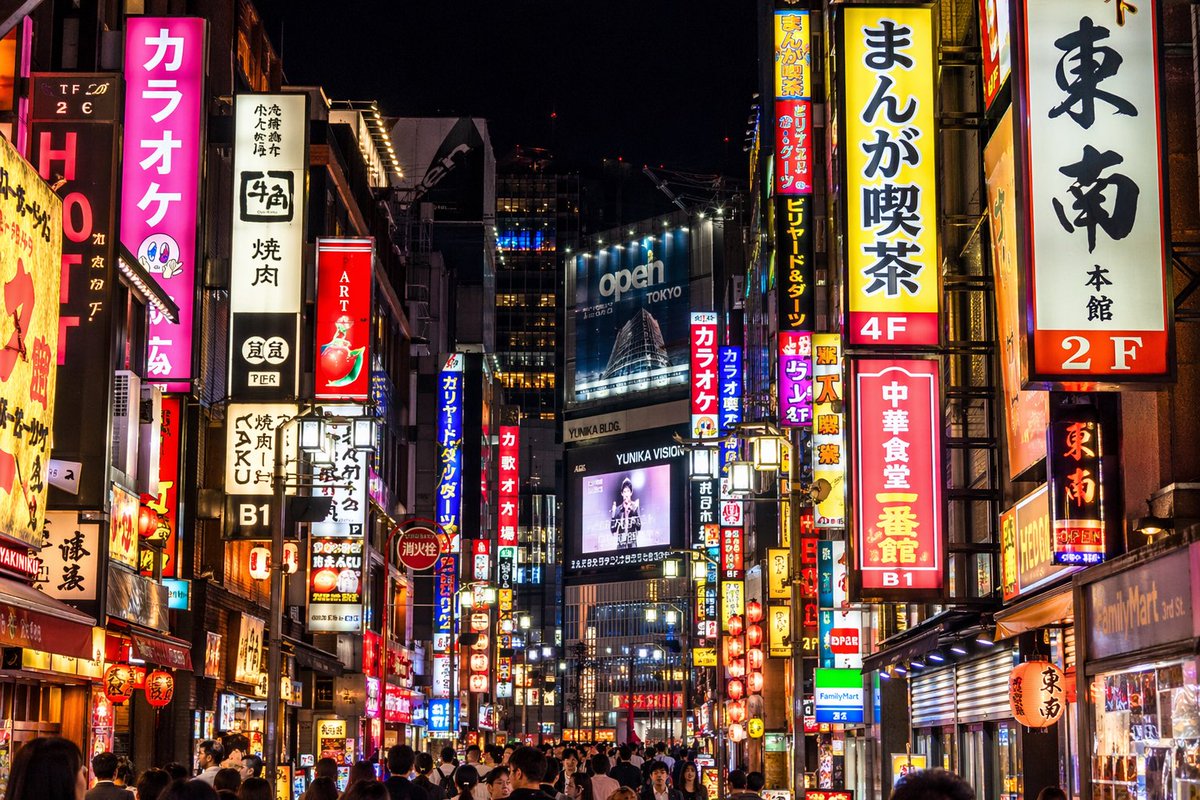
一张照片级写实的夜间街头摄影作品,展现了繁华的 argcity location: 东京 街道,街道被密集的垂直霓虹灯牌和广告牌照亮。左侧是一个显眼的亮粉色招牌,上面写着 "argpink sign text: カラオケ",旁边是一个写着 "牛角 焼肉" 的白色招牌。右侧显眼的招牌包括一个黄色的 "argyellow sign text: まんが喫茶 4F",一个白色的 "東南 本館 2F",以及一个红色的 "argred sign text: 中華食堂 一番館 B1"。在中心远景处,一个巨大的蓝色广告牌上显示着 "argbillboard text: open TOKYO",其上方是一个显示着人物图像的数字屏幕,屏幕上带有 "YUNIKA VISION" 字样。街道上挤满了行人的背影,他们穿梭在这充满活力、光影交错的城市峡谷中。画面光影对比强烈,丰富的霓虹色彩在周围环境中产生倒影。
Sobre este prompt
Create a stunning photorealistic Tokyo street at night with fully customizable neon signs and city location. Use it as a Arte Conceitual starting point for GPT Image 2: keep the visual structure and style constraints intact, then swap in your own subject, brand, or scene.
Start by replacing city location, pink sign text, yellow sign text, and red sign text, then keep the camera, composition, and material cues in the same order. This makes the output easier to compare across variations.
Como usar este prompt
- Copy the prompt template from the page.
- Open your preferred AI image generator (like Sora, Midjourney, or DALL·E 3).
- Replace the variables in curly braces (e.g.,
{city location},{pink sign text}) with your own text. - Ensure the model is set to generate photorealistic images for best quality.
- Generate the image and tweak variables as needed for different results.


