
GPT Image 2Prompt de IA
Vintage Japanese Music Poster — Sora 2 Prompt
Transform rough layouts into a stunning vintage Japanese music release poster with distressed print textures, gold accents, and nostalgic color palettes.
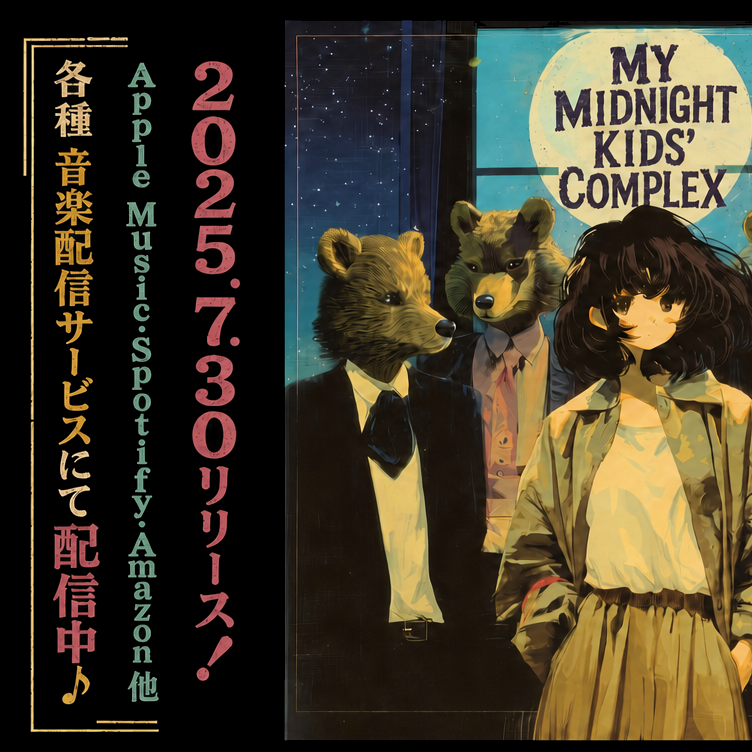
PROMPT · EN
使用提供的参考图,将其重新设计为精致的复古日式音乐发行海报,同时保留相同的分割布局、右侧的乐队插画以及整体构图。将字体从简单的占位文本升级为地道的复古海报风格:添加做旧印刷纹理、不均匀的墨迹以及轻微磨损的丝网印刷外观。保留左侧的 3 列垂直文本,但通过更强的层级和色彩区分进行重构:日文服务公告列使用暖金色,平台列表使用柔和的青色,日期/发行列使用灰粉色。将左侧日文列底部原有的发行开始信息更改为「配信中♪」,并以较大的粉色字体突出显示,同时加上音符。在左侧文本块周围添加细金色的装饰边框线和边角装饰。在右侧面板中,保留月亮区域的标题文本,但将其重构为醒目的复古做旧字体,内容为“MY MIDNIGHT KIDS’ COMPLEX”。为整张图像应用统一的怀旧海报效果:细腻的纸张纹理、褪色的边缘、轻微的划痕、略微变暗的边框,以及更浓郁的复古青/金/粉色调。
Sobre este prompt
Transform rough layouts into a stunning vintage Japanese music release poster with distressed print textures, gold accents, and nostalgic color palettes. Use it as a Arte Conceitual starting point for GPT Image 2: keep the visual structure and style constraints intact, then swap in your own subject, brand, or scene.
Start with small changes to subject, scene, camera, and color, then generate a few variations to compare composition and detail without turning the page copy into keyword stuffing.
Como usar este prompt
- Copy the full prompt and paste it into your preferred Sora 2-compatible AI image generator.
- Upload your reference image when prompted to guide the layout and composition.
- Adjust color tones (warm gold, soft cyan, dusty pink) or text content to match your specific release.
- Generate the image, then iterate by tweaking texture intensity or border details for your ideal result.


