
GPT Image 2Prompt de IA
Anime Photographer Girl — Witty Manga Comic Strip Prompt
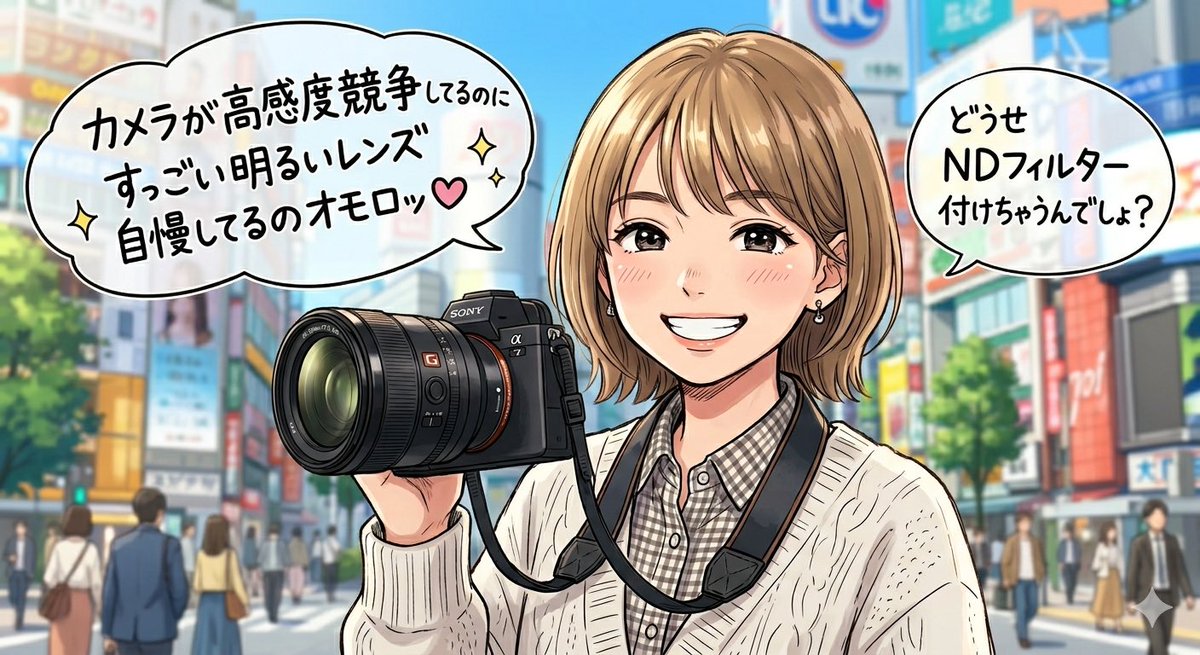
Generate a wide 16:9 anime-style single-panel illustration of a cheeky female photographer on a vibrant Japanese city street, complete with manga speech bubbles for witty dialogue.
PROMPT · EN
创作一张单格动漫风格的社交媒体插画,背景设定在明亮现代的日本城市街道,类似于涩谷或繁华的商业区,背景包含色彩缤纷的店面招牌、虚化的行人、树木以及湛蓝的天空。前景展示一位半身像的年轻女性摄影师,她正拿着一台硕大的黑色 Sony 风格无反相机,镜头宽大且对准观众,相机背带挂在脖子上。她留着短款金色波波头,发尾层次分明,留着斜刘海,戴着小耳环,身穿米色麻花针织开衫,内搭灰白格纹衬衫。她的脸部被一个平面的不透明矩形肤色遮挡块刻意遮住,遮挡块位于脸部中心。采用精致的日本动漫/漫画线条,轮廓清晰,高光亮丽,色彩饱和度高,呈现出一种略带调侃的喜剧氛围。包含 2 个带有粗黑轮廓的白色漫画对话气泡:左侧较大的气泡文字为 argleft speech bubble text: 相机都在拼高感光度了,你还在炫耀大光圈镜头,真有意思♥,并带有小闪光图标和粉色爱心;右上角较小的气泡文字为 argright speech bubble text: 反正你最后还是会装上 ND 滤镜吧?。在对话周围和右下角添加一些装饰性的闪光符号。图像采用 16:9 的宽幅比例,相机和角色占据画面中左侧和中心位置,对话气泡位于左上角和右上角,城市背景进行适当虚化,以确保视觉焦点集中在角色和对话上。
Sobre este prompt
Generate a wide 16:9 anime-style single-panel illustration of a cheeky female photographer on a vibrant Japanese city street, complete with manga speech bubbles for witty dialogue. Use it as a Arte Conceitual starting point for GPT Image 2: keep the visual structure and style constraints intact, then swap in your own subject, brand, or scene.
Start by replacing left speech bubble text and right speech bubble text, then keep the camera, composition, and material cues in the same order. This makes the output easier to compare across variations.
Como usar este prompt
- Copy the entire prompt text, including the curly-bracket variables, and paste it into your preferred AI image generator.
- Choose a model known for anime or manga-style outputs (e.g., Sora 2, Midjourney Niji, or Stable Diffusion anime checkpoints).
- Customize the default dialogue by editing the text inside the
{argument}tags — swap in your own jokes, compliments, or banter. - Adjust any other details like hair color, clothing, or background signage to match your creative vision.
- Generate the image in 16:9 aspect ratio and review; re-roll or tweak keywords until you get the desired expressive pose and clean speech bubble layout.


