
GPT Image 2Prompt de IA
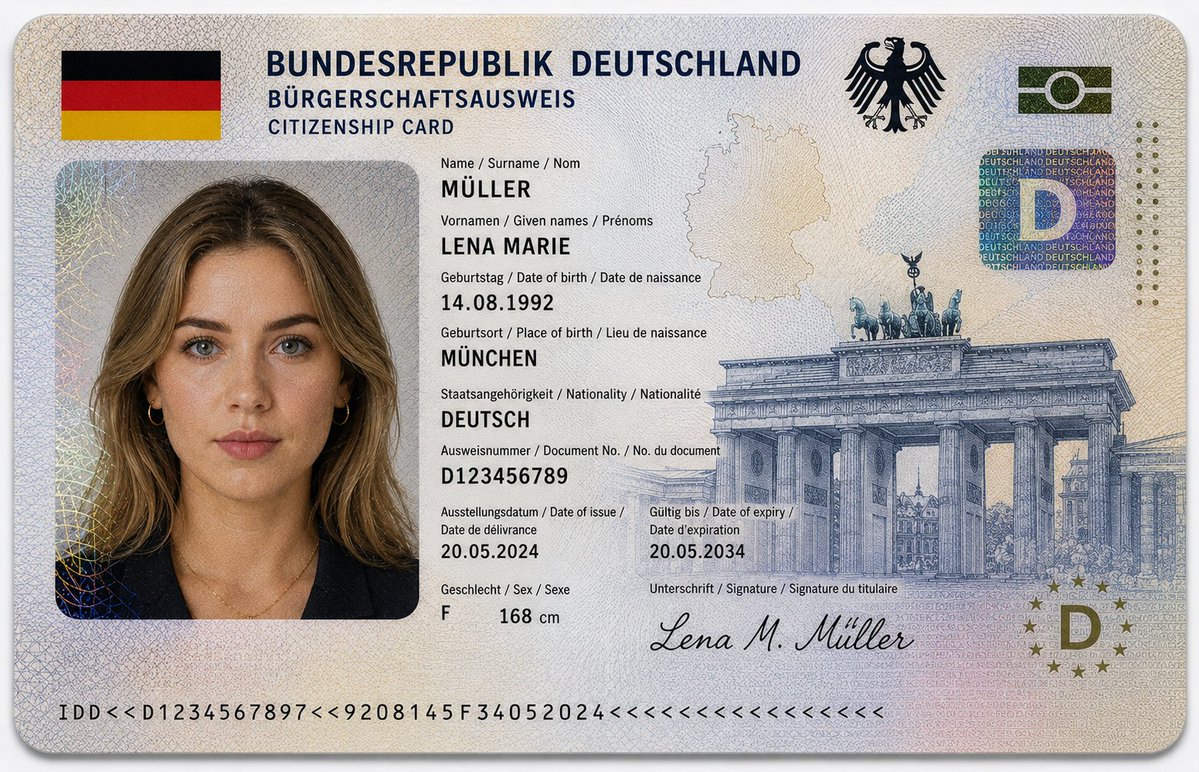
German ID Card Mockup — Ultra-Realistic Sora 2 Prompt
Generate hyper-detailed German citizenship ID mockups with official seals, holograms, and biometric portraits for design and training projects.
1 / 2
PROMPT · EN
16:9 超逼真特写摄影作品,展示了一张 argdocument type: 德国公民身份证,放置在干净的浅灰色或白色背景上。证件水平对齐,位于画面中心,对焦清晰,采用柔和的漫射摄影棚灯光。设计遵循欧洲政府签发证件的官方美学,布局结构严谨,字体清晰,并具备先进的防伪细节。顶部标题为:“BUNDESREPUBLIK DEUTSCHLAND”,副标题为“BÜRGERSCHAFTSAUSWEIS / CITIZENSHIP CARD”。左上角包含德国国旗。右上角印有德国联邦鹰徽(Bundesadler)。证件包含一张 argportrait subject: 年轻德国女性 的护照风格肖像:– 白皙的欧洲肤色,带有细微的自然雀斑 – 肩部长度的 arghair style: 深金色微卷发,中分 – 蓝绿色眼睛,表情中性,直视镜头 – 妆容清淡,皮肤纹理真实 – 身穿深蓝色或黑色西装外套,佩戴精致的金色首饰。个人身份信息以欧洲多语言格式(德语 / 英语 / 法语)显示:– Name / Surname / Nom: MÜLLER – Vornamen / Given names / Prénoms: LENA MARIE – Geburtstag / Date of birth / Date de naissance: 14.08.1992 – Geburtsort / Place of birth / Lieu de naissance: MÜNCHEN – Staatsangehörigkeit / Nationality / Nationalité: DEUTSCH – Ausweisnummer / Document No. / No. du document: D123456789 – Ausstellungsdatum / Date of issue / Date de délivrance: 20.05.2024 – Gültig bis / Date of expiry / Date d’expiration: 20.05.2034 – Geschlecht / Sex / Sexe: F – Height: 168 cm。安全与设计特征包括:– 覆盖整个证件表面的复杂扭索纹图案 – 类似于欧元纸币印刷的细线雕刻纹理 – 微缩印刷文字层和防伪线条 – 带有虹彩反射的全息安全贴片 – 带有嵌入式“D”符号的圆形欧盟风格全息图 – 背景中融入了微妙的德国轮廓地图 – 右侧印有大型勃兰登堡门雕刻插图 – 底部边缘设有机器可读区域条 – 底部签名:“Lena M. Müller”。其他设计亮点:– 受德国国旗启发的黑、红、金柔和渐变色调 – 带有透明安全覆盖层的分层聚碳酸酯纹理 – 简约、干净的欧盟身份证风格。材质外观:层压聚碳酸酯卡片,带有轻微光泽、逼真的反射、全息箔效果和浮雕微纹理。灯光柔和且均匀漫射,突显安全细节、雕刻图案和逼真的印刷纹理。画面中无手部出现。构图简洁、专业。风格:超精细、照片级真实感、8K 分辨率、微距清晰度、专业产品摄影、纪录片式写实。
Sobre este prompt
Generate hyper-detailed German citizenship ID mockups with official seals, holograms, and biometric portraits for design and training projects. Use it as a Arte Conceitual starting point for GPT Image 2: keep the visual structure and style constraints intact, then swap in your own subject, brand, or scene.
Start by replacing document type, portrait subject, and hair style, then keep the camera, composition, and material cues in the same order. This makes the output easier to compare across variations.
Como usar este prompt
- Copy the full prompt text from this page.
- Select Sora 2 (or another compatible image/video model) as your generation engine.
- Customize the
{document type}and{portrait subject}variables to match your desired ID style or character. - Paste the prompt into the model interface and run generation.
- Review the output; regenerate or adjust lighting/detail settings for best results.


