GPT Image 2Prompt de IA
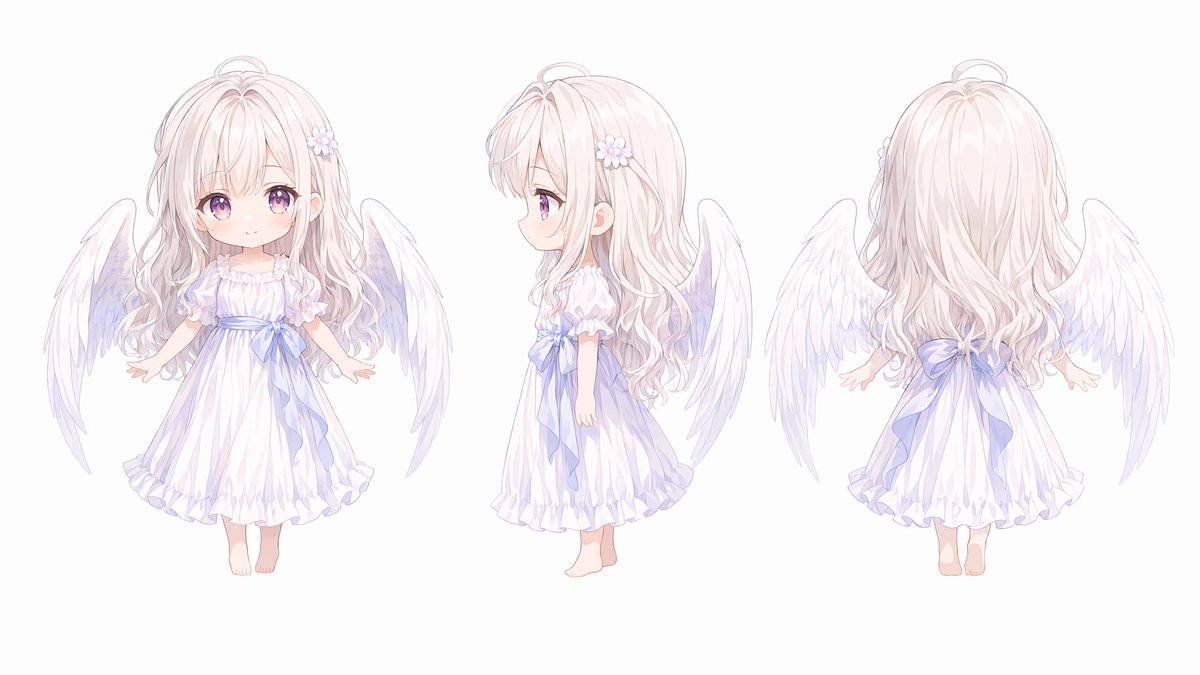
Chibi Angel Character Sheet — Q-Version 3-View Reference
Generate a cute, deformed chibi angel character sheet with front, side, and back views in a soft, pastel anime style for detailed reference.
PROMPT · EN
以 REFERENCE_0 为角色基础,将该天使角色设计图转换为可爱的 Q 版三视图。保留原有的天使设计、白色羽翼、淡色长发、花朵发饰、白色连衣裙、蓝色丝带、赤脚造型、柔和的淡彩动漫渲染风格以及纯白背景。将身体比例调整为超变形 Q 版风格,即大头、小巧的儿童身形、简化的手脚以及更圆润的轮廓,同时保留精致的细节。水平排列 3 个全身视图:左侧为正面,中间为侧面,右侧为背面。保持清晰的角色参考图间距、高细节、柔和光影以及 4K 质量的成品效果。
Sobre este prompt
Generate a cute, deformed chibi angel character sheet with front, side, and back views in a soft, pastel anime style for detailed reference. Use it as a Arte Conceitual starting point for GPT Image 2: keep the visual structure and style constraints intact, then swap in your own subject, brand, or scene.
Start with small changes to subject, scene, camera, and color, then generate a few variations to compare composition and detail without turning the page copy into keyword stuffing.
Como usar este prompt
- Copy the full prompt, including the reference image instructions.
- Choose an AI image generator that supports character design and reference images (e.g., Sora, Midjourney).
- Paste the prompt and attach your angel character reference image as specified.
- Adjust the
REFERENCE_0variable to point to your specific image file or URL. - Generate the image and upscale or refine as needed for a 4K-quality result.