
GPT Image 2Prompt de IA
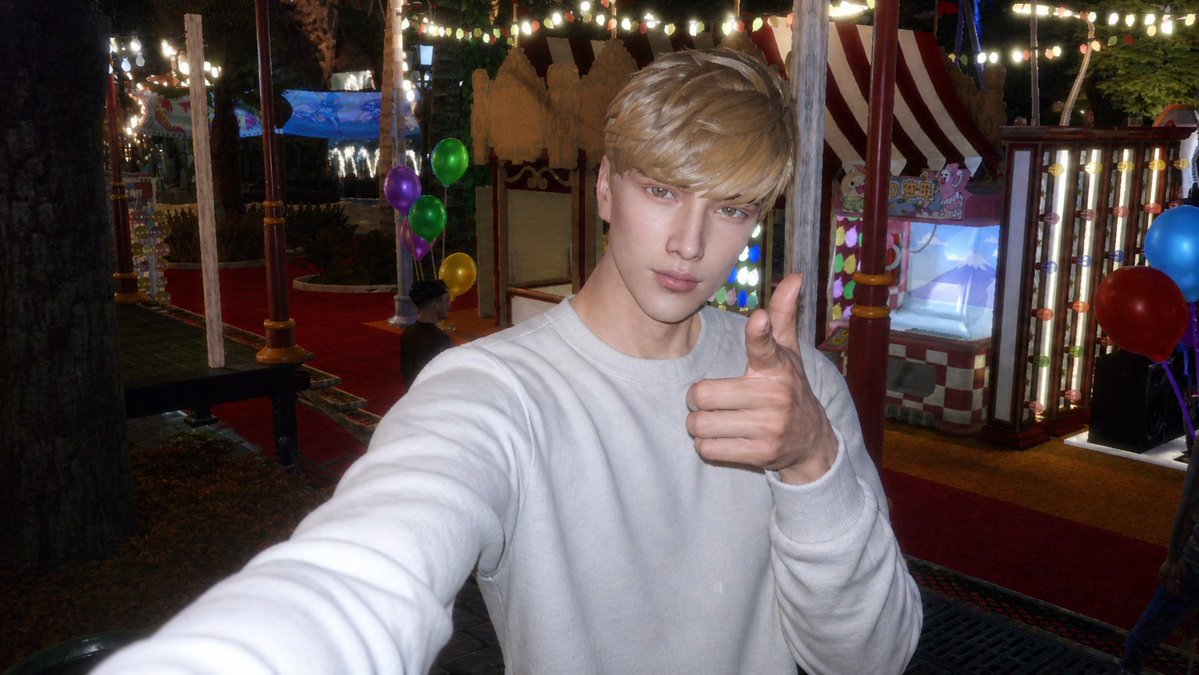
Sims 4 to CCD Carnival Selfie — AI Photo Prompt
Transform a Sims 4 screenshot into a nostalgic CCD-style carnival selfie with authentic camera flash, festive lights, and precise balloon details for social media-ready realism.
1 / 4
PROMPT · EN
以提供的参考图像作为 Sims 4 角色基础,将其转换为逼真的 argphoto style: CCD 数码相机闪光灯照片,而非游戏截图。将角色调整为近距离手持自拍姿势,身穿 argoutfit: 纯白色卫衣,一只手臂伸向镜头,另一只手比出大拇指。将场景更改为 argnew setting: 夜间游乐园或嘉年华,呈现强烈的机顶闪光灯效果、略显生硬的高光、低光噪点、轻微模糊以及怀旧的卡片机色彩。添加充满节日氛围的背景,包括红地毯步道、条纹嘉年华摊位、发光的灯箱灯泡、串灯、树木,以及正好 6 个可见的气球:左侧 4 个分别为紫色、绿色、绿色和黄色,右侧 2 个分别为蓝色和红色。保留参考图中遮挡面部的方形马赛克,但使整体图像看起来像是一张真实的随手拍照片,而非渲染场景。
Sobre este prompt
Transform a Sims 4 screenshot into a nostalgic CCD-style carnival selfie with authentic camera flash, festive lights, and precise balloon details for social media-ready realism. Use it as a Arte Conceitual starting point for GPT Image 2: keep the visual structure and style constraints intact, then swap in your own subject, brand, or scene.
Start by replacing photo style, outfit, and new setting, then keep the camera, composition, and material cues in the same order. This makes the output easier to compare across variations.
Como usar este prompt
- Copy the full prompt text, including all
{argument}tags, into your chosen AI model. - Select a model with strong image generation capabilities, such as Sora 2 or a similar tool that accepts detailed visual instructions.
- Customize the variables in the curly braces — for example, change
photo styleto “Fujifilm QuickSnap film photo” oroutfitto “a black leather jacket” — to personalize the output. - Submit the prompt and generate the image. Review the result; if the mosaic placement or lighting isn’t quite right, regenerate with a slight tweak to the setting or flash description.


