
Sora2 Hub
Sora2 Hub
  • Biblioteca de Prompts
  • Preços
  • Vitrine
Sora2 Hub
Sora2 Hub
Sora2 Hub

Sora2 Hub

Plataforma de criação profissional de IA impulsionada por Sora 2, Veo 3.1 e Nano Banana Pro. Crie vídeos impressionantes e imagens de qualidade de estúdio com controle avançado, qualidade HD e sem marcas d'água.

Email:support@sora2hub.org

Gerador de Vídeo IA

  • Texto para Vídeo
  • Imagem para Vídeo
  • Veo 3.1
  • Sora 2
  • Kling 3.0
  • Kling 2.6
  • Kling 2.5
  • Runway
  • Wan 2.6
  • Seedance 2.0
  • Hailuo 2.3
  • Grok Imagine
  • HappyHorse-1.0

Gerador de Imagens IA

  • Texto para Imagem
  • Imagem para Imagem
  • Nano Banana Pro
  • Nano Banana
  • 4o Image
  • Flux Kontext
  • Z Image
  • Seedream 4.5
  • Seedream 5.0 Lite
  • Nano Banana 2
  • GPT Image 2
  • Ampliador de Imagem IA

Efeitos IA

  • Filtro de Idade IA
  • Troca de Gênero IA
  • Beijo IA
  • Abraço IA
  • Imagem Ghibli
  • Filtro Sereia IA
  • Tremor Corporal IA
  • Filtro de Sorriso
  • Gordo IA
  • Boneco de Ação

Produto

  • Recursos
  • Vitrines
  • Preços

Empresa

  • Sobre
  • Contato

© 2025 • Sora2 Hub ORG Todos os direitos reservados.

  • Política de Privacidade
  • Termos de Serviço
  • Política de Reembolso
  1. Início
  2. /
  3. Prompts
  4. /
  5. GPT Image 2
  6. /
  7. Watercolor Coffee Picnic Flyer Mockup — Two-Sided
GPT Image 2Prompt de IA

Watercolor Coffee Picnic Flyer Mockup — Two-Sided

Generates a cozy, two-sided watercolor event flyer mockup with illustrated picnic scenes, vendor lists, and schedules for coffee festival marketing.
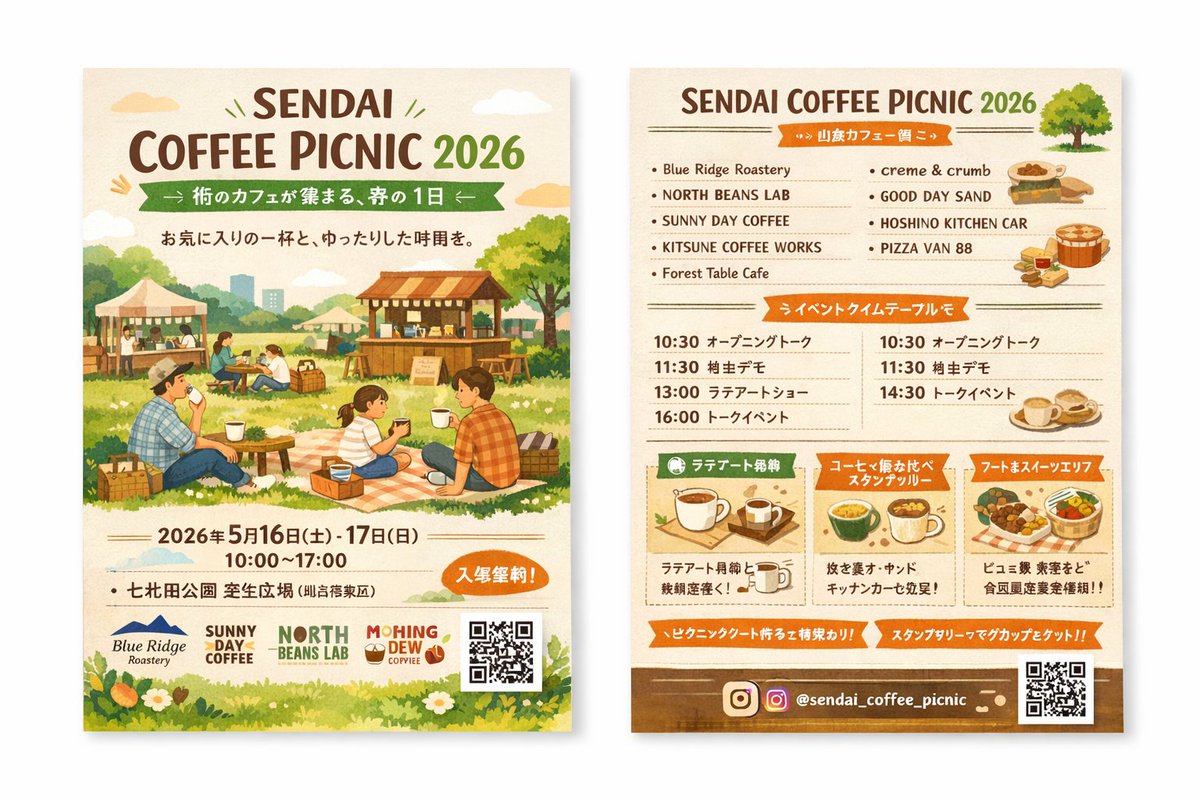
Watercolor Coffee Picnic Flyer Mockup — Two-Sided
PROMPT · EN
type
two-sided event flyer mockup
style
watercolor illustration, warm earthy tones, cozy, inviting, rustic
left_side_front
header
title
{argument name="event name" default="SENDAI COFFEE PICNIC 2026"}
subtitle
{argument name="subtitle" default="街のカフェが集まる、春の1日"}
tagline
A relaxing time with your favorite cup
main_illustration
People enjoying a picnic on a grassy field. A family sitting on a checkered blanket drinking coffee. Background features wooden coffee stalls, tents, trees, and a distant city skyline.
event_info
date
{argument name="event date" default="2026年5月16日(土) - 17日(日)"}
time
10:00 - 17:00
location
{argument name="location" default="七北田公園 芝生広場"}
badge
Orange oval badge with text for free entry
footer
sponsor_logos
4
elements
item 1
QR code
item 2
grass and white flowers border
right_side_back
header
title
{argument name="event name" default="SENDAI COFFEE PICNIC 2026"}
illustration
small green tree
sections
item 1
title
Vendor List
layout
2 columns
count
9
labels
item 1
Blue Ridge Roastery
item 2
NORTH BEANS LAB
item 3
SUNNY DAY COFFEE
item 4
KITSUNE COFFEE WORKS
item 5
Forest Table Cafe
item 6
creme & crumb
item 7
GOOD DAY SAND
item 8
HOSHINO KITCHEN CAR
item 9
PIZZA VAN 88
illustrations
item 1
sandwiches
item 2
pizza
item 3
coffee cups
item 2
title
Event Timetable
layout
2 columns
count
7
description
Schedule with times like 10:30, 11:30, 13:00, 14:30, 16:00 and event names
item 3
title
Feature Highlights
layout
3 horizontal boxes
count
3
labels
item 1
Latte Art Experience
item 2
Coffee Tasting Stamp Rally
item 3
Food & Sweets Area
illustrations
item 1
single coffee cup
item 2
multiple coffee cups
item 3
food basket
footer
social_media
{argument name="social handle" default="@sendai_coffee_picnic"}
icons
item 1
Instagram logo
elements
item 1
QR code
item 2
brown background strip

Sobre este prompt

Generates a cozy, two-sided watercolor event flyer mockup with illustrated picnic scenes, vendor lists, and schedules for coffee festival marketing. Use it as a Arte Conceitual starting point for GPT Image 2: keep the visual structure and style constraints intact, then swap in your own subject, brand, or scene.

This prompt is organized as structured JSON with fields such as type, style, left side front, and right side back. Keeping that hierarchy helps the model separate the subject, layout, interface elements, and detail constraints.

Start with small changes to subject, scene, camera, and color, then generate a few variations to compare composition and detail without turning the page copy into keyword stuffing.

Como usar este prompt

  1. Copy the prompt JSON block into your preferred AI image generator (e.g., Midjourney, Stable Diffusion, or Sora 2).
  2. Choose your model; for best results, select one with strong illustration and text rendering capabilities.
  3. Edit the default arguments (like event name, date, location) to match your event details.
  4. Adjust the style keywords (e.g., 'warm earthy tones', 'rustic') if you need a different aesthetic.
  5. Generate the image and review both the front and back sides for layout and text accuracy.

FAQ

さとこよ

@prompts→

Publicado
30 de abr. de 2026
Idioma original
EN
Modelo
GPT Image 2
Categoria
Arte Conceitual
GPT Image 2Arte Conceitualgpt-image-2gptimage2api promptsgptimage2apien
Visualizações
2.5K
Cópias
126
Curtidas
108

Compartilhar

Mais de GPT Image 2

Ver tudo
Shenzhen Golden Hour City Prompt: Futuristic Heritage Poster

Shenzhen Golden Hour City Prompt: Futuristic Heritage Poster

@ivanalog_com
AI-Generated Crossover Fighter Screenshot — Sora 2 Prompt

AI-Generated Crossover Fighter Screenshot — Sora 2 Prompt

@momoringo_sub
Gothic Anime Girl with Hidden Face — Sora 2 Prompt

Gothic Anime Girl with Hidden Face — Sora 2 Prompt

@hoshi122221

Crie mais rápido com prompts Sora2Hub.

Use páginas de prompts curadas como entradas pesquisáveis e pule direto para geração com o contexto certo do modelo.

Explorar prompts

