
GPT Image 2Prompt de IA
Anime Desktop Wallpaper Screenshot — Windows 11 Sora 2 Prompt
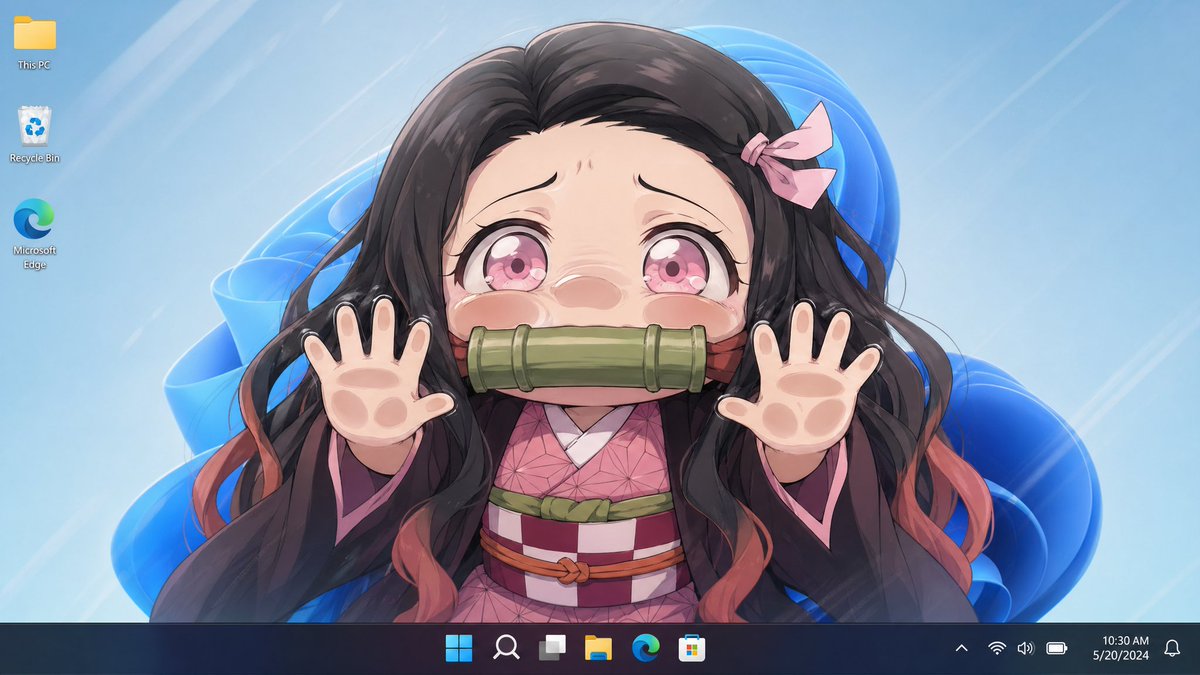
Generate a realistic Windows 11 desktop screenshot featuring a stylized anime wallpaper character, perfect for social media posts or personal use.
PROMPT · EN
一张整洁的 Windows 11 桌面截图,屏幕上显示着动漫壁纸。壁纸展示了 argcharacter name: 灶门祢豆子 的上半身肖像,居中构图,正面对着观众,双手抬起做出俏皮的猫爪姿势,手指张开。面部被中心一个巨大的垂直矩形模糊/遮挡块完全遮住。她留着飘逸的 arghair color: 深棕色至黑色 长发,发梢带有柔和的红橙色,头右侧别着一个小小的淡粉色蝴蝶结,身穿粉色几何图案和服,外罩一件带有粉色内衬的深色羽织,腰间系着带有绿色和红褐色装饰的格纹腰带。可见的手掌经过风格化处理,带有柔软的动物肉垫,每只手一个,呈现出可爱的混合效果。背景是浅冰蓝色的壁纸,带有光泽的抽象 Windows 11 蓝色丝带形状和淡淡的对角线光束。在左上角垂直对齐显示 3 个桌面图标:此电脑、回收站和 Microsoft Edge。底部添加一个深色半透明的 Windows 11 任务栏,图标居中,右侧为系统托盘,时钟显示为 argtime: 10:30 AM,日期显示为 argdate: 2024 年 5 月 20 日。整体外观精致、明亮,具有动漫风格,看起来像一张真实的桌面截图,并以角色壁纸为视觉焦点。
Sobre este prompt
Generate a realistic Windows 11 desktop screenshot featuring a stylized anime wallpaper character, perfect for social media posts or personal use. Use it as a Arte Conceitual starting point for GPT Image 2: keep the visual structure and style constraints intact, then swap in your own subject, brand, or scene.
Start by replacing character name, hair color, time, and date, then keep the camera, composition, and material cues in the same order. This makes the output easier to compare across variations.
Como usar este prompt
- Copy the prompt from sora2hub.com.
- Select your preferred AI image or video model (e.g., Sora 2, Runway, Pika).
- Customize the available variables like character name, hair color, time, and date to match your vision.
- Paste the prompt and generate your image.
- Review the output and adjust variables if needed to refine the result.


