
GPT Image 2AI-промпт

Online School 2x2 Grid Ad — Parent-Friendly Social Media Course

Generate a professional 2x2 grid banner ad for a social media school targeting parents, featuring warm photography, soft illustration, and clear call-to-action buttons.
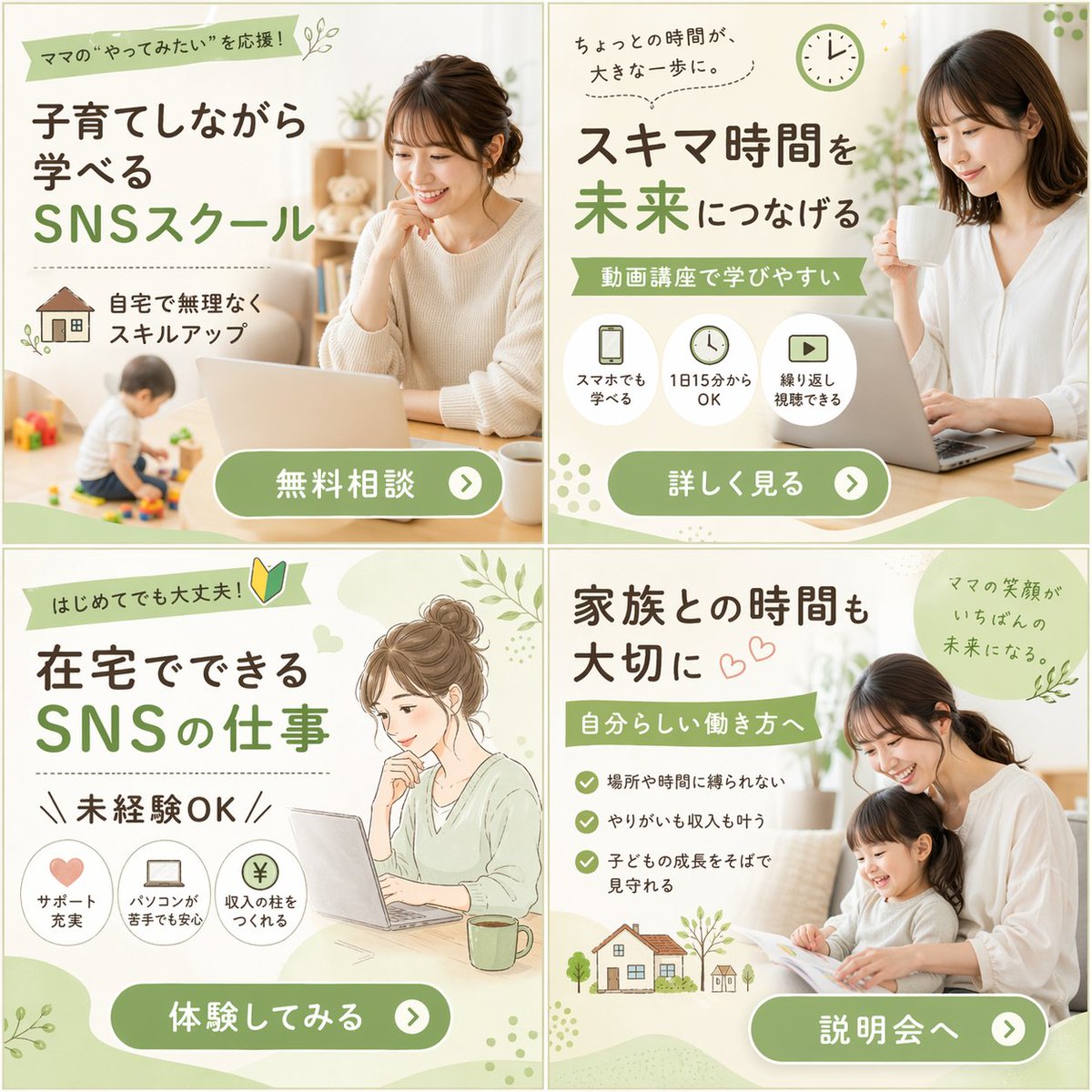
Online School 2x2 Grid Ad — Parent-Friendly Social Media Course
ПРОМПТ · EN
type
2x2 网格横幅广告
theme
针对 {argument name="target audience" default="宝妈"} 的 {argument name="main theme" default="社交媒体学校"}
design_style
柔和、亲切、明亮的灯光,采用 {argument name="color palette" default="柔和的绿色、白色和自然米色调"}
layout
sections
item 1
position
左上
visual_style
摄影
image_description
一位微笑着的女性在桌前使用笔记本电脑,背景模糊处有一个幼儿正在玩玩具。
headlines
item 1
支持宝妈的“想尝试”!
item 2
育儿同时也能学习
item 3
社交媒体学校
features
count
1
type
图标加文字
labels
item 1
在家轻松提升技能 (附房屋图标)
call_to_action_button
免费咨询
item 2
position
右上
visual_style
摄影
image_description
一位微笑着的女性拿着白色马克杯,注视着笔记本电脑。
headlines
item 1
一点点时间,就是一大步。
item 2
将碎片时间连接未来
item 3
视频课程,易于学习
features
count
3
type
圆形图标下方配文字
labels
item 1
手机也能学 (手机图标)
item 2
每天 15 分钟即可 (时钟图标)
item 3
可反复观看 (播放按钮图标)
call_to_action_button
查看详情
item 3
position
左下
visual_style
水彩插画
image_description
一位扎着发髻的女性微笑着面对笔记本电脑,旁边放着一个绿色马克杯的插画。
headlines
item 1
初学者也没问题! (附初学者标志)
item 2
在家即可从事的社交媒体工作
item 3
无需经验
features
count
3
type
圆形图标下方配文字
labels
item 1
完善的支持体系 (爱心图标)
item 2
不擅长电脑也能安心 (笔记本电脑图标)
item 3
建立收入来源 (日元硬币图标)
call_to_action_button
立即体验
item 4
position
右下
visual_style
摄影
image_description
一位微笑着的母亲和年幼的女儿坐在沙发上一起看绘本。
headlines
item 1
珍惜与家人的时光
item 2
实现属于自己的工作方式
item 3
妈妈的笑容是最好的未来。
features
count
3
type
勾选符号列表
labels
item 1
不受地点和时间限制
item 2
兼顾成就感与收入
item 3
在身边守护孩子的成长
extra_graphics
左下角有房屋和树木的小插画。
call_to_action_button
参加说明会
common_elements
所有面板底部均采用 {argument name="button style" default="带有白色文字和向右箭头图标的圆角绿色胶囊按钮"}。

О промпте

Generate a professional 2x2 grid banner ad for a social media school targeting parents, featuring warm photography, soft illustration, and clear call-to-action buttons. Use it as a Концепт-арт starting point for GPT Image 2: keep the visual structure and style constraints intact, then swap in your own subject, brand, or scene.

This prompt is organized as structured JSON with fields such as type, theme, design style, and layout. Keeping that hierarchy helps the model separate the subject, layout, interface elements, and detail constraints.

Start with small changes to subject, scene, camera, and color, then generate a few variations to compare composition and detail without turning the page copy into keyword stuffing.

Как использовать этот промпт

  1. Copy the entire prompt JSON into your Sora 2 or compatible image generation AI model.
  2. Customize the variables: change target audience, main theme, and color palette to match your brand or campaign.
  3. Adjust any headline text, feature labels, or call-to-action button text in the sections to fit your specific offer.
  4. Generate the image. Review the four-panel layout for clarity and visual balance.
  5. Iterate by tweaking design styles or image descriptions to refine the final output for your platform.


FAQ

Больше из GPT Image 2

Смотреть все

Создавайте быстрее с промптами Sora2Hub.

Используйте страницы промптов как поисковые входы и сразу переходите к генерации с нужным контекстом модели.

Изучить промпты
