
GPT Image 2AI-промпт

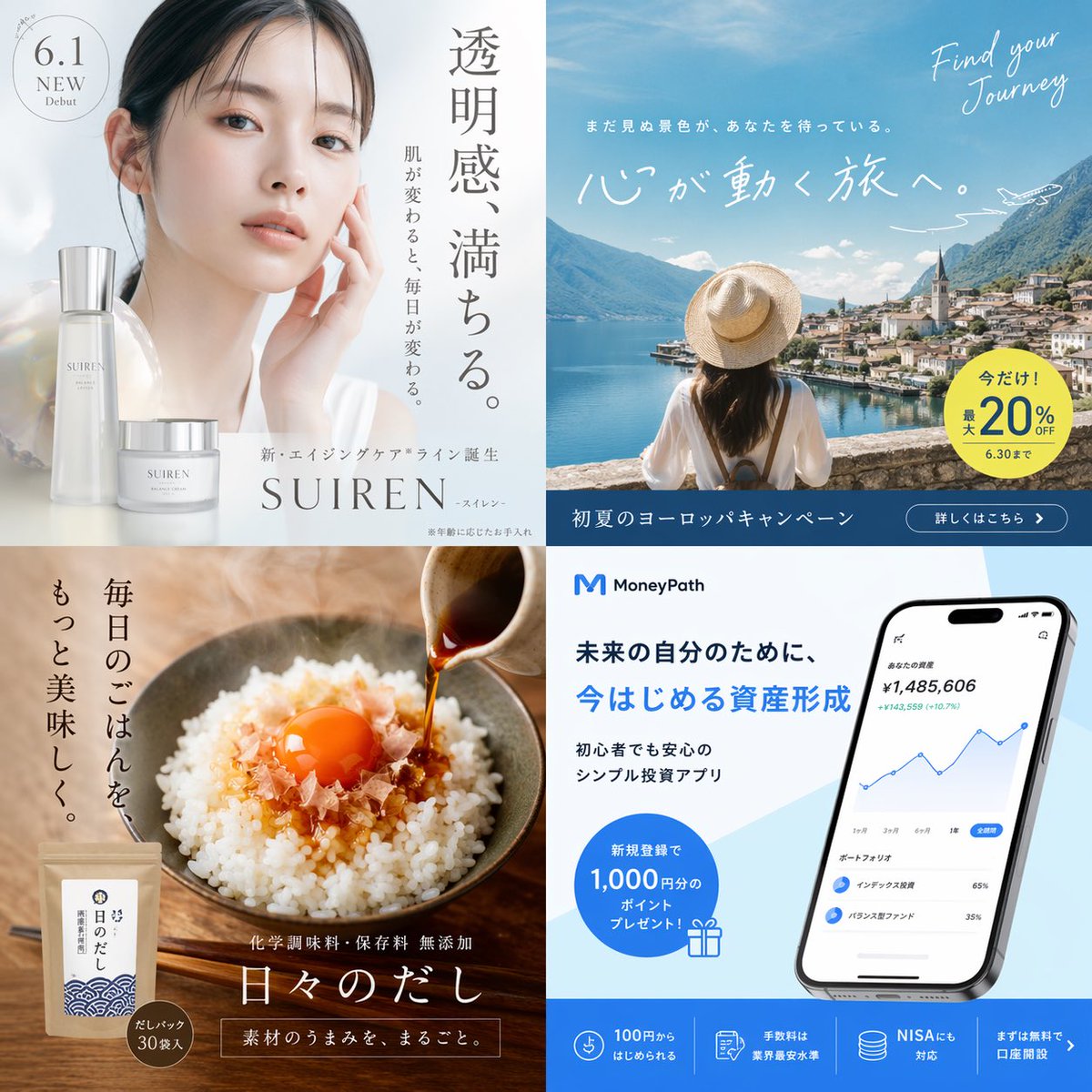
2x2 Japanese Ad Banner Grid — Sora 2 AI Prompt

Create stunning 2x2 Japanese ad banners for skincare, travel, food, and fintech with this customizable AI prompt.
2x2 Japanese Ad Banner Grid — Sora 2 AI Prompt
ПРОМПТ · EN
type
2x2 日式广告横幅网格
layout
grid_size
2x2
panels
item 1
position
左上
industry
护肤化妆品
visuals
一位皮肤清透、散发光泽的年轻亚洲女性轻触脸部的肖像。两瓶贴有“SUIREN”标签的时尚银白色化妆品瓶/罐。
typography
badge
6.1 新品发布
main_copy
{argument name="skincare catchphrase" default="透明感、満ちる。"}
sub_copy
肌肤改变,生活随之改变。
brand_text
全新抗衰老系列 SUIREN -睡莲- 诞生
item 2
position
右上
industry
旅行社
visuals
一位戴着草帽、身穿白衬衫的女性背影,眺望着风景如画的欧洲湖畔小镇和群山。画面中有一条手绘的小飞机航迹。
typography
english_script
Find your Journey
main_copy
{argument name="travel catchphrase" default="心が動く旅へ。"}
sub_copy
未曾见过的风景,正在等待着你。
discount_badge
黄色圆圈,文字为“限时特惠!最高 20% OFF,截止至 6.30”
footer_bar
深蓝色横条,带有“初夏欧洲之旅活动”字样及“了解详情 >”按钮
item 3
position
左下
industry
食品
visuals
特写镜头:一碗撒有鲣鱼干和生蛋黄的蓬松白米饭。深色酱油正从一个小陶瓷壶中倒出。背景是一个带有蓝色波浪图案的自立袋包装。
typography
main_copy
{argument name="food catchphrase" default="毎日のごはんを、もっと美味しく。"}
product_name
日常高汤包
sub_copy
无化学调味料、无防腐剂,保留食材原汁原味。
badge
高汤包 30 袋装
item 4
position
右下
industry
金融科技 App
visuals
一部现代智能手机,屏幕显示带有蓝色折线图和投资组合分析的金融仪表板 UI。整体采用简洁的白蓝配色。
typography
logo
M {argument name="finance app name" default="MoneyPath"}
main_copy
为了未来的自己,{argument name="finance catchphrase" default="今はじめる資産形成"}
sub_copy
新手也能安心使用的极简投资 App
promo_badge
带有礼品图标的蓝色圆圈,文字为“新用户注册即送 1,000 日元积分!”
footer_features
蓝色横条,包含 4 个不同的图标和详细说明 App 优势的文字块

О промпте

Create stunning 2x2 Japanese ad banners for skincare, travel, food, and fintech with this customizable AI prompt. Use it as a Концепт-арт starting point for GPT Image 2: keep the visual structure and style constraints intact, then swap in your own subject, brand, or scene.

This prompt is organized as structured JSON with fields such as type and layout. Keeping that hierarchy helps the model separate the subject, layout, interface elements, and detail constraints.

Start with small changes to subject, scene, camera, and color, then generate a few variations to compare composition and detail without turning the page copy into keyword stuffing.

Как использовать этот промпт

  1. Copy the prompt from this page.
  2. Open Sora 2 and paste it into the prompt field.
  3. Customize the variables in curly braces to match your brands and messages.
  4. Generate the image to receive a 2x2 grid of four Japanese-style ad banners.
  5. Refine by tweaking variables or adding details for better results.

FAQ

Больше из GPT Image 2

Смотреть все

Создавайте быстрее с промптами Sora2Hub.

Используйте страницы промптов как поисковые входы и сразу переходите к генерации с нужным контекстом модели.

Изучить промпты

