
Sora2 Hub
Sora2 Hub
  • Библиотека промптов
  • Цены
  • Примеры
Sora2 Hub
Sora2 Hub
Sora2 Hub

Sora2 Hub

Профессиональная платформа для создания ИИ-контента на базе Sora 2, Veo 3.1 и Nano Banana Pro. Создавайте потрясающие видео и изображения студийного качества с расширенным управлением, HD-качеством и без водяных знаков.

Email:support@sora2hub.org

Генератор видео ИИ

  • Текст в видео
  • Изображение в видео
  • Veo 3.1
  • Sora 2
  • Kling 3.0
  • Kling 2.6
  • Kling 2.5
  • Runway
  • Wan 2.6
  • Seedance 2.0
  • Hailuo 2.3
  • Grok Imagine
  • HappyHorse-1.0

Генератор изображений ИИ

  • Текст в изображение
  • Изображение в изображение
  • Nano Banana Pro
  • Nano Banana
  • 4o Image
  • Flux Kontext
  • Z Image
  • Seedream 4.5
  • Seedream 5.0 Lite
  • Nano Banana 2
  • GPT Image 2
  • Увеличитель изображений ИИ

Эффекты ИИ

  • Фильтр возраста ИИ
  • Смена пола ИИ
  • Поцелуй ИИ
  • Объятие ИИ
  • Изображение Гибли
  • Фильтр русалки ИИ
  • Тряска тела ИИ
  • Фильтр улыбки
  • Толстый ИИ
  • Фигурка

Продукт

  • Функции
  • Витрины
  • Цены

Компания

  • О нас
  • Контакт

© 2025 • Sora2 Hub ORG Все права защищены.

  • Политика конфиденциальности
  • Условия обслуживания
  • Политика возврата
  1. Главная
  2. /
  3. Промпты
  4. /
  5. GPT Image 2
  6. /
  7. Chalkboard AI Infographic Prompt — 10-Section Data Viz
GPT Image 2AI-промпт

Chalkboard AI Infographic Prompt — 10-Section Data Viz

Generate a detailed 10-section chalkboard-style infographic with charts, matrices, and tables for any product launch or AI release.
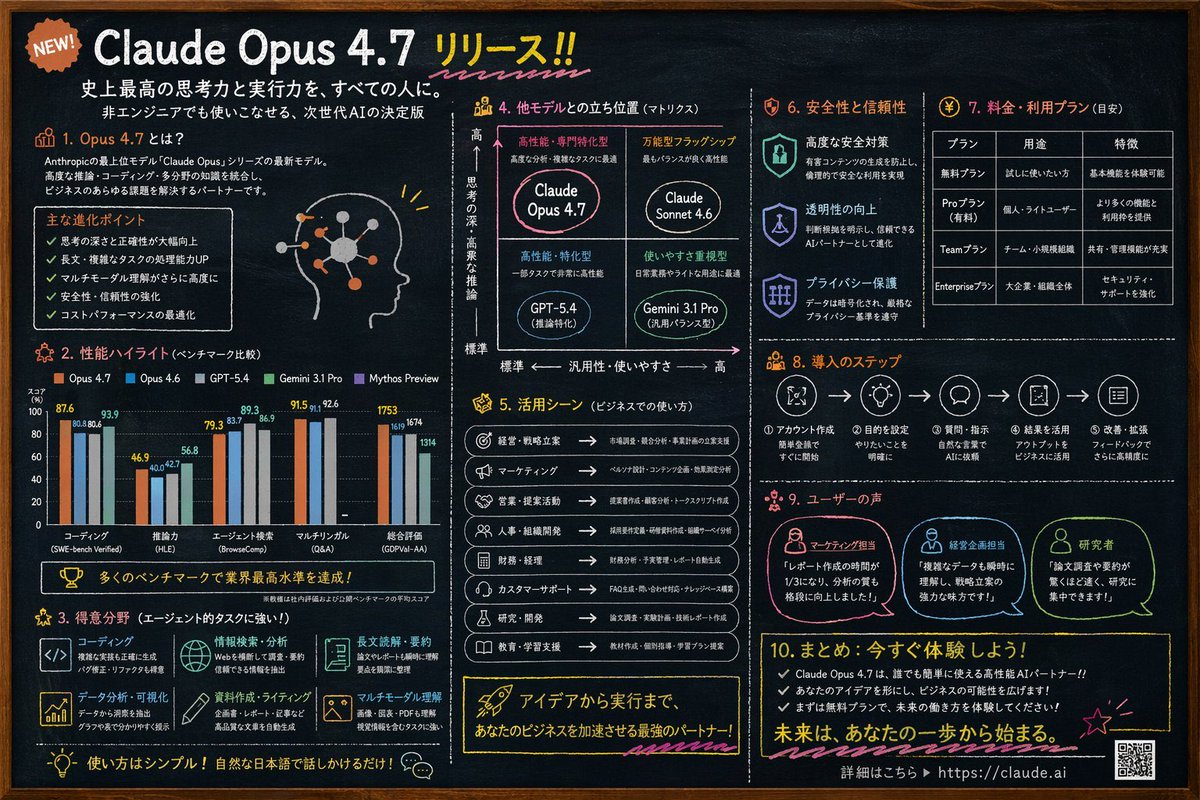
Chalkboard AI Infographic Prompt — 10-Section Data Viz
ПРОМПТ · EN
type
chalkboard style infographic
style
dark slate background, white text, hand-drawn accents, clean typography
colors
background
dark slate grey
text
white
accents
item 1
{argument name="accent color 1" default="orange"}
item 2
{argument name="accent color 2" default="light blue"}
item 3
yellow
item 4
pink
header
badge
NEW!
title
{argument name="main headline" default="Claude Opus 4.7 リリース!!"}
subtitles
item 1
史上最高の思考力と実行力を、すべての人に。
item 2
非エンジニアでも使いこなせる、次世代AIの決定版
layout
sections
item 1
id
1
title
1. Opus 4.7 とは?
content
Description text, 5 bullet points, profile head illustration with glowing neural nodes
item 2
id
2
title
2. 性能ハイライト (ベンチマーク比較)
content
Grouped bar chart comparing 5 models across 5 categories: コーディング, 推論力, エージェント検索, マルチリンガル, 総合評価
item 3
id
3
title
3. 得意分野 (エージェント的タスクに強い!)
content
2x3 grid of 6 strengths with icons: コーディング, 情報検索・分析, 長文読解・要約, データ分析・可視化, 資料作成・ライティング, マルチモーダル理解
item 4
id
4
title
4. 他モデルとの立ち位置 (マトリクス)
content
2x2 positioning matrix with 4 quadrants: {argument name="product name" default="Claude Opus 4.7"}, Claude Sonnet 4.6, GPT-5.4, Gemini 3.1 Pro
item 5
id
5
title
5. 活用シーン (ビジネスでの使い方)
content
List of 8 business use cases with icons and arrows
item 6
id
6
title
6. 安全性と信頼性
content
3 vertical items with shield/lock icons: 高度な安全対策, 透明性の向上, プライバシー保護
item 7
id
7
title
7. 料金・利用プラン (目安)
content
Data table with 3 columns and 4 rows for pricing tiers: 無料プラン, Proプラン, Teamプラン, Enterpriseプラン
item 8
id
8
title
8. 導入のステップ
content
Horizontal flowchart with 5 numbered steps connected by arrows
item 9
id
9
title
9. ユーザーの声
content
3 user testimonials with profile icons: マーケティング担当, 経営企画担当, 研究者
item 10
id
10
title
10. まとめ: 今すぐ体験しよう!
content
3 bullet points, call to action, URL {argument name="website url" default="https://claude.ai"}, and a QR code

О промпте

Generate a detailed 10-section chalkboard-style infographic with charts, matrices, and tables for any product launch or AI release. Use it as a Концепт-арт starting point for GPT Image 2: keep the visual structure and style constraints intact, then swap in your own subject, brand, or scene.

This prompt is organized as structured JSON with fields such as type, style, colors, header, and layout. Keeping that hierarchy helps the model separate the subject, layout, interface elements, and detail constraints.

Start with small changes to subject, scene, camera, and color, then generate a few variations to compare composition and detail without turning the page copy into keyword stuffing.

Как использовать этот промпт

  1. Copy the entire prompt and paste it into an AI image generator that supports detailed JSON-style prompts. 2. Replace placeholder variables like {argument name="main headline"} with your own product name or key message. 3. Adjust accent colors or section content to match your brand or topic. 4. Generate the image and review; tweak layout details or regenerate if needed.


FAQ

lpx

@prompts→

Опубликовано
30 апр. 2026 г.
Исходный язык
EN
Модель
GPT Image 2
Категория
Концепт-арт
GPT Image 2Концепт-артgpt-image-2gptimage2api promptsgptimage2apien
Просмотры
966
Копии
76
Лайки
37

Поделиться

Больше из GPT Image 2

Смотреть все
Anime Reaction Thumbnail Prompt — Neon Edgy VTuber

Anime Reaction Thumbnail Prompt — Neon Edgy VTuber

@abdiisan
Anime Idol Profile Page — Lavender Art Style Prompt

Anime Idol Profile Page — Lavender Art Style Prompt

@uzuyanurp
AI-Generated Crossover Fighter Screenshot — Sora 2 Prompt

AI-Generated Crossover Fighter Screenshot — Sora 2 Prompt

@momoringo_sub

Создавайте быстрее с промптами Sora2Hub.

Используйте страницы промптов как поисковые входы и сразу переходите к генерации с нужным контекстом модели.

Изучить промпты
