
GPT Image 2AI-промпт

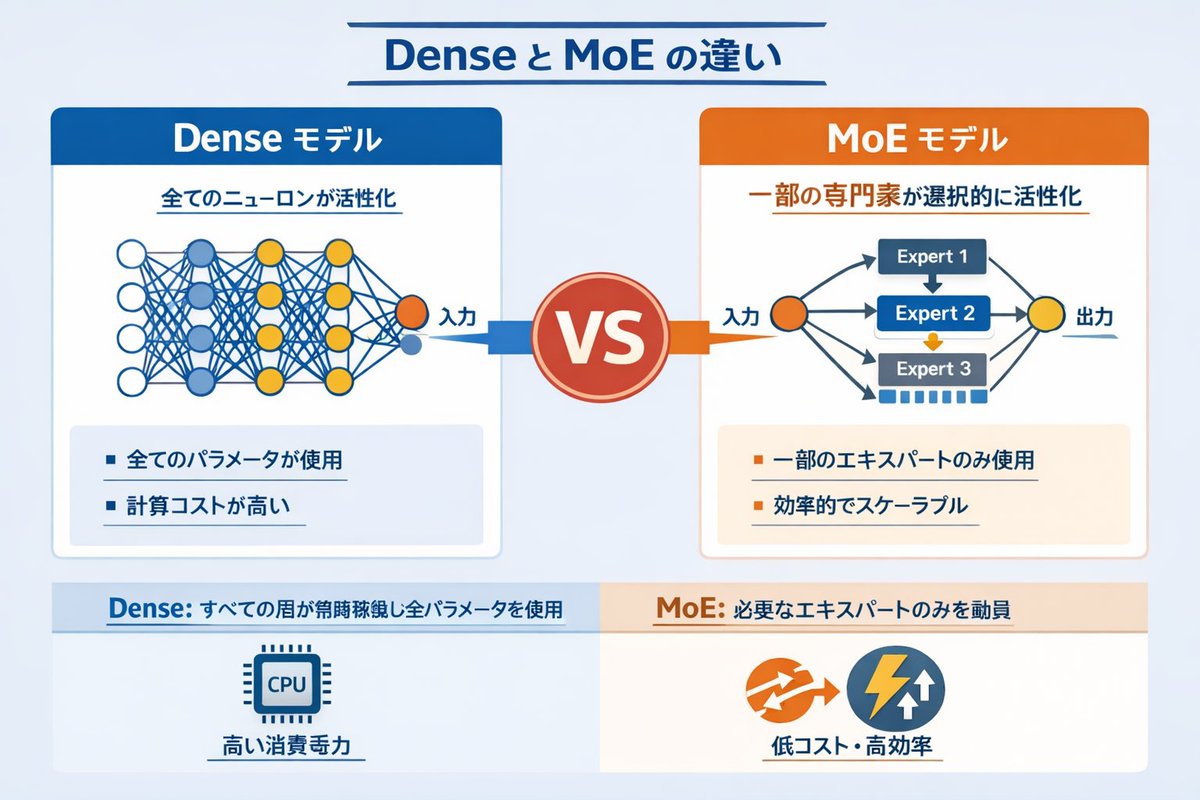
Dense vs MoE Infographic — AI Model Comparison Diagram

Generate a clean, side-by-side infographic comparing Dense and Mixture of Experts neural networks with custom labels, diagrams, and bullet points.
Dense vs MoE Infographic — AI Model Comparison Diagram
ПРОМПТ · EN
type
infographic comparison diagram
header
title
{argument name="main title" default="Dense と MoE の違い"}
layout
structure
two main columns separated by a central VS badge, with a split footer at the bottom
sections
item 1
position
left column
theme_color
blue
header
{argument name="left model name" default="Dense モデル"}
subtitle
全てのニューロンが活性化
diagram
type
fully connected neural network
elements
item 1
1 orange input node labeled 入力
item 2
4 hidden layers with 4, 5, 4, and 2 nodes respectively
item 3
nodes colored white, blue, and yellow
item 4
dense intersecting connection lines between all adjacent nodes
bullet_points
count
2
items
item 1
{argument name="left bullet point" default="全てのパラメータが使用"}
item 2
計算コストが高い
item 2
position
right column
theme_color
orange
header
{argument name="right model name" default="MoE モデル"}
subtitle
一部の専門家が選択的に活性化
diagram
type
mixture of experts network
elements
item 1
1 orange input node labeled 入力
item 2
3 rectangular blocks labeled Expert 1, Expert 2, Expert 3
item 3
1 yellow output node labeled 出力
item 4
branching arrows connecting input to experts, and experts to output
bullet_points
count
2
items
item 1
{argument name="right bullet point" default="一部のエキスパートのみ使用"}
item 2
効率的でスケーラブル
item 3
position
center
element
red circular badge with text VS
connections
blue arrow pointing left, orange arrow pointing right
item 4
position
footer left
background
light blue
text
Dense: すべての層が常時稼働し全パラメータを使用
icon
1 CPU chip graphic
label
高い消費電力
item 5
position
footer right
background
light orange
text
MoE: 必要なエキスパートのみを動員
icons
2 circular graphics (orange arrows, blue lightning bolt)
label
低コスト・高効率

О промпте

Generate a clean, side-by-side infographic comparing Dense and Mixture of Experts neural networks with custom labels, diagrams, and bullet points. Use it as a Концепт-арт starting point for GPT Image 2: keep the visual structure and style constraints intact, then swap in your own subject, brand, or scene.

This prompt is organized as structured JSON with fields such as type, header, and layout. Keeping that hierarchy helps the model separate the subject, layout, interface elements, and detail constraints.

Start with small changes to subject, scene, camera, and color, then generate a few variations to compare composition and detail without turning the page copy into keyword stuffing.

Как использовать этот промпт

  1. Copy the full JSON prompt object into your AI image generator (e.g. Sora, GPT-4o, or DALL·E).
  2. Choose a model that supports structured layouts or infographics for best results.
  3. Customize the variables like main title, left model name, right model name, and bullet points to fit your topic.
  4. Adjust colors, expert count, or layer structure if you need a different architecture visual.
  5. Generate the image and review — iterate on wording or layout variables as needed.

FAQ

Больше из GPT Image 2

Смотреть все

Создавайте быстрее с промптами Sora2Hub.

Используйте страницы промптов как поисковые входы и сразу переходите к генерации с нужным контекстом модели.

Изучить промпты

