
Sora2 Hub
Sora2 Hub
  • Библиотека промптов
  • Цены
  • Примеры
Sora2 Hub
Sora2 Hub
Sora2 Hub

Sora2 Hub

Профессиональная платформа для создания ИИ-контента на базе Sora 2, Veo 3.1 и Nano Banana Pro. Создавайте потрясающие видео и изображения студийного качества с расширенным управлением, HD-качеством и без водяных знаков.

Email:support@sora2hub.org

Генератор видео ИИ

  • Текст в видео
  • Изображение в видео
  • Veo 3.1
  • Sora 2
  • Kling 3.0
  • Kling 2.6
  • Kling 2.5
  • Runway
  • Wan 2.6
  • Seedance 2.0
  • Hailuo 2.3
  • Grok Imagine
  • HappyHorse-1.0

Генератор изображений ИИ

  • Текст в изображение
  • Изображение в изображение
  • Nano Banana Pro
  • Nano Banana
  • 4o Image
  • Flux Kontext
  • Z Image
  • Seedream 4.5
  • Seedream 5.0 Lite
  • Nano Banana 2
  • GPT Image 2
  • Увеличитель изображений ИИ

Эффекты ИИ

  • Фильтр возраста ИИ
  • Смена пола ИИ
  • Поцелуй ИИ
  • Объятие ИИ
  • Изображение Гибли
  • Фильтр русалки ИИ
  • Тряска тела ИИ
  • Фильтр улыбки
  • Толстый ИИ
  • Фигурка

Продукт

  • Функции
  • Витрины
  • Цены

Компания

  • О нас
  • Контакт

© 2025 • Sora2 Hub ORG Все права защищены.

  • Политика конфиденциальности
  • Условия обслуживания
  • Политика возврата
  1. Главная
  2. /
  3. Промпты
  4. /
  5. GPT Image 2
  6. /
  7. Sci-Fi Mecha Base Infographic Prompt — Full Schematic Design
GPT Image 2AI-промпт

Sci-Fi Mecha Base Infographic Prompt — Full Schematic Design

Generates a detailed, multi-panel technical specification sheet for a sci-fi mecha base, showcasing cross-sections, hangar views, and maintenance systems.
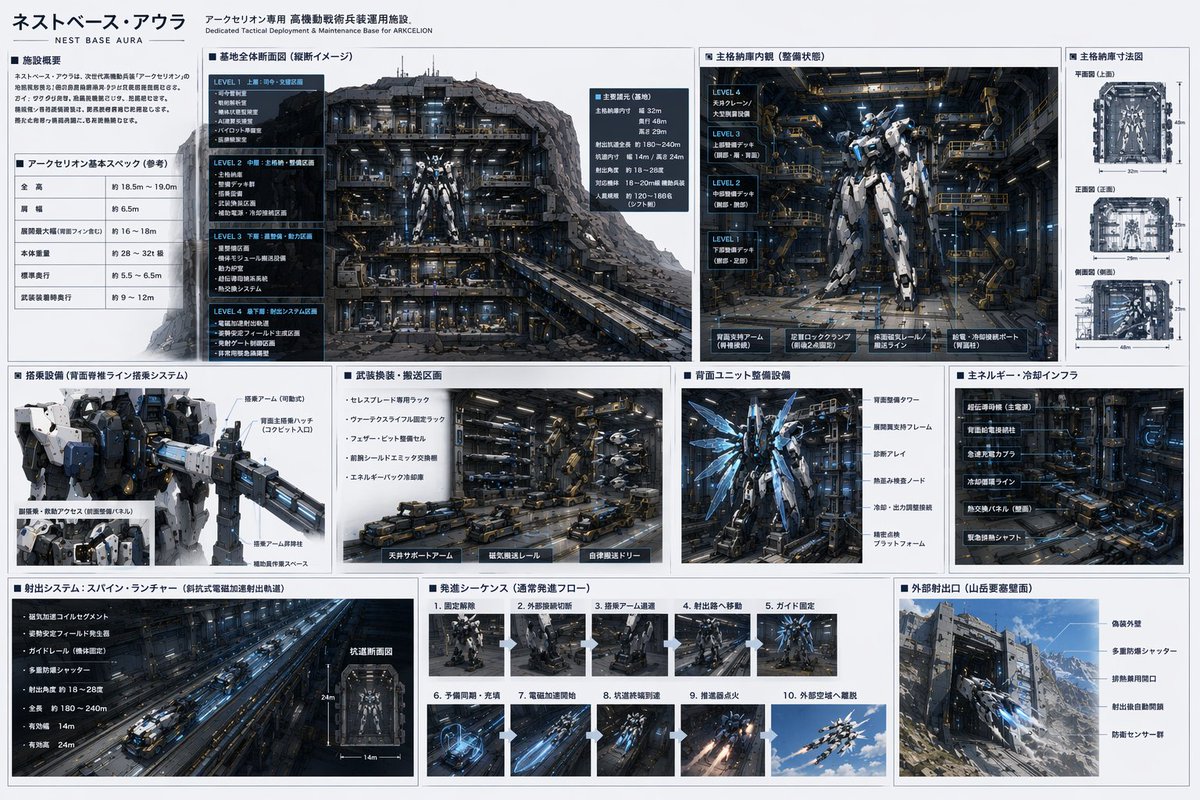
Sci-Fi Mecha Base Infographic Prompt — Full Schematic Design
ПРОМПТ · EN
type
sci-fi mecha base technical specification sheet
style
{argument name="ui theme" default="technical schematic with dark grey panels and white text"}
header
title
{argument name="base name" default="ネストベース・アウラ"}
subtitle
Dedicated Tactical Deployment & Maintenance Base for {argument name="mecha name" default="アークセリオン"}
layout
structure
grid-based infographic with 3 main horizontal rows
row_1
item 1
title
Facility Overview & Basic Specs
content
2 text blocks including a specification table with 5 rows
item 2
title
Base Overall Cross-section
content
Large cutaway view of the underground base showing 4 distinct levels (LEVEL 1 to LEVEL 4)
item 3
title
Main Hangar Interior
content
Front view of a {argument name="mecha color scheme" default="white and blue"} mecha in a maintenance bay, with 4 deck levels labeled on the left
item 4
title
Hangar Dimensions
content
3 orthographic wireframe-style views (Top, Front, Side) with dimension lines
row_2
item 1
title
Boarding Equipment
content
Close-up of the mecha's upper body and cockpit boarding arm
item 2
title
Weapon Transport Area
content
Detailed view of automated transport vehicles and magnetic rails
item 3
title
Rear Unit Maintenance
content
Back view of the mecha showing glowing blue thrusters and maintenance frames
item 4
title
Energy & Cooling Infrastructure
content
Dense machinery wall with pipes and super-conducting equipment
row_3
item 1
title
Launch System: Spine Launcher
content
Long perspective view of an electromagnetic catapult tunnel, plus 1 small cross-section diagram
item 2
title
Launch Sequence
content
Grid of 10 sequential images showing the mecha's launch process step-by-step
item 3
title
External Launch Port
content
Exterior view of the base built into a {argument name="base location" default="Mountain fortress"} wall, showing camouflage armor and blast doors

О промпте

Generates a detailed, multi-panel technical specification sheet for a sci-fi mecha base, showcasing cross-sections, hangar views, and maintenance systems. Use it as a Концепт-арт starting point for GPT Image 2: keep the visual structure and style constraints intact, then swap in your own subject, brand, or scene.

This prompt is organized as structured JSON with fields such as type, style, header, and layout. Keeping that hierarchy helps the model separate the subject, layout, interface elements, and detail constraints.

Start with small changes to subject, scene, camera, and color, then generate a few variations to compare composition and detail without turning the page copy into keyword stuffing.

Как использовать этот промпт

  1. Copy the complete prompt JSON from the page.
  2. Paste it into your preferred AI image generator (e.g., Sora 2, Midjourney, or DALL·E).
  3. Customize the <argument> placeholders like base name, mecha name, and ui theme to fit your concept.
  4. Generate the image and review the multi-panel infographic output.
  5. Refine the arguments or regenerate if you need different styling or detail levels.

FAQ

いにしえ@AI Director & Creator|Will Oldgram

@prompts→

Опубликовано
30 апр. 2026 г.
Исходный язык
EN
Модель
GPT Image 2
Категория
Концепт-арт
GPT Image 2Концепт-артgpt-image-2gptimage2api promptsgptimage2apien
Просмотры
3.1K
Копии
289
Лайки
203

Поделиться

Больше из GPT Image 2

Смотреть все
Shenzhen Golden Hour City Prompt: Futuristic Heritage Poster

Shenzhen Golden Hour City Prompt: Futuristic Heritage Poster

@ivanalog_com
Dark Anime Devil Girl Mario Kart Poster — Sora 2 Prompt

Dark Anime Devil Girl Mario Kart Poster — Sora 2 Prompt

@opener_ai
Dynamic Nike Ad Poster — Sora 2 Prompt with Sydney Sweeney

Dynamic Nike Ad Poster — Sora 2 Prompt with Sydney Sweeney

@im_shahid7

Создавайте быстрее с промптами Sora2Hub.

Используйте страницы промптов как поисковые входы и сразу переходите к генерации с нужным контекстом модели.

Изучить промпты

