
GPT Image 2AI-промпт
Mini-Me 3D Selfie Prompt — Pixar-Style Clones in Your Photo
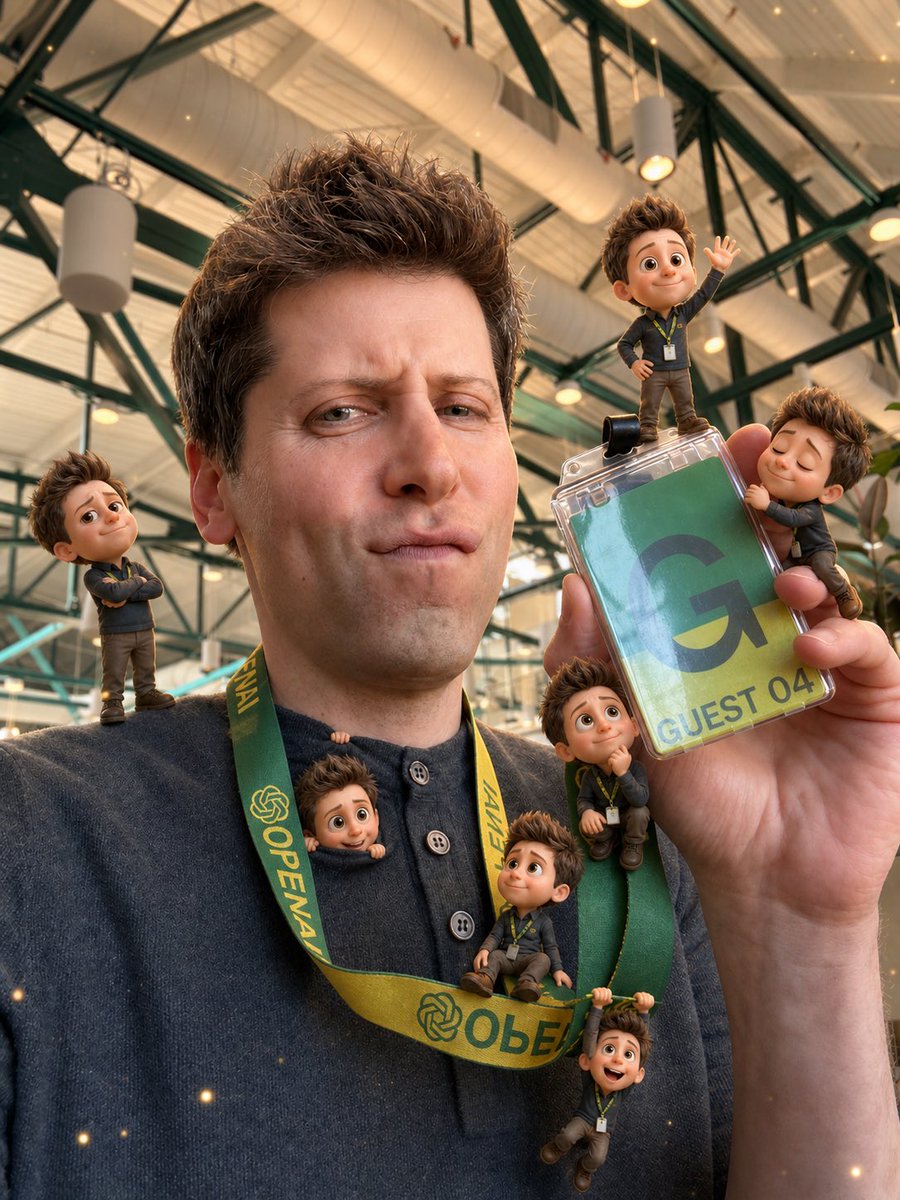
Transform any selfie into a playful miniature world with seven adorable 3D Pixar-style mini-clones that naturally interact with your real photo.
ПРОМПТ · EN
基于提供的参考自拍,保持原照片的构图、服装、挂绳、工牌、手势、室内天花板背景、透视关系以及真实光影基本不变。去除遮挡面部的实心方块,并重构一张自然且真实的面部,使其发型、头部角度、肤色和自拍光线相匹配。在场景中添加 7 个与本人形象一致的 3D 动画“迷你我”,采用可爱的皮克斯风格,并融入真实接触阴影、景深、反射以及相匹配的暖光效果:1 个站在左肩上交叉双臂,1 个站在工牌上方挥手,1 个闭眼拥抱工牌右侧边缘,1 个从衣领处探出头,1 个坐在靠近工牌的挂绳上呈思考姿势,1 个坐在前侧黄色挂绳带上向上看,1 个双手悬挂在下方的挂绳带上。让这些迷你角色穿着简约的同款深色服装并佩戴微型挂绳,与真实物体自然互动。在不改变真实自拍底图的前提下,添加微妙的魔法闪光氛围。整体氛围:俏皮、可爱,营造出一种置身于原照片中的真实微缩世界感。
О промпте
Transform any selfie into a playful miniature world with seven adorable 3D Pixar-style mini-clones that naturally interact with your real photo. Use it as a Концепт-арт starting point for GPT Image 2: keep the visual structure and style constraints intact, then swap in your own subject, brand, or scene.
Start with small changes to subject, scene, camera, and color, then generate a few variations to compare composition and detail without turning the page copy into keyword stuffing.
Как использовать этот промпт
- Copy the full prompt from this page.
- Choose your preferred AI model (e.g., Sora 2 or similar video/image generator).
- Replace the sample selfie reference with your own portrait photo URL or upload.
- Adjust the number of mini-characters, their poses, or clothing details if desired.
- Generate and refine until you get the perfect whimsical miniature scene.


