
GPT Image 2AI-промпт
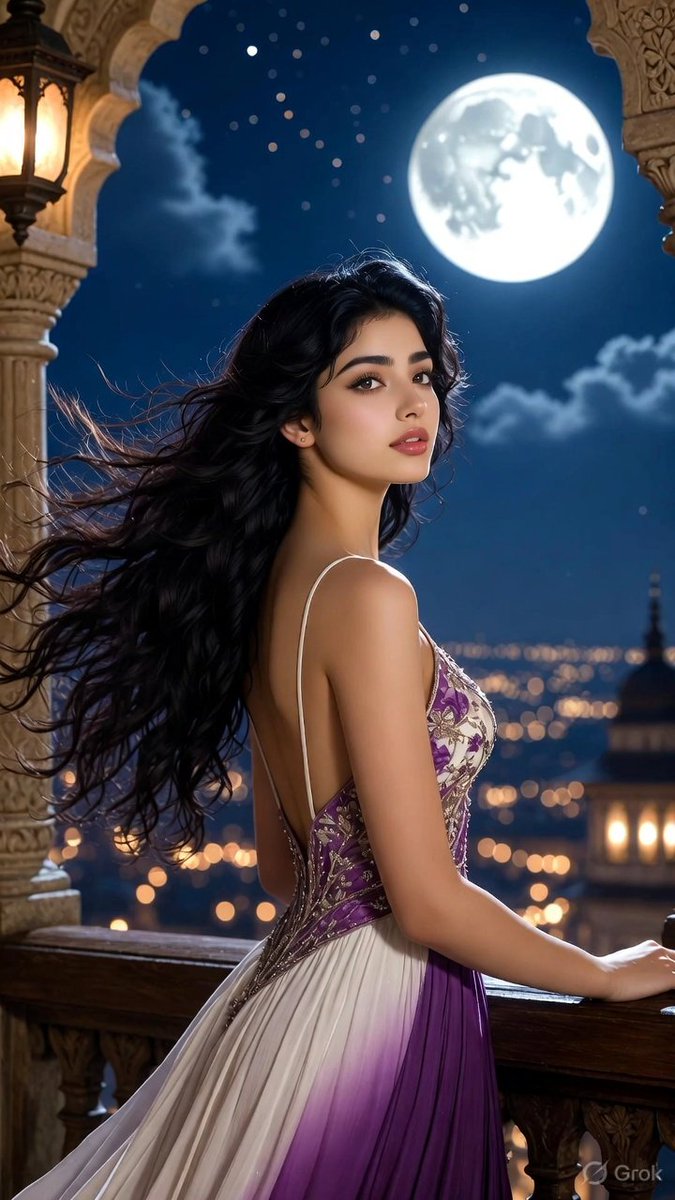
Moonlit Mughal Balcony Portrait — Photorealistic Cinematic Sora 2 Prompt
Generate a stunning cinematic portrait of an elegant woman in a purple ombre gown on an ornate moonlit Indian balcony, perfect for breathtaking vertical art.
ПРОМПТ · EN
Create a stunning photorealistic cinematic vertical portrait of argsubject: a beautiful young Indian woman standing on an ornate carved stone balcony at night, shown from the back and three-quarter side as she leans gracefully on a dark wooden railing and gazes upward toward a huge bright full moon. She has arghair style and color: very long flowing wavy black hair swept dramatically by the wind, fair warm skin, bare shoulders, and a slim elegant figure. Her face is intentionally anonymized with a soft rectangular skin-toned blur covering the facial features. She wears argdress: a sleeveless white-to-purple ombre gradient evening dress with thin straps, a low open back, a fitted purple bodice, delicate silver and floral embroidery, and a flowing pleated skirt fading from ivory to deep violet. Frame the scene with intricate Mughal/Rajasthani-style carved stone arches and columns, with a warm glowing lantern on the upper left and decorative balcony details in the foreground. In the background, show a deep dark blue starry sky with scattered clouds, a luminous oversized full moon near the upper right, and a distant city skyline with golden bokeh lights and a domed tower. Use warm lantern light from the side mixed with cool dramatic moonlight rim lighting on the hair and shoulders, shallow depth of field, highly detailed fabric and stone carving, serene romantic atmosphere, ultra-realistic skin and hair texture, cinematic color grading, 8k resolution, vertical 9:16 composition.
О промпте
Generate a stunning cinematic portrait of an elegant woman in a purple ombre gown on an ornate moonlit Indian balcony, perfect for breathtaking vertical art. Use it as a Концепт-арт starting point for GPT Image 2: keep the visual structure and style constraints intact, then swap in your own subject, brand, or scene.
Start by replacing subject, hair style and color, and dress, then keep the camera, composition, and material cues in the same order. This makes the output easier to compare across variations.
Как использовать этот промпт
- Copy the full prompt text from the page.
- Open your preferred AI video or image generator (like Sora 2 or Midjourney).
- Paste the prompt into the input field.
- Customize the subject's hair, dress, or style using the available variables.
- Generate and download your high-resolution cinematic portrait.


