
Sora2 Hub
Sora2 Hub
  • Библиотека промптов
  • Цены
  • Примеры
Sora2 Hub
Sora2 Hub
Sora2 Hub

Sora2 Hub

Профессиональная платформа для создания ИИ-контента на базе Sora 2, Veo 3.1 и Nano Banana Pro. Создавайте потрясающие видео и изображения студийного качества с расширенным управлением, HD-качеством и без водяных знаков.

Email:support@sora2hub.org

Генератор видео ИИ

  • Текст в видео
  • Изображение в видео
  • Veo 3.1
  • Sora 2
  • Kling 3.0
  • Kling 2.6
  • Kling 2.5
  • Runway
  • Wan 2.6
  • Seedance 2.0
  • Hailuo 2.3
  • Grok Imagine
  • HappyHorse-1.0

Генератор изображений ИИ

  • Текст в изображение
  • Изображение в изображение
  • Nano Banana Pro
  • Nano Banana
  • 4o Image
  • Flux Kontext
  • Z Image
  • Seedream 4.5
  • Seedream 5.0 Lite
  • Nano Banana 2
  • GPT Image 2
  • Увеличитель изображений ИИ

Эффекты ИИ

  • Фильтр возраста ИИ
  • Смена пола ИИ
  • Поцелуй ИИ
  • Объятие ИИ
  • Изображение Гибли
  • Фильтр русалки ИИ
  • Тряска тела ИИ
  • Фильтр улыбки
  • Толстый ИИ
  • Фигурка

Продукт

  • Функции
  • Витрины
  • Цены

Компания

  • О нас
  • Контакт

© 2025 • Sora2 Hub ORG Все права защищены.

  • Политика конфиденциальности
  • Условия обслуживания
  • Политика возврата
  1. Главная
  2. /
  3. Промпты
  4. /
  5. GPT Image 2
  6. /
  7. Flat Color to Anime Rendering — AI Illustration Prompt
GPT Image 2AI-промпт

Flat Color to Anime Rendering — AI Illustration Prompt

Transform flat-colored character references into fully rendered anime illustrations with dynamic lighting, metallic accents, and a pure black background.
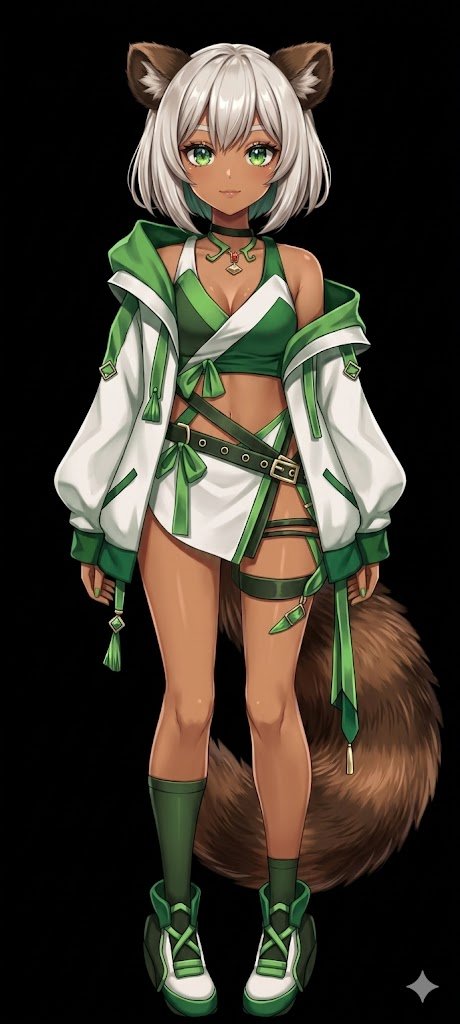
Flat Color to Anime Rendering — AI Illustration Prompt
ПРОМПТ · EN
使用 REFERENCE_0,将平涂配色的角色转换为 argart style: 完整渲染的高质量动漫插画。为皮肤、头发、眼睛、服装和尾巴应用精细的 arglighting effect: 阴影、光泽高光和深度感,赋予 2D 设计精致的立体感。为扣环和珠宝添加金属光泽。将背景更改为 argbackground color: 纯黑色。请务必保留角色在参考图中的原始设计、服装和中性姿势。

О промпте

Transform flat-colored character references into fully rendered anime illustrations with dynamic lighting, metallic accents, and a pure black background. Use it as a Концепт-арт starting point for GPT Image 2: keep the visual structure and style constraints intact, then swap in your own subject, brand, or scene.

Start by replacing art style, lighting effect, and background color, then keep the camera, composition, and material cues in the same order. This makes the output easier to compare across variations.

Как использовать этот промпт

  1. Copy the prompt and paste it into your AI image generation tool.
  2. Select an anime-specialized model (e.g., Niji Journey, NovelAI, Stable Diffusion with anime checkpoints).
  3. Customize the art style, lighting effect, and background color arguments to fit your vision.
  4. Generate the image and refine by iterating with slight adjustments if needed.
  5. For optimal outcome, use a reference character with a neutral pose and distinct design elements.

FAQ

しーげっちは自分で描いた絵を動かしたい

@seagetch→

Опубликовано
25 апр. 2026 г.
Исходный язык
EN
Модель
GPT Image 2
Категория
Концепт-арт
GPT Image 2Концепт-артgpt-image-2twitter
Просмотры
1.2K
Копии
63
Лайки
98

Поделиться

Больше из GPT Image 2

Смотреть все
Cyberpunk AI Launch Banner — Cinematic Neon Poster Prompt

Cyberpunk AI Launch Banner — Cinematic Neon Poster Prompt

@ObieriI
Anime Idol Profile Page — Lavender Art Style Prompt

Anime Idol Profile Page — Lavender Art Style Prompt

@uzuyanurp
Minimalist Skincare Brand Manual — Sora 2 Prompt

Minimalist Skincare Brand Manual — Sora 2 Prompt

@FranromeGraph

Создавайте быстрее с промптами Sora2Hub.

Используйте страницы промптов как поисковые входы и сразу переходите к генерации с нужным контекстом модели.

Изучить промпты

