
GPT Image 2AI-промпт
High-End Streetwear Ad: Floating Pose & Smoke — Sora 2 Prompt
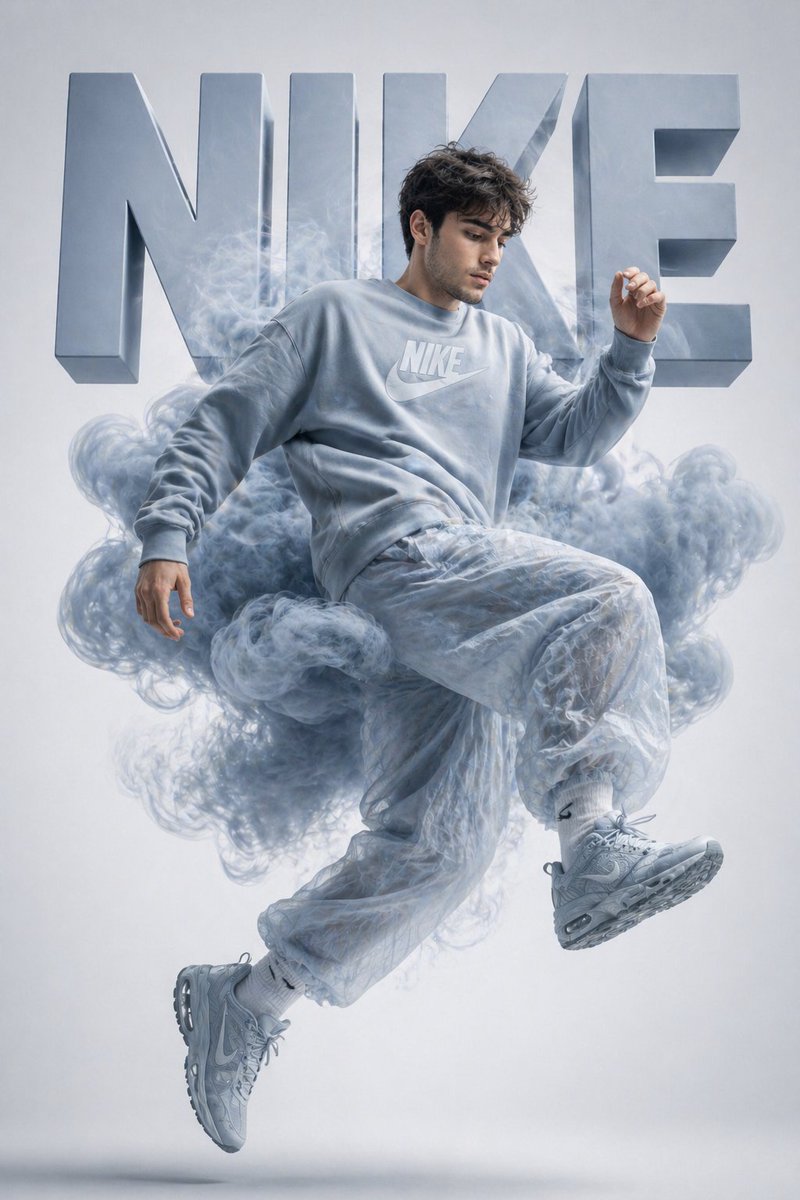
Generate a luxury streetwear poster with a floating subject, colorful smoke, and bold 3D typography for a high-fashion editorial look.
ПРОМПТ · EN
使用上传的参考图作为人物身份来源。创作一张高端街头服饰宣传海报,让同一人物以半空中动态漂浮的姿势呈现。使用简洁的摄影棚背景,背景为 argbackground gradient: 柔和白到浅灰色的渐变。主体穿着单色 argclothing: 廓形卫衣、配套运动鞋和半透明宽松长裤。在身体周围添加 argsmoke color: 富有戏剧性的彩色烟雾,并使其与服装色调相融合。采用强烈的时尚杂志灯光,细节锐利,呈现高级广告质感,构图居中。在主体后方,放置巨大的粗体 3D 块状字母,拼写出 “argbrand name: [品牌名称]” 作为背景,取代其他任何文字,并使其颜色与服装相呼应。阴影清晰,光泽感强,展现现代奢华运动服饰美学,高度细节化,海报级画质。
О промпте
Generate a luxury streetwear poster with a floating subject, colorful smoke, and bold 3D typography for a high-fashion editorial look. Use it as a Концепт-арт starting point for GPT Image 2: keep the visual structure and style constraints intact, then swap in your own subject, brand, or scene.
Start by replacing background gradient, clothing, smoke color, and brand name, then keep the camera, composition, and material cues in the same order. This makes the output easier to compare across variations.
Как использовать этот промпт
- Copy the provided prompt and upload your reference image to define the person's identity.
- Open Sora 2 (or a compatible image model) and paste the prompt.
- Customize variables like clothing style, smoke color, background gradient, and the 3D brand name.
- Generate the image and adjust settings for optimal lighting and smoke integration.
- Download the high-resolution result for use in fashion campaigns or posters.


