
GPT Image 2AI-промпт
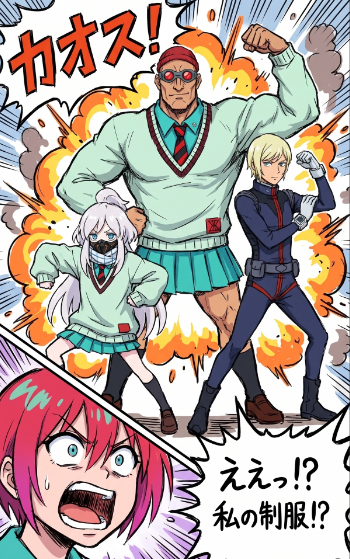
Dynamic Manga Explosion — Sketch to Cel-Shaded Comic Art Prompt
Transform rough character sketches into a vibrant, high-energy manga page with cel-shading, explosive effects, and Japanese onomatopoeia using reference images for layout and character poses.
ПРОМПТ · EN
以 REFERENCE_0 作为构图参考,REFERENCE_1 作为角色/姿势参考,将草图转化为精美、高能量的漫画/动画插图。保持 4 个角色的排列:中间后方是一个巨大的肌肉发达的学生正在展示手臂,左下角是一个白发小个子学生处于蹲伏/动作姿势,右侧是一个苗条的站立学生正在举起拳头,左下角是一个被裁切的粉发震惊特写脸部。将粗糙的彩色草图转换为干净的墨线稿,并配以鲜艳的赛璐珞阴影、强烈的漫画分镜感和夸张的透视效果。在三个全身角色身后添加混乱的爆炸背景,包括橙黄色火花、烟雾、速度线、冲击尖刺和漫画爆炸形状。添加 2 个可见的日语文本元素:左上角的大型音效 argsound effect text: カオス! 和右下角的锯齿状对话气泡,内容为 argspeech bubble text: えぇっ!?\n私の制服!?。保留 REFERENCE_1 中的校服主题,但将其渲染为成品服装:中间和左侧角色采用薄荷绿毛衣和蓝绿色裙子,右侧角色采用深色修身制服,左下角前景为震惊的特写脸部。采用动态少年喜剧漫画页面风格,使用粗轮廓线、戏剧性的运动线条、饱和的色彩和分层漫画效果。
О промпте
Transform rough character sketches into a vibrant, high-energy manga page with cel-shading, explosive effects, and Japanese onomatopoeia using reference images for layout and character poses. Use it as a Концепт-арт starting point for GPT Image 2: keep the visual structure and style constraints intact, then swap in your own subject, brand, or scene.
Start by replacing sound effect text and speech bubble text, then keep the camera, composition, and material cues in the same order. This makes the output easier to compare across variations.
Как использовать этот промпт
- Prepare two reference images: one for composition/layout (REFERENCE_0) and one for character designs/poses (REFERENCE_1).
- Copy the full prompt into your preferred Sora 2 or compatible AI image generation model.
- Customize the
sound effect textandspeech bubble textarguments with your own Japanese or other language text. - Adjust character details, outfit colors, or background elements in the prompt body to match your specific vision.
- Generate the image and iterate by refining references or tweaking text/positioning arguments for the perfect manga panel.


