
GPT Image 2AI-промпт
Dynamic Comic Page Prompt — Full-Color Manga Storytelling
Transform a reference photo into a full-page, action-packed comic layout with cinematic panels, expressive poses, ink splatters, and vibrant colors.
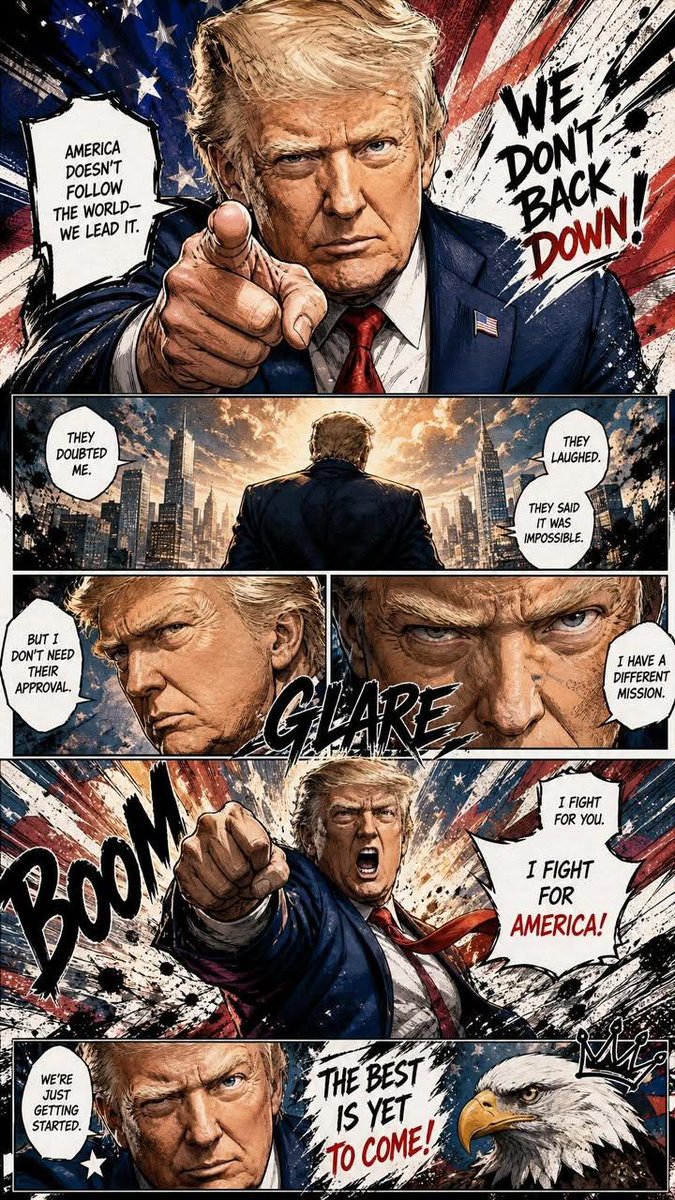
1 / 2
ПРОМПТ · EN
根据参考照片中的人物,创作一幅全页彩色漫画插画。采用地道的漫画页面构图,在单页中使用 argpanel count: 5–7 个动态连贯的分镜格。融入电影般的叙事手法、戏剧性的视角、丰富的表情、动态姿势、速度线、冲击帧、特写镜头以及强烈的视觉流动感。添加英文漫画风格的音效字、手写对话气泡、墨迹飞溅笔触、网点质感、粗犷的漫画草图线条以及涂鸦风格的笔触。将鲜艳的色彩与漫画风格的阴影及强烈的对比度相结合。通过象征性的视觉元素和氛围感能量特效,强调角色的个性和气场。画面高度精细、情感充沛、风格时尚且充满活力,呈现出专业漫画美学,并在留白与混乱的墨迹质感之间取得平衡。手绘外观,线条流畅,构图沉浸,高质量。长宽比 9:16 高清。
О промпте
Transform a reference photo into a full-page, action-packed comic layout with cinematic panels, expressive poses, ink splatters, and vibrant colors. Use it as a Концепт-арт starting point for GPT Image 2: keep the visual structure and style constraints intact, then swap in your own subject, brand, or scene.
Start by replacing panel count, then keep the camera, composition, and material cues in the same order. This makes the output easier to compare across variations.
Как использовать этот промпт
- Copy the full prompt text below.
- In your AI image generator (e.g., Sora 2, Midjourney, or DALL·E), paste the prompt.
- Replace
{panel count}with your desired number of panels (default is 5–7). - Upload your reference photo when prompted for an input image.
- Generate the image and iterate by adjusting panel count or adding style keywords.


