
GPT Image 2AI-промпт
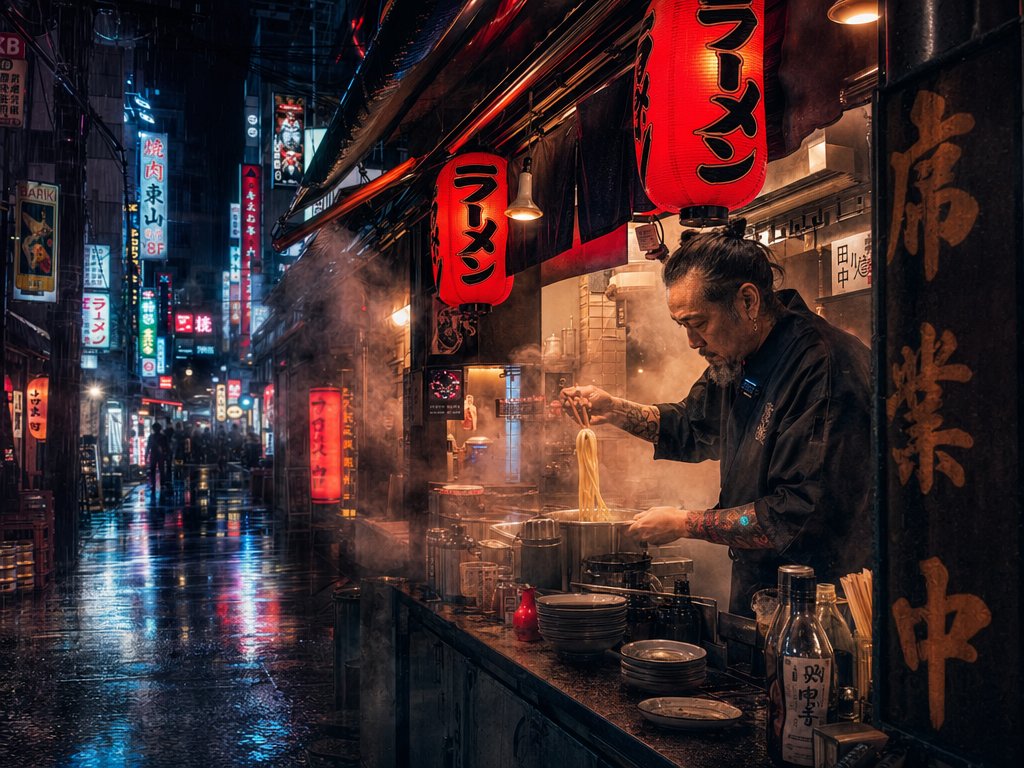
Rainy Cyberpunk Ramen Alley — Cinematic Sora 2 Prompt
Generate a moody, rain-soaked Tokyo ramen alley with neon reflections, steam, and dramatic cyberpunk lighting for ultra-realistic cinematic AI video.
ПРОМПТ · EN
Create an ultra-realistic cinematic night street scene in argcity: Tokyo, showing a narrow rainy alley lined with ramen shops and dense vertical neon signs. The camera is at street level with a wide-angle documentary feel, looking down the wet pavement where blue, red, and white neon reflections stretch across puddles. In the right foreground, an open-air ramen counter glows with warm amber light and heavy steam; a chef in a dark work shirt with tattooed forearms lifts noodles from a boiling pot with chopsticks, his face obscured by a soft rectangular anonymizing blur. Hang exactly two prominent red paper lanterns over the stall, both with bold black Japanese text arglantern text: ラーメン. Add stainless pots, stacked bowls, chopsticks, condiment bottles, hanging lamps, dark noren curtains, and a tall black wooden signboard with large gold Japanese calligraphy beside the counter. The background alley should contain distant silhouettes of pedestrians, countless small illuminated storefront signs, rain streaks, mist, and atmospheric steam drifting through the scene. Style: photorealistic but clearly AI-generated, high dynamic range, moody cyberpunk-noir color palette, wet asphalt, volumetric lighting, sharp foreground detail, deep perspective, 16:9 composition, dramatic contrast, shot as if with a 24mm lens at night after rainfall.
О промпте
Generate a moody, rain-soaked Tokyo ramen alley with neon reflections, steam, and dramatic cyberpunk lighting for ultra-realistic cinematic AI video. Use it as a Концепт-арт starting point for GPT Image 2: keep the visual structure and style constraints intact, then swap in your own subject, brand, or scene.
Start by replacing city and lantern text, then keep the camera, composition, and material cues in the same order. This makes the output easier to compare across variations.
Как использовать этот промпт
- Copy the full prompt text from the page. 2. Select your preferred AI video model (e.g. Sora 2, Kling, Runway). 3. Replace the
{city}and{lantern text}variables with your desired locations or custom Japanese characters. 4. Paste the prompt into the AI tool's generation field and start rendering. 5. Adjust the style, lens, or color palette keywords if you want a different mood.


