GPT Image 2AI-промпт

Two-Panel RPG Concept Art — Peaceful & Combat Split

Create a dual-scene fantasy illustration showing a beast-kin party in a sunny market and a magical battle, complete with stylized typography.
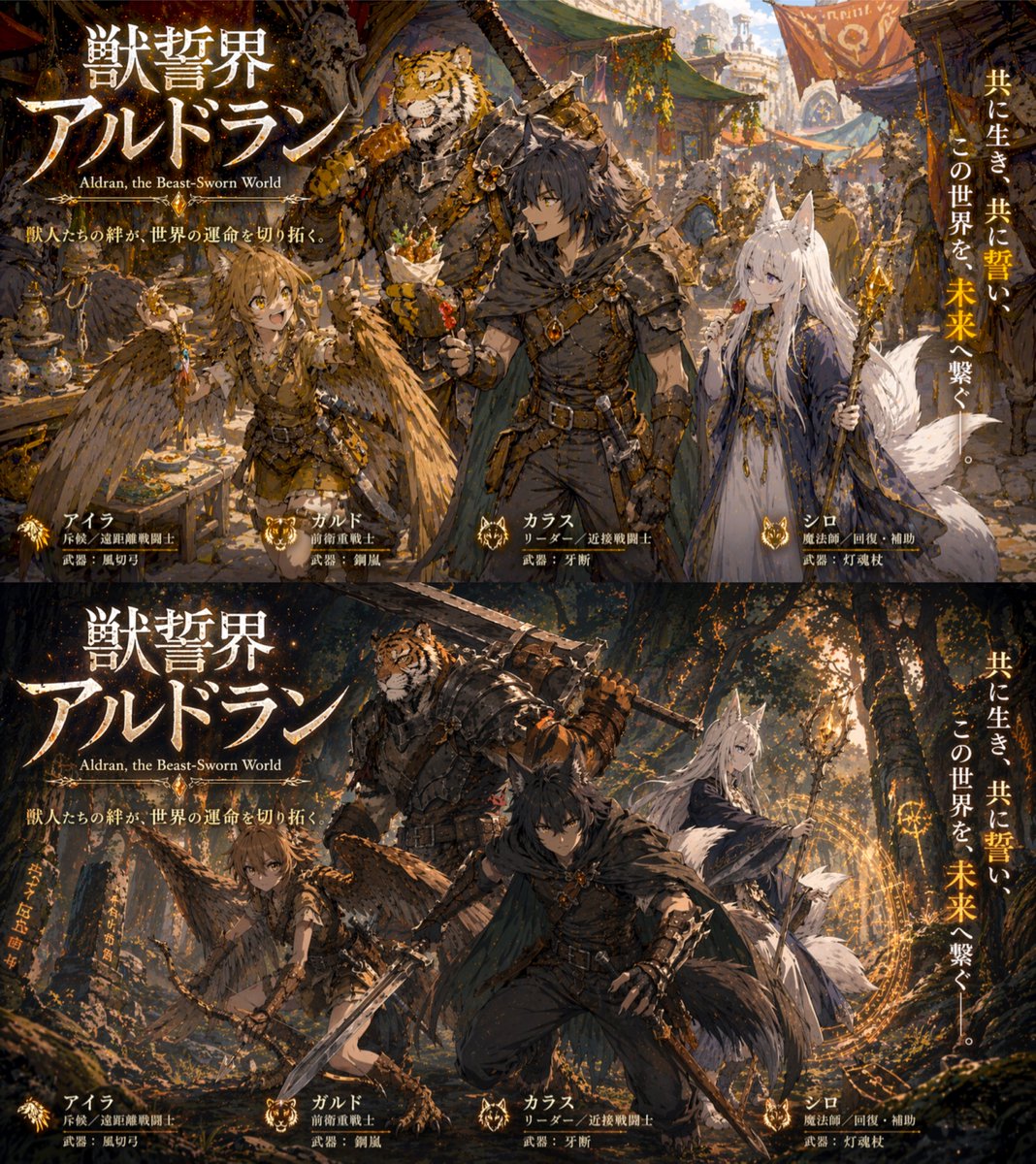
Two-Panel RPG Concept Art — Peaceful & Combat Split
ПРОМПТ · EN
type
two-panel fantasy RPG promotional illustration
global_elements
main_title
{argument name="main title" default="獣誓界アルドラン"}
english_subtitle
{argument name="english subtitle" default="Aldran, the Beast-Sworn World"}
catchphrase
獣人たちの絆が、世界の運命を切り拓く。
vertical_tagline
{argument name="tagline" default="共に生き、共に誓い、この世界を、未来へ繋ぐ。"}
characters
item 1
name
アイラ
description
winged beast-girl with brown hair and feathered wings
role_label
斥候 / 遠距離戦闘士
weapon_label
武器:風切弓
item 2
name
ガルド
description
massive tiger beastman in heavy plate armor
role_label
前衛重戦士
weapon_label
武器:鋼嵐
item 3
name
カラス
description
wolf-boy with black hair, wolf ears, tail, dark leather armor and cloak
role_label
リーダー / 近接戦闘士
weapon_label
武器:牙断
item 4
name
シロ
description
white fox-girl with long white hair, fox ears, multiple fluffy tails, blue and white robes
role_label
魔法師 / 回復・補助
weapon_label
武器:灯魂杖
layout
panels
item 1
position
top half
scene
{argument name="peaceful setting" default="bustling fantasy market town in warm daylight"}
action
characters are relaxed, smiling, and eating street food skewers together
item 2
position
bottom half
scene
{argument name="combat setting" default="dark atmospheric forest with glowing magic runes"}
action
characters are in dynamic combat stances, weapons drawn, casting magic, tense atmosphere

О промпте

Create a dual-scene fantasy illustration showing a beast-kin party in a sunny market and a magical battle, complete with stylized typography. Use it as a Концепт-арт starting point for GPT Image 2: keep the visual structure and style constraints intact, then swap in your own subject, brand, or scene.

This prompt is organized as structured JSON with fields such as type, global elements, characters, and layout. Keeping that hierarchy helps the model separate the subject, layout, interface elements, and detail constraints.

Start with small changes to subject, scene, camera, and color, then generate a few variations to compare composition and detail without turning the page copy into keyword stuffing.

Как использовать этот промпт

  1. Copy the entire JSON prompt into your AI image generator.
  2. Select a model known for high-quality anime or fantasy illustration, such as DALL·E 3 or Stable Diffusion.
  3. Customize the argument variables (like main title or peaceful setting) to fit your specific RPG world or characters.
  4. Generate the image and refine the prompt if needed, adjusting details for character poses or lighting.
  5. Use the output as promotional art, a character sheet, or a dynamic scene for your project.
FAQ

Больше из GPT Image 2

Смотреть все

Создавайте быстрее с промптами Sora2Hub.

Используйте страницы промптов как поисковые входы и сразу переходите к генерации с нужным контекстом модели.

Изучить промпты