
GPT Image 2AI 提示词
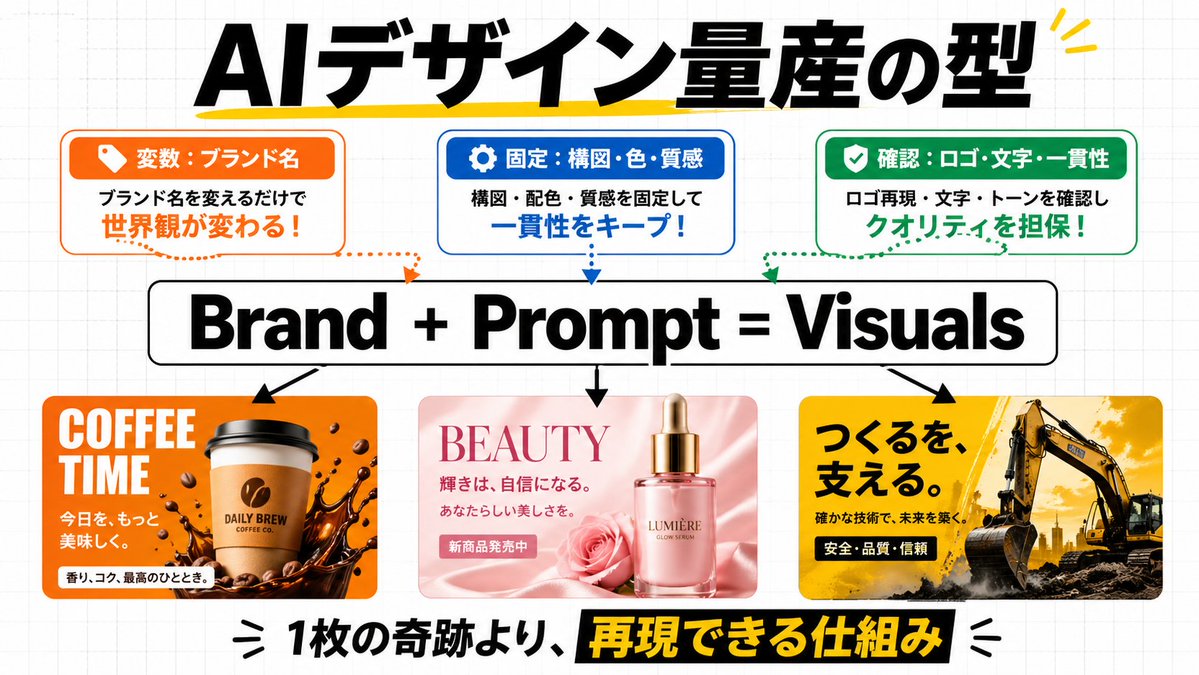
Japanese AI Design Infographic: Brand + Prompt = Visuals
Create a striking Japanese-style infographic that visualizes the AI design formula Brand + Prompt = Visuals, with customizable brand examples and sleek social-media-ready layout.
1 / 2
提示词 · EN
type
日式商务信息图社交媒体图表style
简洁现代的演示 Slides,初创公司营销说明,粗体排版,纯白背景配淡灰色网格纸纹理,清爽的矢量风格布局,融合写实产品样机缩略图canvas
aspect_ratio
16:9background
白色,带有细微的浅灰色方格网格headline
text
{argument name="headline text" default="AI 设计量产的范式"}position
顶部居中style
超粗黑色日文无衬线字体,非常大,带有手绘黄色下划线/强调笔触,右上角有黄色小装饰点top_boxes
count
3items
item 1
position
左上header
变量:品牌名theme_color
橙色icon
橙色标签上的白色标签图标body
只需更改品牌名,即可改变世界观!body_emphasis
世界观改变!outline
带橙色边框的圆角矩形item 2
position
顶部居中header
固定:构图・色彩・质感theme_color
蓝色icon
蓝色标签上的白色齿轮图标body
固定构图、配色和质感,保持一致性!body_emphasis
保持一致性!outline
带蓝色边框的圆角矩形item 3
position
右上header
确认:Logo・文字・一致性theme_color
绿色icon
绿色标签上的白色对勾图标body
确认 Logo 复现、文字和基调,确保质量!body_emphasis
确保质量!outline
带绿色边框的圆角矩形connector_lines
count
3style
从每个顶部框向下延伸至中心公式的虚线曲线箭头,颜色与对应框匹配:橙色、蓝色、绿色formula
text
{argument name="formula text" default="Brand + Prompt = Visuals"}position
居中style
巨大的粗体黑色无衬线字体,位于带有黑色边框的白色圆角矩形内down_arrows
count
3style
从中心公式指向下方三个示例面板的实心黑色箭头example_panels
count
3items
item 1
position
左下theme
咖啡品牌广告palette
橙色、棕色、白色headline
COFFEE TIMEsubtext_count
3subtexts
item 1
让今天item 2
更美味。item 3
香气、醇厚,绝佳时刻。visuals
居中的外带咖啡杯,杯上有咖啡豆 Logo,杯底周围有深色咖啡溅出效果,散落的咖啡豆,光泽感十足的商业广告外观,圆角矩形卡片item 2
position
底部居中theme
美容精华液广告palette
柔粉色、玫瑰粉、奶油色headline
BEAUTYsubtext_count
3subtexts
item 1
光彩,源于自信。item 2
展现属于你的美。item 3
新品发售中visuals
奢华粉色玻璃精华瓶配金色滴管盖,旁有玫瑰花,丝绸粉色背景,优雅的化妆品广告美学,圆角矩形卡片item 3
position
右下theme
建筑公司广告palette
黄色、黑色、深灰色headline
支撑创造。subtext_count
3subtexts
item 1
以扎实技术,筑就未来。item 2
安全・品质・信赖item 3
visuals
崎岖地面上的大型挖掘机,戏剧性的金色天空,工业力量与可靠感,醒目的日式广告布局,圆角矩形卡片footer
position
底部居中text
{argument name="footer text" default="比起一次性的奇迹,更重要的是可复现的机制"}style
非常大的粗体日文无衬线字体,主体为黑色文本,其中“可复现的机制”以黑色高亮条上的黄色反白显示,两侧带有装饰性黑色强调符号composition
对称的信息图,具有强烈的层级感:顶部为标题,下方为 3 个说明框,中间为核心公式,下半部分为 3 个视觉示例,底部为醒目的页脚陈述quality
高分辨率,精致的社交媒体教育图表,文字清晰,间距平衡,留白整洁关于这个提示词
Create a striking Japanese-style infographic that visualizes the AI design formula Brand + Prompt = Visuals, with customizable brand examples and sleek social-media-ready layout. 它更适合作为 GPT Image 2 的概念艺术起点:先保留画面结构、主体关系和风格约束,再替换成你的品牌、人物或场景。
这条提示词使用结构化 JSON 组织信息,包含 type、style、canvas、headline、top boxes、connector lines、formula 等字段。保留这种层级能让模型更清楚地区分画面主题、布局、界面元素和细节约束。
使用时建议先小幅修改主体、场景、镜头和色调,再生成多个版本对比构图与细节。这样页面内容对用户有实际帮助,也避免把模型名或标签机械堆在正文里。
如何使用这个提示词
- Copy the prompt and paste into your preferred AI image generator (Midjourney, DALL·E 3, etc.).
- Modify the variables in curly braces to match your brand—change the headline, formula text, and example details like product and colors.
- Generate the image in 16:9 aspect ratio with a white grid background.
- If needed, regenerate to fine-tune text clarity or layout precision.


