
GPT Image 2AI 提示词
Aerial to Land Cover Map — Sora 2 Prompt
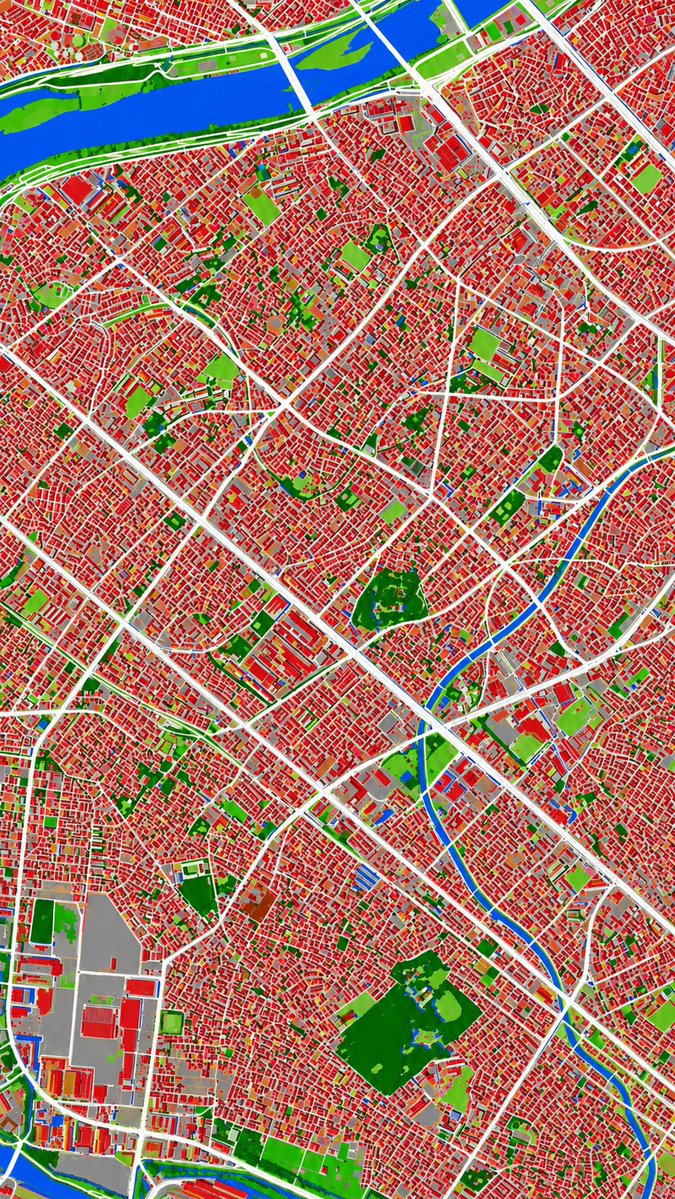
Convert a monochrome aerial photo into a sharp, color-coded urban land cover classification map with 6 distinct categories.
提示词 · EN
以 REFERENCE_0 作为地理和城市布局的参考源,利用 REFERENCE_1 所暗示的伪彩色视觉语言,将单色历史航拍照片转换为清晰的土地覆盖分类图。保持相同的俯视视角和街道/街区结构,但将摄影纹理替换为平坦的分割区域和清晰的边界。将场景精确划分为 6 个视觉类别:1) 建筑物为红色,2) 道路和主要铺装走廊为白色,3) 水体和运河为蓝色,4) 茂密植被/公园为深绿色,5) 开阔草地或稀疏绿地为浅绿色,以及 6) 工业区或大型铺装/开阔设施区域为灰色。生成一张对比度强、阴影极少、且不含标签、图例、边框或胶片标记的密集城市专题地图。
关于这个提示词
Convert a monochrome aerial photo into a sharp, color-coded urban land cover classification map with 6 distinct categories. 它更适合作为 GPT Image 2 的概念艺术起点:先保留画面结构、主体关系和风格约束,再替换成你的品牌、人物或场景。
使用时建议先小幅修改主体、场景、镜头和色调,再生成多个版本对比构图与细节。这样页面内容对用户有实际帮助,也避免把模型名或标签机械堆在正文里。
如何使用这个提示词
- Copy the prompt and replace
REFERENCE_0with your aerial photo andREFERENCE_1with a color palette image. - Select a Sora 2 or similar advanced text-to-video model.
- Adjust the 6 color categories in the prompt to match your analysis needs.
- Generate the output to receive a high-contrast thematic map.
- Use the resulting map for urban planning, GIS analysis, or visualization.


