
Sora2 Hub
Sora2 Hub
  • Prompt-Bibliothek
  • Preise
  • Galerie
Sora2 Hub
Sora2 Hub
Sora2 Hub

Sora2 Hub

Professionelle KI-Kreationsplattform, betrieben von Sora 2, Veo 3.1 und Nano Banana Pro. Erstellen Sie atemberaubende Videos und Bilder in Studioqualität mit erweiterter Steuerung, HD-Qualität und ohne Wasserzeichen.

Email:support@sora2hub.org

KI-Videogenerator

  • Text zu Video
  • Bild zu Video
  • Veo 3.1
  • Sora 2
  • Kling 3.0
  • Kling 2.6
  • Kling 2.5
  • Runway
  • Wan 2.6
  • Seedance 2.0
  • Hailuo 2.3
  • Grok Imagine
  • HappyHorse-1.0

KI-Bildgenerator

  • Text zu Bild
  • Bild zu Bild
  • Nano Banana Pro
  • Nano Banana
  • 4o Image
  • Flux Kontext
  • Z Image
  • Seedream 4.5
  • Seedream 5.0 Lite
  • Nano Banana 2
  • GPT Image 2
  • KI-Bildvergrößerer

KI-Effekte

  • KI-Altersfilter
  • KI-Geschlechtertausch
  • KI-Kuss
  • KI-Umarmung
  • Ghibli-Bild
  • KI-Meerjungfrau-Filter
  • KI-Körperschütteln
  • Lächeln-Filter
  • KI-Fett
  • Actionfigur

Produkt

  • Funktionen
  • Showcases
  • Preise

Unternehmen

  • Über uns
  • Kontakt

© 2025 • Sora2 Hub ORG Alle Rechte vorbehalten.

  • Datenschutzrichtlinie
  • Nutzungsbedingungen
  • Rückerstattungsrichtlinie
  1. Startseite
  2. /
  3. Prompts
  4. /
  5. GPT Image 2
  6. /
  7. 3D Stylized Male Portrait — Red Studio Backdrop Prompt
GPT Image 2AI-Prompt

3D Stylized Male Portrait — Red Studio Backdrop Prompt

Generate a polished 3D animated-style male headshot with cinematic red backdrop, perfect for profile pictures, branding, and social media avatars.
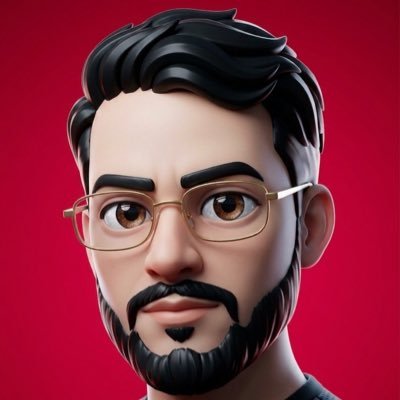
3D Stylized Male Portrait — Red Studio Backdrop Prompt
PROMPT · EN
一张居中的 3D 风格化男性特写肖像,背景为平滑且鲜艳的深红色摄影棚背景。渲染效果如同精致的动画角色,具有逼真的光影和柔和的次表面皮肤着色。他留着浓密且富有光泽的黑色头发,梳理成整齐的侧分蓬巴杜发型,带有雕塑感的波浪纹理,露出耳朵,两侧隐约可见细圆框金丝眼镜。仅展示头部和少量上肩部,紧凑裁剪,使发型填满画面顶部。角色穿着深色上衣,仅在底部边缘隐约可见。采用对称的正面构图,背景极其简洁,对比度高,带有柔和的轮廓光,呈现出类似于现代动画头像的高级 3D 插画质感。面部应清晰且细节丰富,表情中性,整体设计保持简约且具有标志性。

Über diesen Prompt

Generate a polished 3D animated-style male headshot with cinematic red backdrop, perfect for profile pictures, branding, and social media avatars. Use it as a Konzeptkunst starting point for GPT Image 2: keep the visual structure and style constraints intact, then swap in your own subject, brand, or scene.

Start with small changes to subject, scene, camera, and color, then generate a few variations to compare composition and detail without turning the page copy into keyword stuffing.

So verwendest du diesen Prompt

  1. Copy the full prompt text from the prompt page.
  2. Open your preferred AI image generator (Sora 2, Midjourney, DALL·E, or similar).
  3. Paste the prompt into the input field and adjust minor details like hair color, glasses style, or background hue to suit your needs.
  4. Select a high-quality or detailed rendering setting if available.
  5. Generate and review the output — refine the prompt or regenerate until the portrait matches your vision.


FAQ

OpenClaw Tips

@OpenClawTips→

Veröffentlicht
15. Mai 2026
Originalsprache
EN
Modell
GPT Image 2
Kategorie
Konzeptkunst
GPT Image 2Konzeptkunstgpt-image-2twitter
Aufrufe
1.4K
Kopien
95
Likes
44

Teilen

Mehr von GPT Image 2

Alle ansehen
Cyberpunk AI Launch Banner — Cinematic Neon Poster Prompt

Cyberpunk AI Launch Banner — Cinematic Neon Poster Prompt

@ObieriI
Indonesian Bird Contest Meme — Low-Quality Phone Photo

Indonesian Bird Contest Meme — Low-Quality Phone Photo

@NyaiiBubu
Anime Idol Profile Page — Lavender Art Style Prompt

Anime Idol Profile Page — Lavender Art Style Prompt

@uzuyanurp

Schneller erstellen mit Sora2Hub-Prompts.

Nutze kuratierte Prompt-Seiten als suchbare Einstiege und starte direkt mit dem passenden Modellkontext.

Prompts entdecken
