
Sora2 Hub
Sora2 Hub
  • Prompt-Bibliothek
  • Preise
  • Galerie
Sora2 Hub
Sora2 Hub
Sora2 Hub

Sora2 Hub

Professionelle KI-Kreationsplattform, betrieben von Sora 2, Veo 3.1 und Nano Banana Pro. Erstellen Sie atemberaubende Videos und Bilder in Studioqualität mit erweiterter Steuerung, HD-Qualität und ohne Wasserzeichen.

Email:support@sora2hub.org

KI-Videogenerator

  • Text zu Video
  • Bild zu Video
  • Veo 3.1
  • Sora 2
  • Kling 3.0
  • Kling 2.6
  • Kling 2.5
  • Runway
  • Wan 2.6
  • Seedance 2.0
  • Hailuo 2.3
  • Grok Imagine
  • HappyHorse-1.0

KI-Bildgenerator

  • Text zu Bild
  • Bild zu Bild
  • Nano Banana Pro
  • Nano Banana
  • 4o Image
  • Flux Kontext
  • Z Image
  • Seedream 4.5
  • Seedream 5.0 Lite
  • Nano Banana 2
  • GPT Image 2
  • KI-Bildvergrößerer

KI-Effekte

  • KI-Altersfilter
  • KI-Geschlechtertausch
  • KI-Kuss
  • KI-Umarmung
  • Ghibli-Bild
  • KI-Meerjungfrau-Filter
  • KI-Körperschütteln
  • Lächeln-Filter
  • KI-Fett
  • Actionfigur

Produkt

  • Funktionen
  • Showcases
  • Preise

Unternehmen

  • Über uns
  • Kontakt

© 2025 • Sora2 Hub ORG Alle Rechte vorbehalten.

  • Datenschutzrichtlinie
  • Nutzungsbedingungen
  • Rückerstattungsrichtlinie
  1. Startseite
  2. /
  3. Prompts
  4. /
  5. GPT Image 2
  6. /
  7. How AI Works Infographic — Educational Flowchart Prompt
GPT Image 2AI-Prompt

How AI Works Infographic — Educational Flowchart Prompt

Generates a clean, multi-panel infographic that visually explains modern AI (ChatGPT/Claude) mechanics using flowcharts, icons, and a summary character.
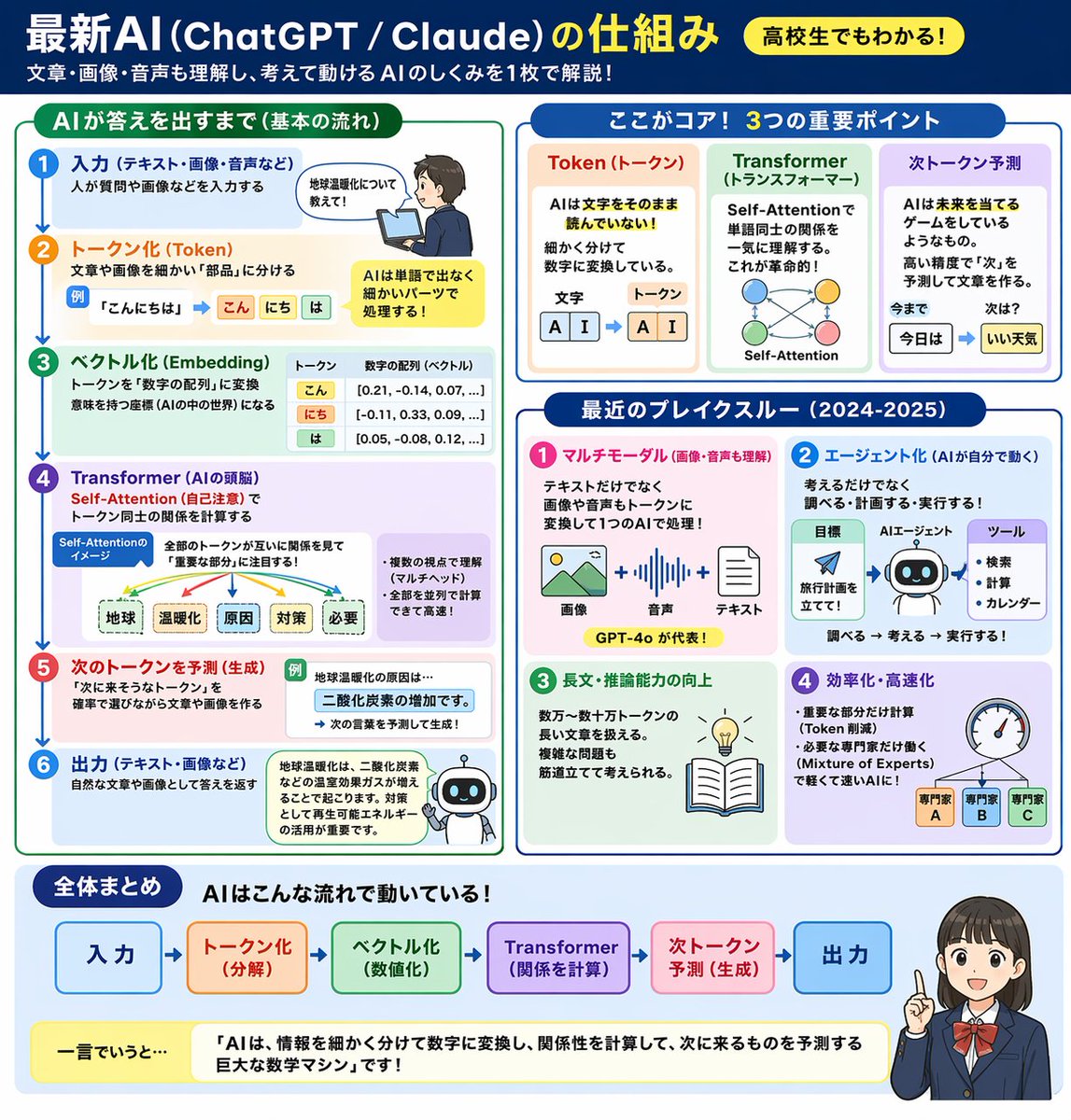
How AI Works Infographic — Educational Flowchart Prompt
PROMPT · EN
type
educational infographic
header
title
{argument name="main title" default="最新AI (ChatGPT / Claude) の仕組み"}
badge
{argument name="target audience badge" default="高校生でもわかる!"}
subtitle
{argument name="subtitle" default="文章・画像・音声も理解し、考えて動けるAIのしくみを1枚で解説!"}
layout
style
clean, flat design, structured grid, Japanese text
sections
item 1
title
AIが答えを出すまで(基本の流れ)
position
left column
count
6
labels
item 1
入力
item 2
トークン化 (Token)
item 3
ベクトル化 (Embedding)
item 4
Transformer (AIの頭脳)
item 5
次のトークンを予測 (生成)
item 6
出力
visuals
vertical flow with arrows, boy using laptop, token splitting diagram, vector number arrays, self-attention tree, robot icon
item 2
title
ここがコア! 3つの重要ポイント
position
top right
count
3
labels
item 1
Token (トークン)
item 2
Transformer (トランスフォーマー)
item 3
次トークン予測
visuals
tokenization blocks, self-attention node network, word prediction sequence
item 3
title
最近のブレイクスルー (2024-2025)
position
middle right
count
4
labels
item 1
マルチモーダル
item 2
エージェント化
item 3
長文・推論能力の向上
item 4
効率化・高速化
visuals
image/audio/text icons, robot agent flowchart, lightbulb and book, speedometer with 3 expert nodes
item 4
title
全体まとめ
position
bottom full width
elements
item 1
horizontal 6-step flowchart
item 2
yellow summary box with text: {argument name="summary text" default="「AIは、情報を細かく分けて数字に変換し、関係性を計算して、次に来るものを予測する巨大な数学マシン」です!"}
item 3
{argument name="character style" default="anime-style female student pointing and smiling"}

Über diesen Prompt

Generates a clean, multi-panel infographic that visually explains modern AI ChatGPT/Claude mechanics using flowcharts, icons, and a summary character. Use it as a Konzeptkunst starting point for GPT Image 2: keep the visual structure and style constraints intact, then swap in your own subject, brand, or scene.

This prompt is organized as structured JSON with fields such as type, header, and layout. Keeping that hierarchy helps the model separate the subject, layout, interface elements, and detail constraints.

Start with small changes to subject, scene, camera, and color, then generate a few variations to compare composition and detail without turning the page copy into keyword stuffing.

So verwendest du diesen Prompt

  1. Copy the full prompt JSON and paste it into your preferred AI image generator (e.g., Sora 2, DALL·E 3, Midjourney).
  2. Replace placeholder variables like main title, subtitle, and summary text with your own Japanese (or English) content to customize the lesson.
  3. Adjust the target audience badge or character style arguments to match your desired tone or audience level.
  4. Select a model that supports high-resolution, text-heavy layouts for best results.
  5. Generate and iterate — tweak section labels or layout descriptions if text renders incorrectly.

FAQ

らけしで / Mizmic Studio

@prompts→

Veröffentlicht
30. Apr. 2026
Originalsprache
EN
Modell
GPT Image 2
Kategorie
Konzeptkunst
GPT Image 2Konzeptkunstgpt-image-2gptimage2api promptsgptimage2apien
Aufrufe
594
Kopien
42
Likes
35

Teilen

Mehr von GPT Image 2

Alle ansehen
Shenzhen Golden Hour City Prompt: Futuristic Heritage Poster

Shenzhen Golden Hour City Prompt: Futuristic Heritage Poster

@ivanalog_com
Minimalist Mother's Day Wallpaper — Sora 2 Prompt with Calligraphy & Carnations

Minimalist Mother's Day Wallpaper — Sora 2 Prompt with Calligraphy & Carnations

@EdimakorJP
Ultra-Realistic 3D Exploded View Prompt: Sony BRAVIA 8K TV

Ultra-Realistic 3D Exploded View Prompt: Sony BRAVIA 8K TV

@Ankit_patel211

Schneller erstellen mit Sora2Hub-Prompts.

Nutze kuratierte Prompt-Seiten als suchbare Einstiege und starte direkt mit dem passenden Modellkontext.

Prompts entdecken

