
GPT Image 2AI-Prompt
Anime Streetwear Character — Customizable Fashion Prompt
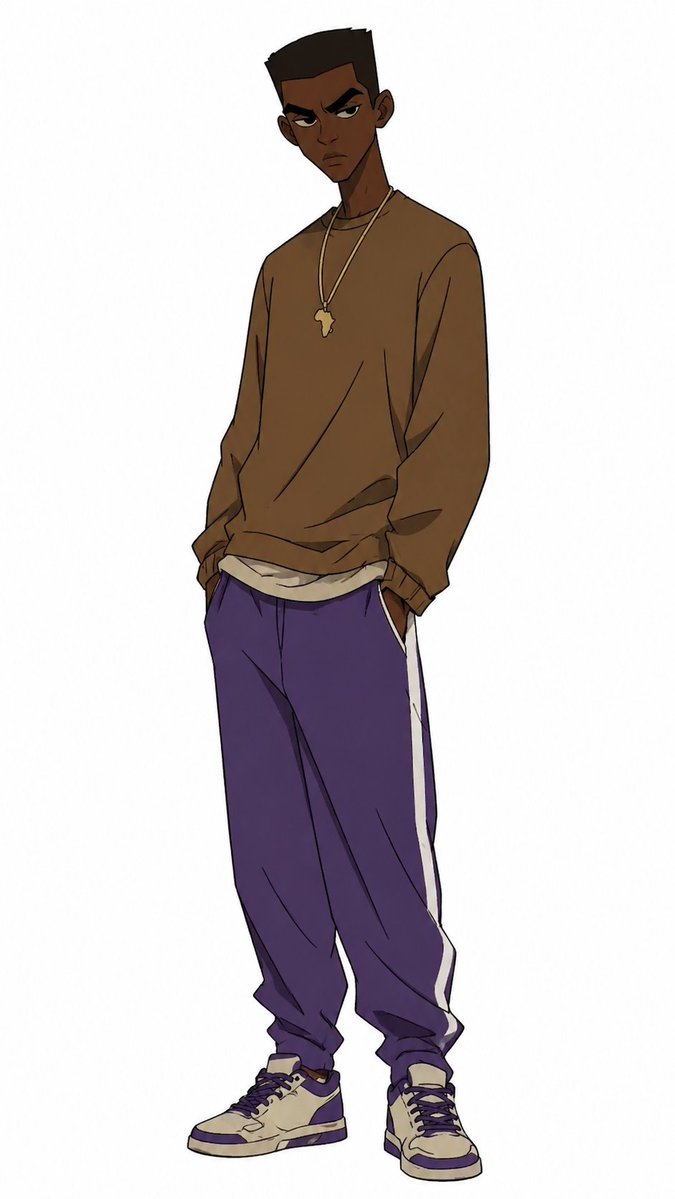
Generates a clean, full-body anime illustration of a stylish Black streetwear character with customizable colors and accessories for fashion or avatar use.
PROMPT · EN
Create a full-body anime-style character illustration on a plain white background, showing a tall, slim young Black man with dark brown skin standing in a relaxed streetwear pose, head slightly tilted, shoulders loose, and both hands tucked into his pants pockets. His face is intentionally obscured by a centered square blur/censor block with a soft brown-to-white gradient, while short high-top black hair and one visible ear remain partly visible. He wears an oversized argsweatshirt color: warm brown crewneck sweatshirt with loose sleeves and wrinkled fabric, layered over a slightly visible off-white undershirt at the hem. Around his neck are two thin gold chains, one with a small argpendant shape: Africa-shaped pendant. He wears baggy argpants color: deep purple track pants with a single bold white side stripe on each leg, gathered at the ankles, plus cream and purple high-top sneakers with dark laces and chunky soles. Use clean manga/anime line art, muted colors, subtle cel shading, expressive clothing folds, long proportions, and a fashion character design feel, with the figure centered vertically and no props or background details.
Über diesen Prompt
Generates a clean, full-body anime illustration of a stylish Black streetwear character with customizable colors and accessories for fashion or avatar use. Use it as a Konzeptkunst starting point for GPT Image 2: keep the visual structure and style constraints intact, then swap in your own subject, brand, or scene.
Start by replacing sweatshirt color, pendant shape, and pants color, then keep the camera, composition, and material cues in the same order. This makes the output easier to compare across variations.
So verwendest du diesen Prompt
- Copy the full prompt text into your preferred AI image generator (Sora, Midjourney, DALL·E, etc.).
- Replace the
{sweatshirt color}and{pants color}variables with your desired color names (e.g., "olive green", "black"). - Adjust the
{pendant shape}variable if you want a different necklace charm (e.g., "star pendant", "cross pendant"). - Select a model that supports anime or illustration styles for best results.
- Generate the image and iterate by tweaking color values or pose descriptions until satisfied.


