
Sora2 Hub
Sora2 Hub
  • Prompt-Bibliothek
  • Preise
  • Galerie
Sora2 Hub
Sora2 Hub
Sora2 Hub

Sora2 Hub

Professionelle KI-Kreationsplattform, betrieben von Sora 2, Veo 3.1 und Nano Banana Pro. Erstellen Sie atemberaubende Videos und Bilder in Studioqualität mit erweiterter Steuerung, HD-Qualität und ohne Wasserzeichen.

Email:support@sora2hub.org

KI-Videogenerator

  • Text zu Video
  • Bild zu Video
  • Veo 3.1
  • Sora 2
  • Kling 3.0
  • Kling 2.6
  • Kling 2.5
  • Runway
  • Wan 2.6
  • Seedance 2.0
  • Hailuo 2.3
  • Grok Imagine
  • HappyHorse-1.0

KI-Bildgenerator

  • Text zu Bild
  • Bild zu Bild
  • Nano Banana Pro
  • Nano Banana
  • 4o Image
  • Flux Kontext
  • Z Image
  • Seedream 4.5
  • Seedream 5.0 Lite
  • Nano Banana 2
  • GPT Image 2
  • KI-Bildvergrößerer

KI-Effekte

  • KI-Altersfilter
  • KI-Geschlechtertausch
  • KI-Kuss
  • KI-Umarmung
  • Ghibli-Bild
  • KI-Meerjungfrau-Filter
  • KI-Körperschütteln
  • Lächeln-Filter
  • KI-Fett
  • Actionfigur

Produkt

  • Funktionen
  • Showcases
  • Preise

Unternehmen

  • Über uns
  • Kontakt

© 2025 • Sora2 Hub ORG Alle Rechte vorbehalten.

  • Datenschutzrichtlinie
  • Nutzungsbedingungen
  • Rückerstattungsrichtlinie
  1. Startseite
  2. /
  3. Prompts
  4. /
  5. GPT Image 2
  6. /
  7. Pixel Art Cat in PowerPoint Copilot — Sora 2 Prompt
GPT Image 2AI-Prompt

Pixel Art Cat in PowerPoint Copilot — Sora 2 Prompt

Transform a Copilot screenshot's generated cat image into retro 8-bit pixel art while preserving the dark-mode PowerPoint layout and updating Japanese UI text.
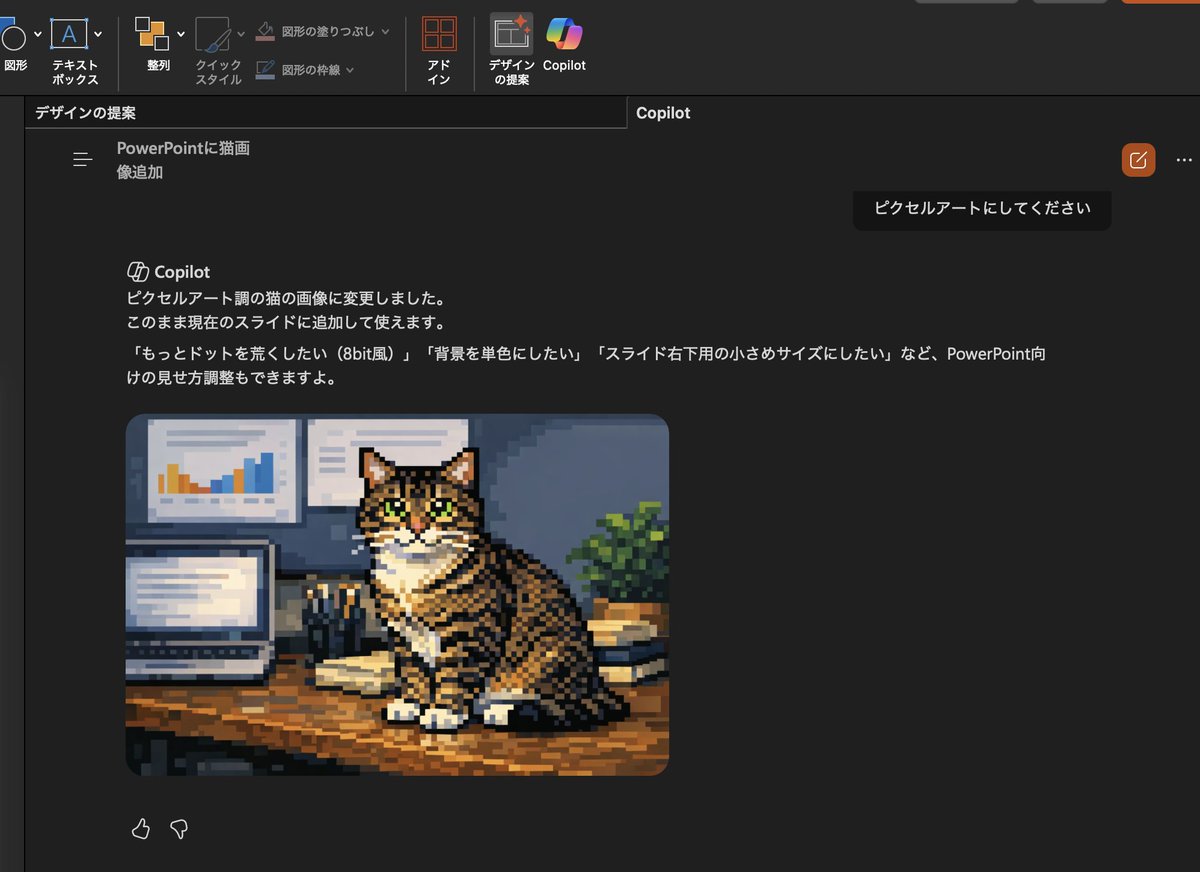
Pixel Art Cat in PowerPoint Copilot — Sora 2 Prompt
PROMPT · EN
使用提供的参考图像,仅将插入的猫咪照片转换为复古像素艺术,同时保持 PowerPoint 深色模式下 Copilot 的截图布局、界面和构图不变。保留相同的虎斑猫、姿势、桌面设置、笔记本电脑、墙上图表、书籍和植物,但将该图像重绘为具有明显方块像素、简化阴影和 8-bit 风格的粗颗粒低分辨率游戏风格像素艺术。同时更新可见的日语 Copilot 请求和响应文本,使请求变为「ピクセルアートにしてください」,响应说明猫咪图片已更改为像素艺术风格,并提供包含 3 个选项的后续建议:「もっとドットを荒くしたい(8bit風)」、「背景を単色にしたい」以及「スライド右下用の小さめサイズにしたい」。

Über diesen Prompt

Transform a Copilot screenshot's generated cat image into retro 8-bit pixel art while preserving the dark-mode PowerPoint layout and updating Japanese UI text. Use it as a Konzeptkunst starting point for GPT Image 2: keep the visual structure and style constraints intact, then swap in your own subject, brand, or scene.

Start with small changes to subject, scene, camera, and color, then generate a few variations to compare composition and detail without turning the page copy into keyword stuffing.

So verwendest du diesen Prompt

  1. Copy the full prompt into your chosen AI image generator (Sora 2, DALL·E, etc.).
  2. Upload or reference the PowerPoint Copilot screenshot containing the cat image.
  3. Adjust variables like pixel grain level, color palette, or shadow complexity if desired.
  4. Generate the output and review the pixel-art conversion and updated Japanese text.
  5. Tweak and regenerate until the retro style and UI accuracy meet your needs.

FAQ

ほげた@基盤準備中

@hogeizm→

Veröffentlicht
15. Mai 2026
Originalsprache
EN
Modell
GPT Image 2
Kategorie
Konzeptkunst
GPT Image 2Konzeptkunstgpt-image-2twitter
Aufrufe
1.1K
Kopien
94
Likes
53

Teilen

Mehr von GPT Image 2

Alle ansehen
Gothic Anime Girl Bites Playground Rail — Sora 2 Prompt

Gothic Anime Girl Bites Playground Rail — Sora 2 Prompt

@hoshi122221
Luxury Tennis Fashion Poster — Bold Studio Shoot Sora Prompt

Luxury Tennis Fashion Poster — Bold Studio Shoot Sora Prompt

@blueski68251660
Cyberpunk Catgirl Soda Splash — Sora 2 Prompt

Cyberpunk Catgirl Soda Splash — Sora 2 Prompt

@kuso_seisakusyo

Schneller erstellen mit Sora2Hub-Prompts.

Nutze kuratierte Prompt-Seiten als suchbare Einstiege und starte direkt mit dem passenden Modellkontext.

Prompts entdecken

