Sora2 Hub
Sora2 Hub
  • Prompt-Bibliothek
  • Preise
  • Galerie
Sora2 Hub
Sora2 Hub
Sora2 Hub

Sora2 Hub

Professionelle KI-Kreationsplattform, betrieben von Sora 2, Veo 3.1 und Nano Banana Pro. Erstellen Sie atemberaubende Videos und Bilder in Studioqualität mit erweiterter Steuerung, HD-Qualität und ohne Wasserzeichen.

Email:support@sora2hub.org

KI-Videogenerator

  • Text zu Video
  • Bild zu Video
  • Veo 3.1
  • Sora 2
  • Kling 3.0
  • Kling 2.6
  • Kling 2.5
  • Runway
  • Wan 2.6
  • Seedance 2.0
  • Hailuo 2.3
  • Grok Imagine
  • HappyHorse-1.0
  • HappyHorse 1.1
  • Kling 3.0 Turbo
  • Volcengine Video-to-Video Lip Sync
  • OmniHuman 1.5
  • Grok Imagine Video 1.5
  • Gemini Omni
  • Wan 2.7 Video
  • Seedance 2.0 Mini

KI-Bildgenerator

  • Text zu Bild
  • Bild zu Bild
  • Nano Banana Pro
  • Nano Banana
  • 4o Image
  • Flux Kontext
  • Z Image
  • Seedream 4.5
  • Seedream 5.0 Lite
  • Nano Banana 2
  • GPT Image 2
  • KI-Bildvergrößerer
  • Seedream 5.0 Pro
  • Nano Banana 2 Lite
  • Qwen Image 2.0

KI-Effekte

  • KI-Altersfilter
  • KI-Geschlechtertausch
  • KI-Kuss
  • KI-Umarmung
  • Ghibli-Bild
  • KI-Meerjungfrau-Filter
  • KI-Körperschütteln
  • Lächeln-Filter
  • KI-Fett
  • Actionfigur

Produkt

  • Funktionen
  • Showcases
  • Preise

Unternehmen

  • Über uns
  • Kontakt

© 2025 • Sora2 Hub ORG Alle Rechte vorbehalten.

  • Datenschutzrichtlinie
  • Nutzungsbedingungen
  • Rückerstattungsrichtlinie
  1. Startseite
  2. /
  3. Prompts
  4. /
  5. GPT Image 2
  6. /
  7. F1 Race Results Infographic — Sora 2 Prompt for Dynamic Visuals
GPT Image 2AI-Prompt

F1 Race Results Infographic — Sora 2 Prompt for Dynamic Visuals

Generate a stunning Formula 1 race results infographic with podium illustrations, track maps, and detailed stats tables — fully customizable by Grand Prix.
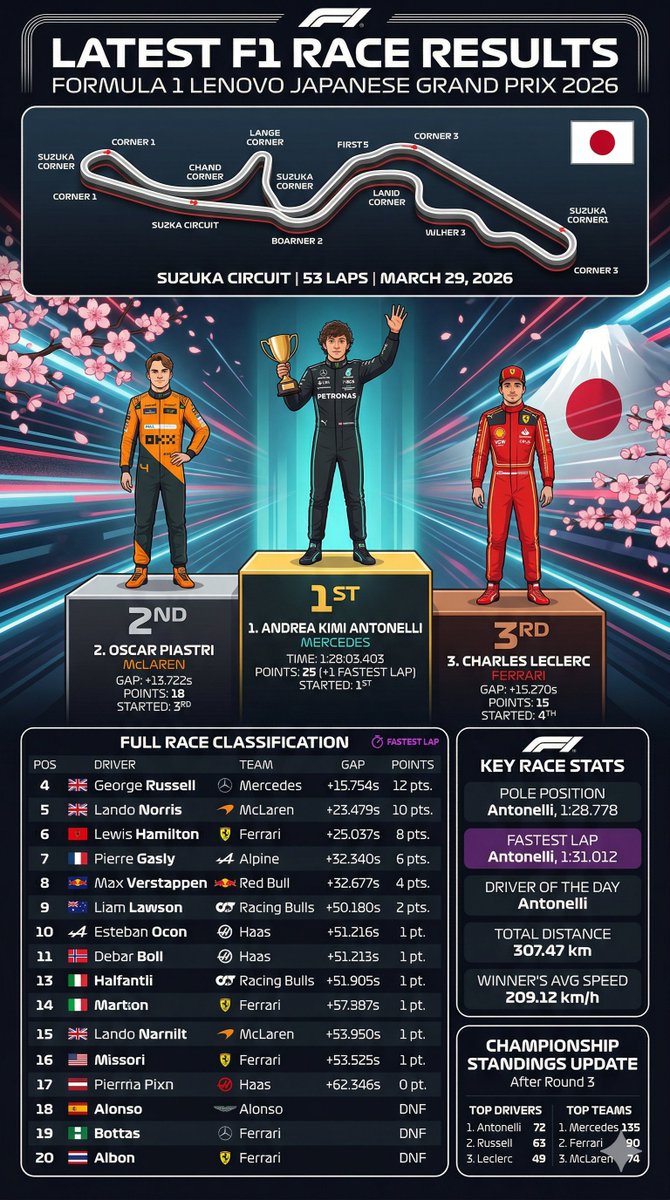
F1 Race Results Infographic — Sora 2 Prompt for Dynamic Visuals
PROMPT · EN
type
sports infographic
theme
Formula 1 Race Results
header
title
LATEST F1 RACE RESULTS
subtitle
{argument name="grand prix name" default="FORMULA 1 LENOVO JAPANESE GRAND PRIX 2026"}
layout
sections
item 1
title
Track Map
position
top
elements
item 1
circuit layout with 11 labeled corners
item 2
Japanese flag
item 3
track details text: {argument name="track name" default="SUZUKA CIRCUIT"} | 53 LAPS | MARCH 29, 2026
item 2
title
Podium
position
middle
background
Mount Fuji, cherry blossoms, neon radiating lines
count
3
drivers
item 1
position
1st
name
{argument name="first place driver" default="ANDREA KIMI ANTONELLI"}
team
MERCEDES
pose
holding gold trophy, waving
suit
black
item 2
position
2nd
name
{argument name="second place driver" default="OSCAR PIASTRI"}
team
McLAREN
pose
hands on hips
suit
orange and black
item 3
position
3rd
name
{argument name="third place driver" default="CHARLES LECLERC"}
team
FERRARI
pose
standing straight
suit
red
item 3
title
FULL RACE CLASSIFICATION
position
bottom-left
count
17
description
Table with 17 rows showing positions 4 through 20, including columns for POS, DRIVER, TEAM, GAP, and POINTS.
item 4
title
KEY RACE STATS
position
bottom-right-top
count
5
stats
item 1
POLE POSITION
item 2
FASTEST LAP (purple background)
item 3
DRIVER OF THE DAY
item 4
TOTAL DISTANCE
item 5
WINNER'S AVG SPEED
item 5
title
CHAMPIONSHIP STANDINGS UPDATE
position
bottom-right-bottom
columns
2
lists
item 1
TOP DRIVERS (3 items)
item 2
TOP TEAMS (3 items)

Über diesen Prompt

Generate a stunning Formula 1 race results infographic with podium illustrations, track maps, and detailed stats tables — fully customizable by Grand Prix. Use it as a Konzeptkunst starting point for GPT Image 2: keep the visual structure and style constraints intact, then swap in your own subject, brand, or scene.

This prompt is organized as structured JSON with fields such as type, theme, header, and layout. Keeping that hierarchy helps the model separate the subject, layout, interface elements, and detail constraints.

Start with small changes to subject, scene, camera, and color, then generate a few variations to compare composition and detail without turning the page copy into keyword stuffing.

So verwendest du diesen Prompt

  1. Copy the entire JSON prompt object from the page.
  2. Open your preferred AI image generator (e.g., Sora 2, DALL·E, Midjourney).
  3. Customize variables like grand_prix_name, first_place_driver, or track_name to match your desired race.
  4. Paste the modified prompt and generate — iterate on style or layout tweaks as needed.
FAQ

呆大人

@prompts→

Veröffentlicht
30. Apr. 2026
Originalsprache
EN
Modell
GPT Image 2
Kategorie
Konzeptkunst
GPT Image 2Konzeptkunstgpt-image-2gptimage2api promptsgptimage2apien
Aufrufe
273
Kopien
26
Likes
7

Teilen

Mehr von GPT Image 2

Alle ansehen
Guangzhou 2026 Poster: Silk Ribbon Cityscape — Sora 2 Prompt

Guangzhou 2026 Poster: Silk Ribbon Cityscape — Sora 2 Prompt

@alanlovelq
8-Panel Romantic Manga: Shy Maid Robot & Master — Sora 2 Prompt

8-Panel Romantic Manga: Shy Maid Robot & Master — Sora 2 Prompt

@yume00112211
Minimalist Japanese Electric Nail Clipper Product Landing Page — Sora 2 Prompt

Minimalist Japanese Electric Nail Clipper Product Landing Page — Sora 2 Prompt

@eisho_m

Schneller erstellen mit Sora2Hub-Prompts.

Nutze kuratierte Prompt-Seiten als suchbare Einstiege und starte direkt mit dem passenden Modellkontext.

Prompts entdecken