
GPT Image 2AI-Prompt
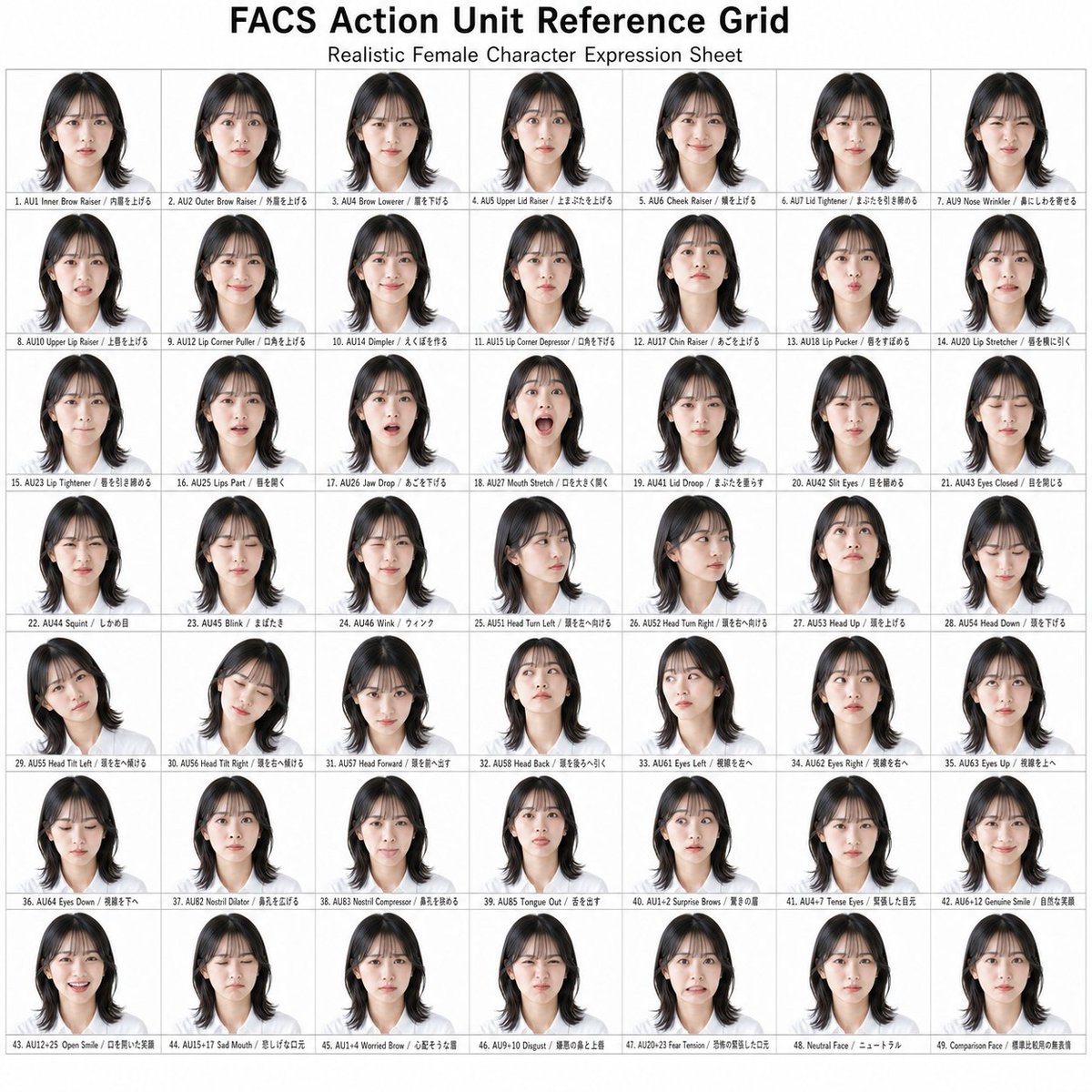
FACS Action Unit Reference Grid — Realistic Female Portrait Sheet
Generate a 49-cell scientific reference grid of realistic female facial expressions for every FACS Action Unit, ideal for AI artists and animators.
PROMPT · EN
目标:创建一个整洁的参考表信息图,标题为 argheadline text: FACS 面部动作单元参考网格,展示用于面部动作编码系统(Facial Action Coding System)动作单元的逼真女性角色表情表。 画布:1:1 正方形白色画布,约 1024 x 1024 像素,顶部居中显示黑色标题,下方配有较小的副标题 argsubtitle text: 逼真女性角色表情表。采用简洁的学术参考图表布局。 布局:在标题下方,创建一个精确的 7 列 x 7 行网格,带有细浅灰色边框,共 49 个独立肖像单元格。每个单元格包含一个位于微小说明文字上方的小型半身肖像。保持间距均匀,页边距较窄。所有肖像均为同一位逼真的年轻女性,发型为 arghair style: 齐肩黑发,中分,发梢微卷,身着简单的深色上衣,除非标签要求头部转向、倾斜、向上、向下、向前或向后,否则均保持正面朝向。面部区域应进行柔和的匿名化处理或使用肤色矩形模糊,同时保留头发轮廓、头部角度和整体表情参考姿势。 视觉风格:照片级逼真的角色表缩略图、中性摄影棚灯光、白色背景、统一比例、逼真的头发细节、极简阴影、科学参考网格美学。排版采用小型黑色无衬线字体;说明文字应适合放入每个单元格内。 文本内容:包含 49 个带标签的单元格,从左到右、从上到下编号。请按顺序使用以下精确的英文标签:1. AU1 内眉提升;2. AU2 外眉提升;3. AU4 降眉;4. AU5 上眼睑提升;5. AU6 颊部提升;6. AU7 眼睑收紧;7. AU9 鼻部皱缩;8. AU10 上唇提升;9. AU12 唇角拉伸;10. AU14 酒窝形成;11. AU15 唇角下压;12. AU17 下巴提升;13. AU18 撅嘴;14. AU20 唇部拉伸;15. AU23 唇部收紧;16. AU25 双唇微张;17. AU26 下颌下垂;18. AU27 口部拉伸;19. AU41 眼睑下垂;20. AU42 眯眼;21. AU43 闭眼;22. AU44 皱眉;23. AU45 眨眼;24. AU46 眨眼(单眼);25. AU51 头部左转;26. AU52 头部右转;27. AU53 抬头;28. AU54 低头;29. AU55 头部左倾;30. AU56 头部右倾;31. AU57 头部前倾;32. AU58 头部后仰;33. AU61 眼球左转;34. AU62 眼球右转;35. AU63 眼球上转;36. AU64 眼球下转;37. AU82 鼻孔扩张;38. AU83 鼻孔收缩;39. AU85 吐舌;40. AU1+2 惊讶眉;41. AU4+7 紧张眼;42. AU6+12 真诚微笑;43. AU12+25 开口笑;44. AU15+17 悲伤嘴;45. AU14+4 忧虑眉;46. AU9+10 厌恶;47. AU20+25 恐惧紧张;48. 中性表情;49. 对比表情。 主体细节:角色为 argcharacter description: 一位逼真的年轻东亚女性。在所有 49 个单元格中保持一致的身份、发型、灯光和裁剪,仅根据说明文字改变动作单元、注视方向或头部姿势。 约束:使用精确的 49 个单元格,不要添加额外的缩略图。除了逼真的肖像色彩外,图表保持单色和白色。不要添加徽标、水印、装饰性图标或额外的解释性段落。标题应大而清晰,单个说明文字应微小但具有参考网格的结构感。
Über diesen Prompt
Generate a 49-cell scientific reference grid of realistic female facial expressions for every FACS Action Unit, ideal for AI artists and animators. Use it as a Konzeptkunst starting point for GPT Image 2: keep the visual structure and style constraints intact, then swap in your own subject, brand, or scene.
Start by replacing headline text, subtitle text, hair style, and character description, then keep the camera, composition, and material cues in the same order. This makes the output easier to compare across variations.
So verwendest du diesen Prompt
- Copy the entire prompt text into your Sora 2 or other image-generation model.
- Edit the
headline text,subtitle text,hair style, orcharacter descriptionvariables to customize the subject and labels. - Select a model that excels at photorealistic portraits and precise grid layouts (e.g., Sora 2, Midjourney v6).
- Generate the image and review the 49 evenly-spaced cells for consistency in lighting, framing, and identity.
- Use the output as a direct visual reference for FACS training, animation rigging, or prompt engineering.


