
Japanese Samurai Character Sheet — Ginger Ale Can Design
Transform a beverage can reference into a detailed RPG samurai character design sheet with turnaround views, weapon specs, and color palette.
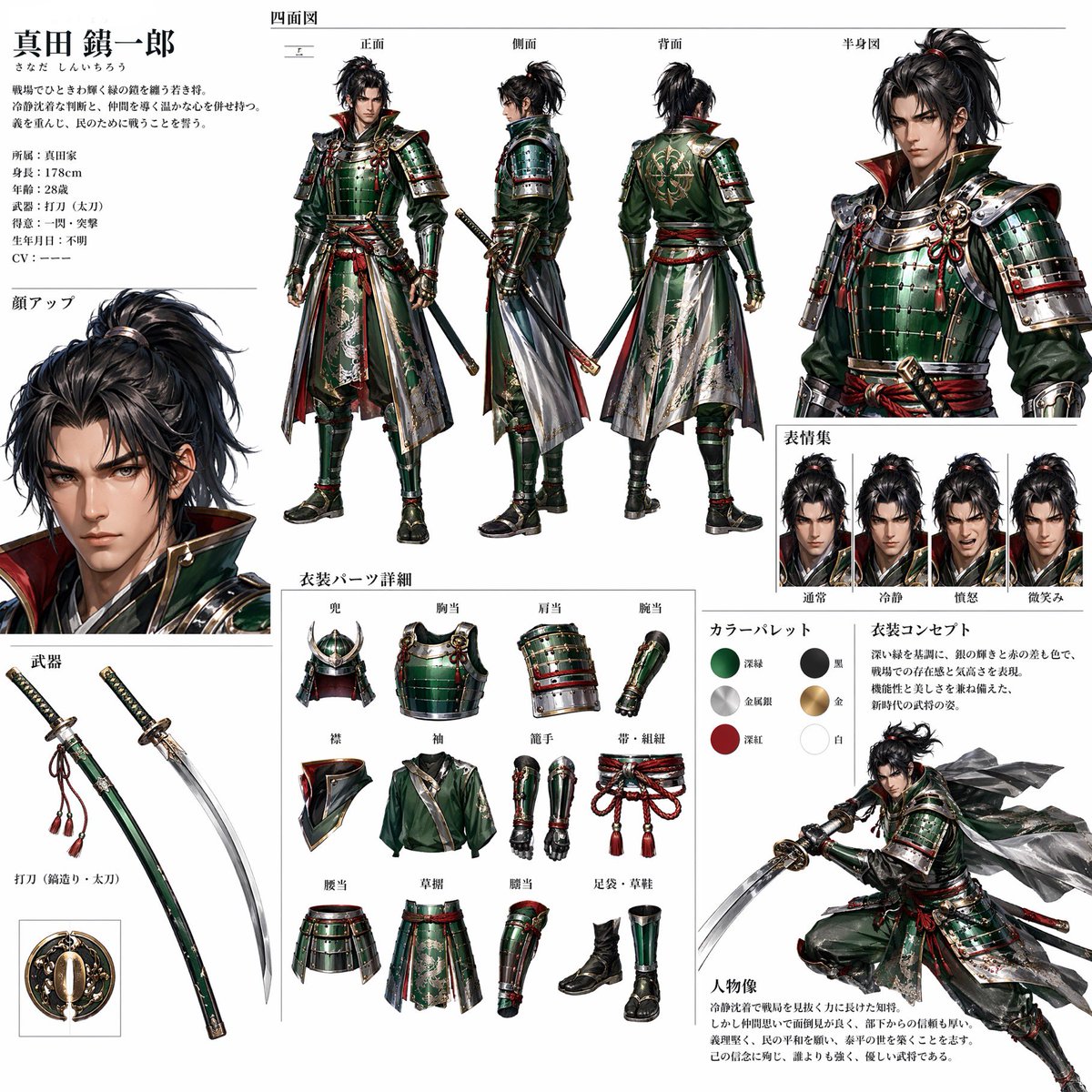
Using REFERENCE_0 as the sole inspiration, transform the ginger ale can into a polished Japanese game character design sheet. Anthropomorphize the can into a stern male samurai warrior, deriving the armor materials, colors, crest motifs, metallic highlights, red-and-gold accents, and green lacquered surfaces from the can design. Present it as a professional RPG concept-art reference page on a clean white background with thin divider lines and Japanese annotation text. Create these discrete sections: 1 main character profile block at top left with the name argcharacter name: 真田 錫一郎 and short Japanese bio text; 1 four-view turnaround across the top center labeled front, side, back, and half-body view; 1 large face close-up on the left; 1 weapon section showing exactly 2 weapon elements, a sheathed green katana and an unsheathed curved katana, plus a small circular guard detail; 1 clothing-parts detail section showing exactly 12 separate items: helmet, chest armor, shoulder armor, arm guard, collar, sleeve, shin guards, corded belt, waist armor, battle skirt, leg guard, and boots; 1 expression set showing exactly 4 bust portraits labeled normal, calm, battle-ready, and faint smile; 1 color palette showing exactly 6 swatches based on the can: deep green, black, metallic silver, gold, deep red, and white; 1 costume concept text block; and 1 dynamic action pose at bottom right with the character drawing his sword and cloth panels flowing dramatically. Keep the design language tied to the reference can rather than copying the beverage packaging literally: use the can’s emerald green as lacquered armor, silver aluminum as polished metal, red logo color as cords and trim, gold shield/crown elements as heraldic ornamentation, and white typography areas as cloth highlights. Make the sheet look like high-end Japanese fantasy game production art, detailed, realistic anime/semi-realistic rendering, crisp linework, accurate armor construction, readable layout, and no photographic countertop background. Use argsheet title: 四面図, argexpression title: 表情集, argparts title: 衣装パーツ詳細, and argpalette title: カラーパレット as visible Japanese section headings.
Über diesen Prompt
Transform a beverage can reference into a detailed RPG samurai character design sheet with turnaround views, weapon specs, and color palette. Use it as a Konzeptkunst starting point for GPT Image 2: keep the visual structure and style constraints intact, then swap in your own subject, brand, or scene.
Common directions include gptimage2api prompts, gptimage2api, and en. Treat these tags as creative cues; the prompt structure and preview image are the more useful guide.
Start by replacing character name, sheet title, expression title, and parts title, then keep the camera, composition, and material cues in the same order. This makes the output easier to compare across variations.
So verwendest du diesen Prompt
- Copy the entire prompt into your preferred AI image generator (e.g., Sora 2, Midjourney, or DALL·E). 2. Replace the character name variable (
{argument name="character name"...}) with your preferred samurai name if desired. 3. Upload your ginger ale can image asREFERENCE_0to drive the design. 4. Adjust any optional section details (like expression labels or weapon count) to suit your vision. 5. Generate and refine: if the layout needs tweaking, re-run with clearer section dividers specified in the prompt.


