
GPT Image 2AI-Prompt
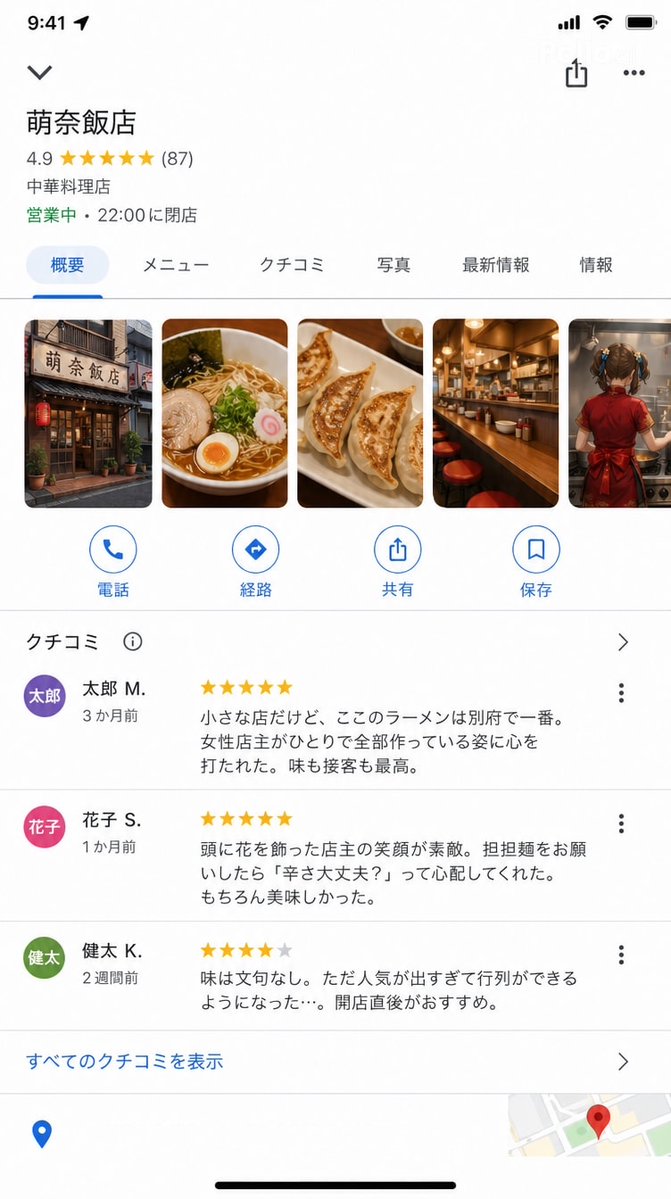
Google Maps iOS UI Screenshot — Hyper-Realistic Restaurant Detail Prompt
Generate a pixel-perfect Google Maps iOS app store listing for a fictional restaurant, complete with custom store name, reviews, and photo gallery.
PROMPT · EN
Google Maps iOS 应用商店详情页截图(9:16)。 具备精准的 Google Maps UI: 店铺名称:"argstore name: Mona Hanten"
评分:★★★★★ 4.9(87 条评价)
类别:"中餐厅"
状态:"营业中 · 22:00 结束营业" 照片部分(横向滚动):
店铺外观 / 拉面照片 / 饺子 / 吧台 / argphoto content: 一位年轻女孩正在烹饪的背影 评价部分(部分内容可见): ★★★★★ "这是一家小店,但这里的拉面是别府最好吃的。女店主独自打理一切,让我非常感动。味道和服务都是一流的。" — argreviewer: Taro M.(3 个月前) ★★★★★ "店主发间别着花朵,笑容非常灿烂。当我点担担面时,她问我‘你能吃辣吗?’,非常贴心。当然,味道也很棒。" — Hanako S.(1 个月前) ★★★★☆ "味道无可挑剔。不过因为太受欢迎,总是需要排队……建议刚开门时就去。" — Kenta K.(2 周前) 底部的 Google Maps UI 元素(路线、通话、保存按钮)。 UI 精确度极高,足以以假乱真,看起来就像真实的 Google Maps 截图。
Über diesen Prompt
Generate a pixel-perfect Google Maps iOS app store listing for a fictional restaurant, complete with custom store name, reviews, and photo gallery. Use it as a Konzeptkunst starting point for GPT Image 2: keep the visual structure and style constraints intact, then swap in your own subject, brand, or scene.
Start by replacing store name, photo content, and reviewer, then keep the camera, composition, and material cues in the same order. This makes the output easier to compare across variations.
So verwendest du diesen Prompt
- Copy the full prompt text and paste it into your preferred Sora 2 compatible AI model interface.
- Replace the default variables like store name, reviewer, or photo content with your own custom details.
- Choose a model that excels at UI and interface rendering for best results.
- Generate the image and review the output for UI accuracy—tweak any details as needed.
- Download your final hyper-realistic Google Maps screenshot for mockup or creative use.


