
AI Sales Tool Ad Generator — Sora 2 Prompt
Generate a professional, trust-building promotional advertisement for an AI sales tool based on a handwritten layout and detailed creative brief.
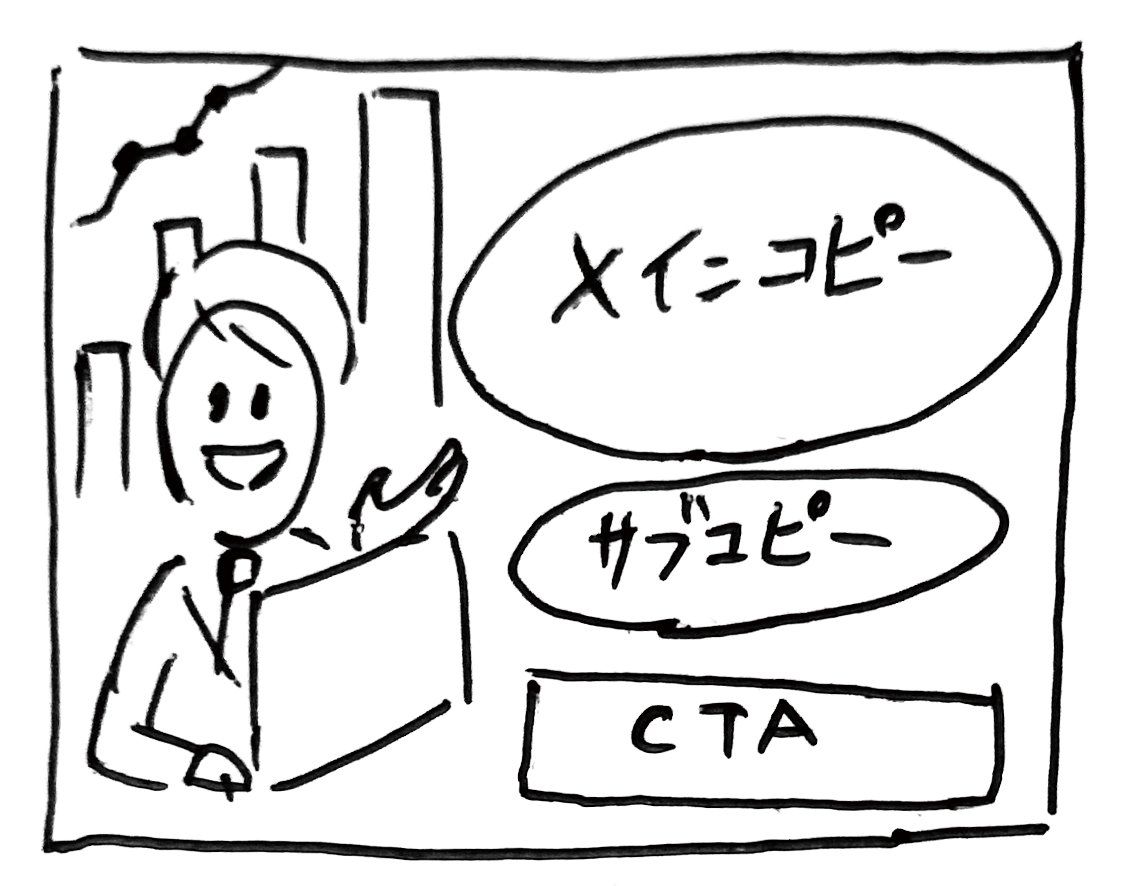
Reproduce the layout of this handwritten rough (attached image) and generate an advertisement image with the following requirements. # Title/Project
- A new sales support tool using AI: "argtool name: KAWAISALES" # Purpose
- To gain free demo sign-ups # Target
- Sales representatives of small and medium-sized enterprises struggling with sales performance # Content
## Main Copy
- Why not let your sales "take flight" with AI?
## Sub-copy
- AI strongly supports your sales activities from lead acquisition to closing!
## CTA
- Experience the free demo now! ## Eye-catch 1
- A photorealistic stylish male and female sales representative in their 30s in suits, smiling while having an online business meeting with a customer on a laptop.
## Eye-catch 2
- Abstract illustrations or shapes symbolizing service benefits, such as a rising graph or icons indicating target customers. # Impression
- Trustworthy, innovative, productive, easy to use
Über diesen Prompt
Generate a professional, trust-building promotional advertisement for an AI sales tool based on a handwritten layout and detailed creative brief. Use it as a Konzeptkunst starting point for GPT Image 2: keep the visual structure and style constraints intact, then swap in your own subject, brand, or scene.
Common directions include gptimage2api prompts, gptimage2api, and ja. Treat these tags as creative cues; the prompt structure and preview image are the more useful guide.
Start by replacing tool name, then keep the camera, composition, and material cues in the same order. This makes the output easier to compare across variations.
So verwendest du diesen Prompt
- Copy the entire prompt body into your chosen AI image generator (e.g., Sora 2).
- Select the best available model for photorealistic or illustrative commercial art.
- Tweak the
{argument name="tool name"}variable and adjust any other specific details. - Provide any handwritten rough image as a reference if the model supports image inputs.
- Generate the image, reviewing the output for the correct layout, copy, and professional impression.


