
Sora2 Hub
Sora2 Hub
  • Prompt-Bibliothek
  • Preise
  • Galerie
Sora2 Hub
Sora2 Hub
Sora2 Hub

Sora2 Hub

Professionelle KI-Kreationsplattform, betrieben von Sora 2, Veo 3.1 und Nano Banana Pro. Erstellen Sie atemberaubende Videos und Bilder in Studioqualität mit erweiterter Steuerung, HD-Qualität und ohne Wasserzeichen.

Email:support@sora2hub.org

KI-Videogenerator

  • Text zu Video
  • Bild zu Video
  • Veo 3.1
  • Sora 2
  • Kling 3.0
  • Kling 2.6
  • Kling 2.5
  • Runway
  • Wan 2.6
  • Seedance 2.0
  • Hailuo 2.3
  • Grok Imagine
  • HappyHorse-1.0

KI-Bildgenerator

  • Text zu Bild
  • Bild zu Bild
  • Nano Banana Pro
  • Nano Banana
  • 4o Image
  • Flux Kontext
  • Z Image
  • Seedream 4.5
  • Seedream 5.0 Lite
  • Nano Banana 2
  • GPT Image 2
  • KI-Bildvergrößerer

KI-Effekte

  • KI-Altersfilter
  • KI-Geschlechtertausch
  • KI-Kuss
  • KI-Umarmung
  • Ghibli-Bild
  • KI-Meerjungfrau-Filter
  • KI-Körperschütteln
  • Lächeln-Filter
  • KI-Fett
  • Actionfigur

Produkt

  • Funktionen
  • Showcases
  • Preise

Unternehmen

  • Über uns
  • Kontakt

© 2025 • Sora2 Hub ORG Alle Rechte vorbehalten.

  • Datenschutzrichtlinie
  • Nutzungsbedingungen
  • Rückerstattungsrichtlinie
  1. Startseite
  2. /
  3. Prompts
  4. /
  5. GPT Image 2
  6. /
  7. Diabetes Causal Chain Medical Infographic Prompt
GPT Image 2AI-Prompt

Diabetes Causal Chain Medical Infographic Prompt

Creates a 14-section, bilingual medical infographic detailing the progression, mechanisms, and complications of diabetes with precise anatomical diagrams.
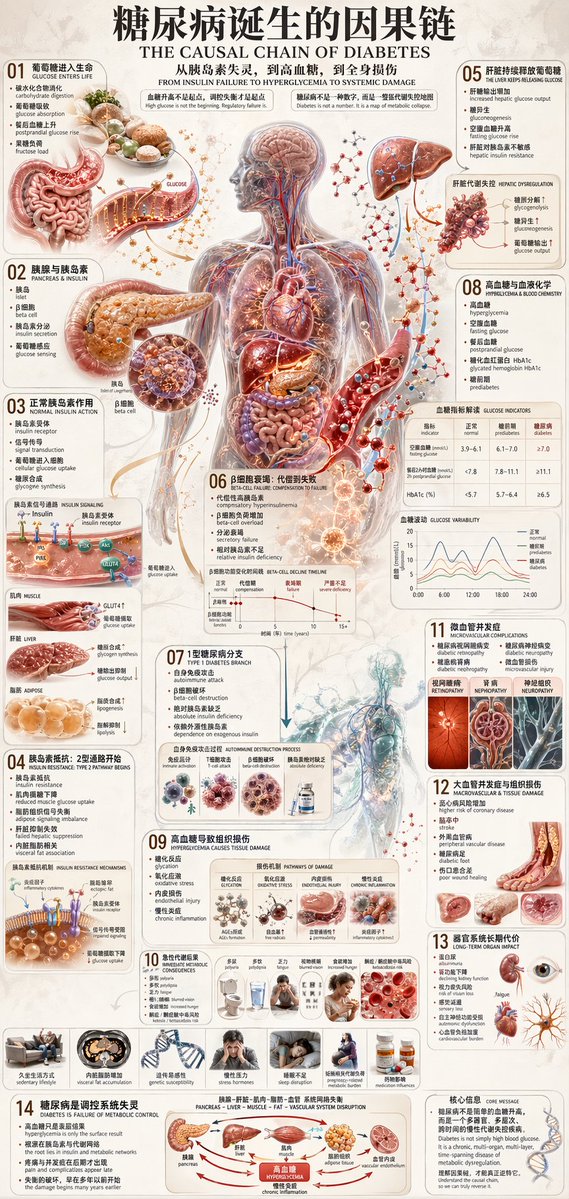
Diabetes Causal Chain Medical Infographic Prompt
PROMPT · EN
type
medical infographic poster
style
highly detailed anatomical illustrations, clean structured layout, scientific diagrammatic style
color_palette
{argument name="color palette" default="medical red, blue, beige, and anatomical flesh tones"}
language
{argument name="language" default="bilingual Chinese and English"}
header
main_title
{argument name="main title" default="糖尿病诞生的因果链"}
english_title
{argument name="english title" default="THE CAUSAL CHAIN OF DIABETES"}
subtitle
从胰岛素失灵,到高血糖,到全身损伤
layout
centerpiece
{argument name="central subject" default="transparent human body showing circulatory system and internal organs"}
sections_count
14
sections
item 1
id
01
title
葡萄糖进入生命
visuals
item 1
stomach and intestines
item 2
id
02
title
胰腺与胰岛素
visuals
item 1
pancreas
item 2
beta cell
item 3
id
03
title
正常胰岛素作用
visuals
item 1
receptor signaling diagram
item 2
muscle, liver, adipose icons
item 4
id
04
title
胰岛素抵抗: 2型通路开始
visuals
item 1
receptor blockage diagram
item 2
7 lifestyle icons
item 5
id
05
title
肝脏持续释放葡萄糖
visuals
item 1
liver
item 6
id
06
title
β细胞衰竭: 代偿到失败
visuals
item 1
beta-cell decline line chart
item 7
id
07
title
1型糖尿病分支
visuals
item 1
autoimmune destruction diagram
item 8
id
08
title
高血糖与血液化学
visuals
item 1
blood vessel with glucose
item 2
glucose indicators table
item 3
glucose variability chart
item 9
id
09
title
高血糖导致组织损伤
visuals
item 1
4 pathways of damage diagrams
item 10
id
10
title
急性代谢后果
visuals
item 1
7 symptom icons
item 11
id
11
title
微血管并发症
visuals
item 1
eye
item 2
kidney
item 3
nerve cross-section
item 12
id
12
title
大血管并发症与组织损伤
visuals
item 1
heart
item 2
brain
item 3
diabetic foot
item 13
id
13
title
器官系统长期代价
visuals
item 1
text list
item 14
id
14
title
糖尿病是调控系统失灵
visuals
item 1
metabolic control flowchart
footer
core_message
核心信息 CORE MESSAGE

Über diesen Prompt

Creates a 14-section, bilingual medical infographic detailing the progression, mechanisms, and complications of diabetes with precise anatomical diagrams. Use it as a Konzeptkunst starting point for GPT Image 2: keep the visual structure and style constraints intact, then swap in your own subject, brand, or scene.

This prompt is organized as structured JSON with fields such as type, style, color palette, language, header, and layout. Keeping that hierarchy helps the model separate the subject, layout, interface elements, and detail constraints.

Start with small changes to subject, scene, camera, and color, then generate a few variations to compare composition and detail without turning the page copy into keyword stuffing.

So verwendest du diesen Prompt

  1. Copy the entire prompt JSON object.
  2. In your chosen AI model's interface (like Sora 2), paste it into the prompt field.
  3. Customize the variables (like color_palette, main_title) in the curly braces to fit your specific needs.
  4. Generate the image. The model will interpret the detailed structure to produce the infographic.

FAQ

虎小象

@prompts→

Veröffentlicht
30. Apr. 2026
Originalsprache
EN
Modell
GPT Image 2
Kategorie
Konzeptkunst
GPT Image 2Konzeptkunstgpt-image-2gptimage2api promptsgptimage2apien
Aufrufe
567
Kopien
80
Likes
34

Teilen

Mehr von GPT Image 2

Alle ansehen
Japanese Cinematic Poster Prompt — 4-Panel Agency Ad

Japanese Cinematic Poster Prompt — 4-Panel Agency Ad

@kantamizutamari
Anime Mahjong Win Scene with Yakuza Score UI — Sora 2 Prompt

Anime Mahjong Win Scene with Yakuza Score UI — Sora 2 Prompt

@AI_Ossan
Celebrity Crossover — Sora 2 Prompt

Celebrity Crossover — Sora 2 Prompt

@Conor_D_Dart

Schneller erstellen mit Sora2Hub-Prompts.

Nutze kuratierte Prompt-Seiten als suchbare Einstiege und starte direkt mit dem passenden Modellkontext.

Prompts entdecken

