
GPT Image 2AI-Prompt

Photorealistic Chinese Short Video App Screenshot — Sora 2 Prompt

Generate a hyper-realistic screenshot of a popular Chinese short video app with a customizable portrait, golden-hour lighting, and authentic UI overlays.
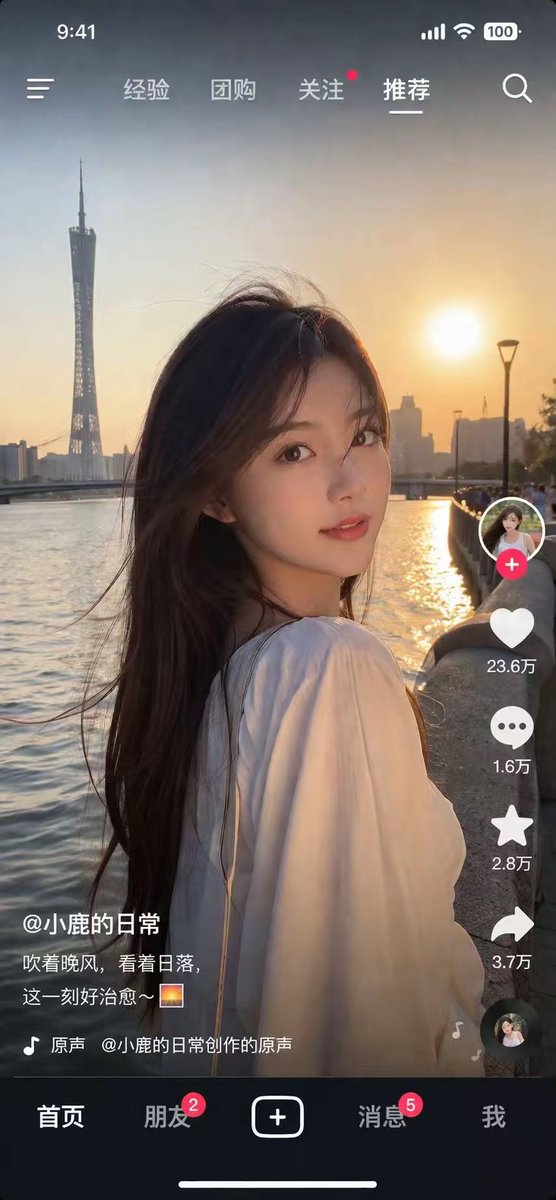
Photorealistic Chinese Short Video App Screenshot — Sora 2 Prompt
PROMPT · EN
type
mobile short video app screenshot
style
photorealistic, highly detailed
main_image
subject
{argument name="subject description" default="young Asian woman with long dark hair, wearing a white top, looking back over her shoulder"}
lighting
golden hour, sunset backlight, warm glowing light
background
{argument name="background location" default="riverfront at sunset with a tall twisted tower skyline"}
ui_overlay
top_bar
left
time 9:41, menu icon
center_tabs
item 1
经验
item 2
团购
item 3
关注
item 4
推荐
right
signal, wifi, battery 100, search icon
right_sidebar
count
6
elements
item 1
profile picture with red plus button
item 2
heart icon with text '{argument name="like count" default="23.6万"}'
item 3
comment bubble icon with text '1.6万'
item 4
star icon with text '2.8万'
item 5
share arrow icon with text '3.7万'
item 6
spinning record album icon
bottom_left_info
username
{argument name="username" default="@小鹿的日常"}
caption
{argument name="caption" default="吹着晚风,看着日落,这一刻好治愈~ 🌅"}
audio_track
🎵 原声 @小鹿的日常创作的原声
bottom_nav
count
5
tabs
item 1
首页
item 2
朋友 (with red badge 2)
item 3
central square plus button
item 4
消息 (with red badge 5)
item 5
footer
white home indicator line

Über diesen Prompt

Generate a hyper-realistic screenshot of a popular Chinese short video app with a customizable portrait, golden-hour lighting, and authentic UI overlays. Use it as a Konzeptkunst starting point for GPT Image 2: keep the visual structure and style constraints intact, then swap in your own subject, brand, or scene.

This prompt is organized as structured JSON with fields such as type, style, main image, and ui overlay. Keeping that hierarchy helps the model separate the subject, layout, interface elements, and detail constraints.

Start with small changes to subject, scene, camera, and color, then generate a few variations to compare composition and detail without turning the page copy into keyword stuffing.

So verwendest du diesen Prompt

  1. Copy the entire JSON prompt body above.
  2. Choose Sora 2 (or your preferred image/video model) on your AI platform.
  3. Paste the prompt. Edit variables like subject description, background location, like count, username, and caption to personalize the scene.
  4. Generate and review. Adjust lighting or UI text details for a more tailored result.

FAQ

Mehr von GPT Image 2

Alle ansehen

Schneller erstellen mit Sora2Hub-Prompts.

Nutze kuratierte Prompt-Seiten als suchbare Einstiege und starte direkt mit dem passenden Modellkontext.

Prompts entdecken

