
GPT Image 2AI-Prompt
Blue Jays Broadcast Fan Shot — Sora 2 Prompt
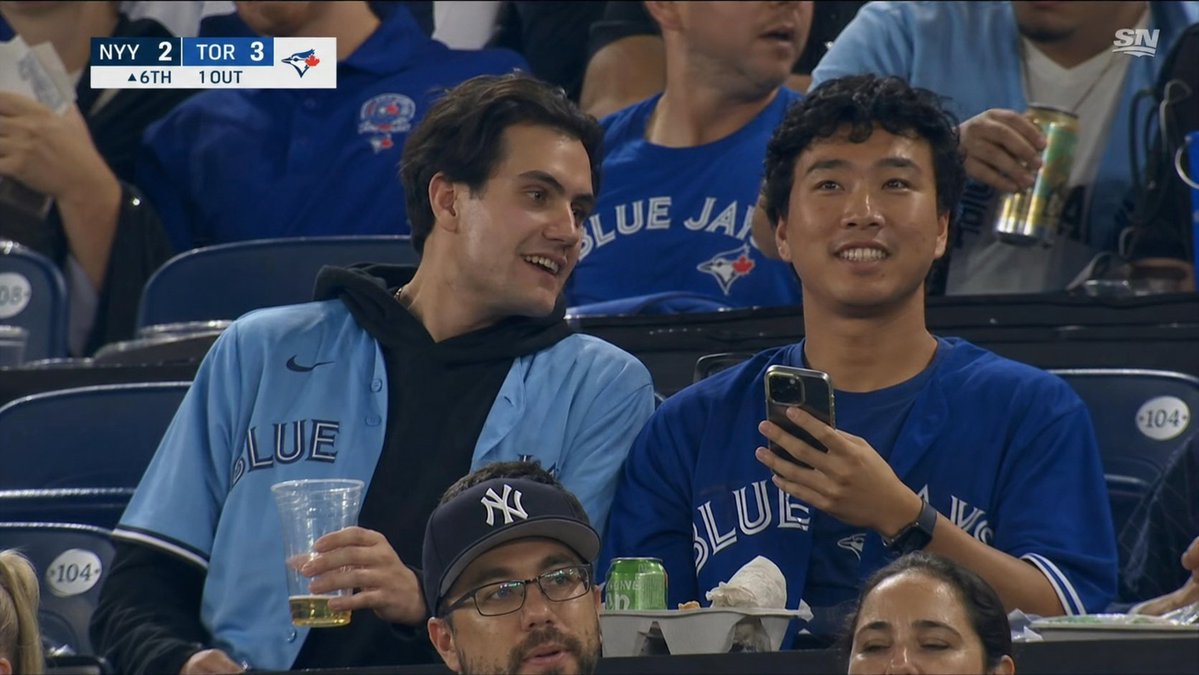
Create a hyper-realistic MLB broadcast screenshot of Blue Jays fans in the stands, complete with authentic score bug and privacy-blurred faces for a professional TV look.
PROMPT · EN
创建一张逼真的美国职业棒球大联盟多伦多蓝鸟队主场比赛看台电视转播截图,效果如同从 Sportsnet 直播画面中截取。场景展示了 argnumber of main fans: 两名 坐在深蓝色看台座椅上的年轻男性球迷,位于画面中央,两人的面部均被纯深褐色矩形隐私遮罩覆盖。左侧球迷留着中等长度深色头发,身穿浅粉蓝色蓝鸟队纽扣球衣,内搭黑色连帽衫,手持一个装有少量啤酒的透明塑料杯;右侧球迷身穿宝蓝色蓝鸟队球衣,一手竖直拿着智能手机,佩戴黑色智能手表。前景中,部分被裁剪的观众包括另外两个可见的深褐色面部遮罩矩形,使图像中总共出现 argnumber of privacy masks: 四个 隐私遮罩。周围是其他身穿蓝鸟队球衣的球迷,其中一人拿着高罐装饮料,此外还有标有 104 的看台座位号牌、放有食物的零食托盘、一个绿色易拉罐和揉皱的餐巾纸。在左上角添加一个真实的电视记分牌图形,显示 argaway team score: NYY 2、arghome team score: TOR 3、蓝鸟队队徽,以及显示 arginning and outs: ▲6局 1出局 的底部状态栏。在右上角添加一个白色的小型 argnetwork logo: SN 标志。采用纪录片式体育转播构图,轻微的长焦压缩感,体育场灯光,逼真的观众模糊效果,球衣和手部细节清晰,16:9 宽高比,无电影滤镜,非插画风格。
Über diesen Prompt
Create a hyper-realistic MLB broadcast screenshot of Blue Jays fans in the stands, complete with authentic score bug and privacy-blurred faces for a professional TV look. Use it as a Konzeptkunst starting point for GPT Image 2: keep the visual structure and style constraints intact, then swap in your own subject, brand, or scene.
Start by replacing number of main fans, number of privacy masks, away team score, and home team score, then keep the camera, composition, and material cues in the same order. This makes the output easier to compare across variations.
So verwendest du diesen Prompt
- Copy the prompt and paste it into your AI image generator.
- Select a model like Sora 2 or a high-fidelity photorealistic model for best results.
- Adjust the variables such as fan count, scores, and privacy mask numbers to customize the scene.
- Generate the image and refine the prompt if needed to perfect the broadcast feel.


