
GPT Image 2AI-Prompt
Create Dramatic True Crime YouTube Thumbnails — Sora 2 Prompt
Generate a cinematic collage thumbnail with a central portrait, conspiracy board, and moody background scenes for your true crime videos.
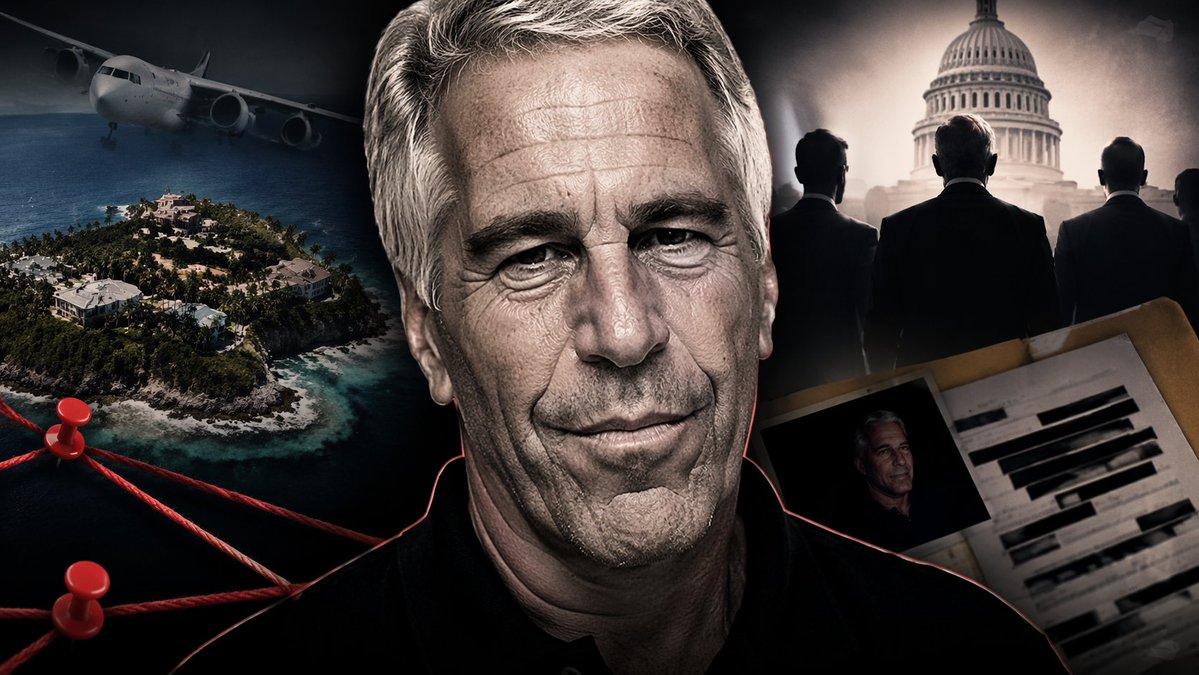
PROMPT · EN
一张 YouTube 缩略图风格的拼贴画,主题为 argoverall mood: 黑暗、戏剧性、真实犯罪调查。中心是一张高度细节化的 argcentral figure: 一位留着灰发、满脸深皱纹,神似杰弗里·爱泼斯坦的老人 的特写肖像,他身穿黑色 Polo 衫,边缘有一圈淡淡的红色发光轮廓,将其与背景区分开来。左侧是 argleft background scene: 带有豪华别墅的热带岛屿,深色天空中有一架正在飞行的飞机。岛屿下方是一个阴谋论 argboard: 项目 主题,包含 2 枚红色图钉,由 3 根粗红线连接。右上角是 argright background scene: 朦胧的棕褐色调美国国会大厦,前方有 3 名身穿西装的男士剪影。右下角是一个打开的马尼拉文件夹,里面装着 argdocument type: 一份经过大量涂改的档案,上面有粗重的黑色记号笔线条,以及一张该男子的较小照片。整体构图具有电影感和强烈的视觉冲击力,专为纪录片视频风格化设计。
Über diesen Prompt
Generate a cinematic collage thumbnail with a central portrait, conspiracy board, and moody background scenes for your true crime videos. Use it as a Konzeptkunst starting point for GPT Image 2: keep the visual structure and style constraints intact, then swap in your own subject, brand, or scene.
Start by replacing overall mood, central figure, left background scene, and board, then keep the camera, composition, and material cues in the same order. This makes the output easier to compare across variations.
So verwendest du diesen Prompt
- Copy the prompt text from this page.
- Paste it into Sora or another AI image generator.
- Replace the variables in curly braces (e.g., {overall mood}, {central figure}) to match your video's theme.
- Generate the image and re-run with minor tweaks if needed to perfect the thumbnail composition.


