Sora2 Hub
Sora2 Hub
  • Prompt-Bibliothek
  • Preise
  • Galerie
Sora2 Hub
Sora2 Hub
Sora2 Hub

Sora2 Hub

Professionelle KI-Kreationsplattform, betrieben von Sora 2, Veo 3.1 und Nano Banana Pro. Erstellen Sie atemberaubende Videos und Bilder in Studioqualität mit erweiterter Steuerung, HD-Qualität und ohne Wasserzeichen.

Email:support@sora2hub.org

KI-Videogenerator

  • Text zu Video
  • Bild zu Video
  • Veo 3.1
  • Sora 2
  • Kling 3.0
  • Kling 2.6
  • Kling 2.5
  • Runway
  • Wan 2.6
  • Seedance 2.0
  • Hailuo 2.3
  • Grok Imagine
  • HappyHorse-1.0
  • HappyHorse 1.1
  • Kling 3.0 Turbo
  • Volcengine Video-to-Video Lip Sync
  • OmniHuman 1.5
  • Grok Imagine Video 1.5
  • Gemini Omni
  • Wan 2.7 Video
  • Seedance 2.0 Mini

KI-Bildgenerator

  • Text zu Bild
  • Bild zu Bild
  • Nano Banana Pro
  • Nano Banana
  • 4o Image
  • Flux Kontext
  • Z Image
  • Seedream 4.5
  • Seedream 5.0 Lite
  • Nano Banana 2
  • GPT Image 2
  • KI-Bildvergrößerer
  • Seedream 5.0 Pro
  • Nano Banana 2 Lite
  • Qwen Image 2.0

KI-Effekte

  • KI-Altersfilter
  • KI-Geschlechtertausch
  • KI-Kuss
  • KI-Umarmung
  • Ghibli-Bild
  • KI-Meerjungfrau-Filter
  • KI-Körperschütteln
  • Lächeln-Filter
  • KI-Fett
  • Actionfigur

Produkt

  • Funktionen
  • Showcases
  • Preise

Unternehmen

  • Über uns
  • Kontakt

© 2025 • Sora2 Hub ORG Alle Rechte vorbehalten.

  • Datenschutzrichtlinie
  • Nutzungsbedingungen
  • Rückerstattungsrichtlinie
  1. Startseite
  2. /
  3. Prompts
  4. /
  5. GPT Image 2
  6. /
  7. Fantasy Anime Storyboard Template — Sora 2 Prompt
GPT Image 2AI-Prompt

Fantasy Anime Storyboard Template — Sora 2 Prompt

Creates a professional, printable A4 storyboard page with a main scene visual, scene summary, and eight shot cards for planning fantasy animation sequences.
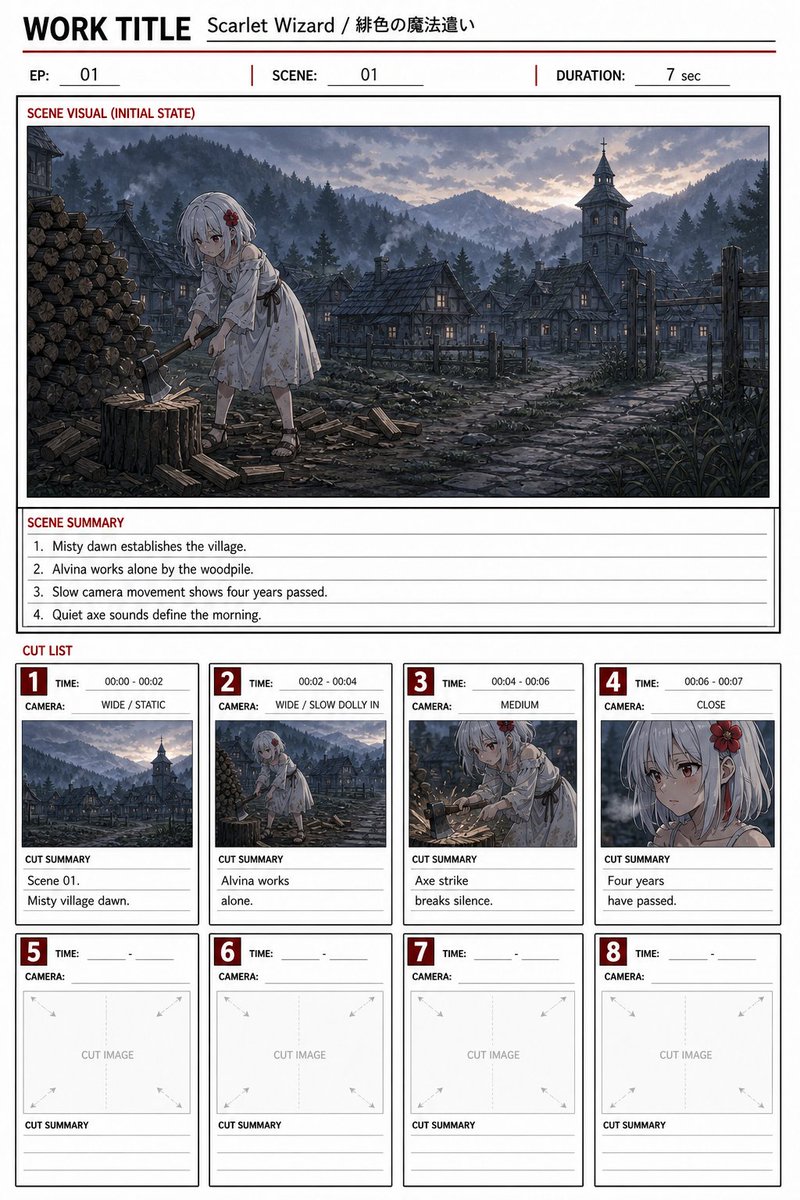
Fantasy Anime Storyboard Template — Sora 2 Prompt
PROMPT · EN
type
动画电影分镜表 / 制作分镜页
format
整洁可打印的 A4 纵向布局,黑色网格线,红色强调标签,白色纸张背景,专业的日本动画分镜模板
header
work title
{argument name="work title" default="Scarlet Wizard / 绯色的魔法使"}
episode
{argument name="episode number" default="01"}
scene
{argument name="scene number" default="01"}
duration
{argument name="duration" default="7 秒"}
main scene visual
title
场景视觉(初始状态)
position
上半部分的大型宽屏面板
image description
雾气缭绕的奇幻清晨山村,蓝灰色的清晨光线,远处是松树覆盖的丘陵和层叠的山峦,带有石板屋顶的古老木屋,温暖的窗灯,鹅卵石铺就的村道,木栅栏,右侧有一座带十字架的教堂钟楼,左侧堆放着木柴。前景中,一位名叫 {argument name="character name" default="Alvina"} 的银发小动画女孩正在树墩旁用斧头劈柴;她穿着简单的浅色连衣裙,凉鞋,戴着红色花朵发饰,安静忧郁的氛围,电影级背景艺术,细腻的手绘动画风格。
composition
宽镜头建立场景,角色位于中心偏左,木堆在最左侧,村庄和塔楼隐没在雾气中,戏剧性但柔和的晨曦天空
scene summary
title
场景摘要
count
4
items
item 1
1. 雾气缭绕的清晨确立了村庄环境。
item 2
2. Alvina 独自在木堆旁工作。
item 3
3. 缓慢的镜头移动展示了四年时光流逝。
item 4
4. 安静的劈柴声定义了清晨。
cut list
title
分镜列表
total cards
8
filled cards
4
blank cards
4
layout
主面板下方两行共四个分镜卡片,每个卡片都有红色编号框、时间字段、摄像机字段、图像缩略图区域和分镜摘要行
cards
item 1
number
1
time
00:00 - 00:02
camera
全景 / 固定
thumbnail
清晨雾气弥漫的山村全景,可见教堂钟楼和屋顶
cut summary
item 1
场景 01。
item 2
雾气缭绕的清晨村庄。
item 2
number
2
time
00:02 - 00:04
camera
全景 / 缓慢推入
thumbnail
Alvina 在村庄前景的木堆旁劈柴
cut summary
item 1
Alvina 独自
item 2
工作。
item 3
number
3
time
00:04 - 00:06
camera
中景
thumbnail
Alvina 挥动斧头的中景,可见木屑和树墩,表情坚定而疲惫
cut summary
item 1
劈柴声
item 2
打破寂静。
item 4
number
4
time
00:06 - 00:07
camera
特写
thumbnail
Alvina 银发和红色花朵发饰的侧脸特写,脸部被一个灰色的类似审查遮挡的方块部分遮盖
cut summary
item 1
四年
item 2
已经过去。
item 5
number
5
time
空白行
camera
空白行
thumbnail
标有 CUT IMAGE 的空白占位框,带有淡淡的对角线引导箭头
cut summary
空白横线
item 6
number
6
time
空白行
camera
空白行
thumbnail
标有 CUT IMAGE 的空白占位框,带有淡淡的对角线引导箭头
cut summary
空白横线
item 7
number
7
time
空白行
camera
空白行
thumbnail
标有 CUT IMAGE 的空白占位框,带有淡淡的对角线引导箭头
cut summary
空白横线
item 8
number
8
time
空白行
camera
空白行
thumbnail
标有 CUT IMAGE 的空白占位框,带有淡淡的对角线引导箭头
cut summary
空白横线
typography
加粗无衬线大写英文字体标签,红色章节标题,细灰色表格线,强力黑色边框,小巧整洁的制作备注文字
style
高度可读的分镜规划文档,动画概念艺术缩略图,柔和的低饱和度色彩,电影级奇幻写实风格,无额外页面,无水印

Über diesen Prompt

Creates a professional, printable A4 storyboard page with a main scene visual, scene summary, and eight shot cards for planning fantasy animation sequences. Use it as a Konzeptkunst starting point for GPT Image 2: keep the visual structure and style constraints intact, then swap in your own subject, brand, or scene.

This prompt is organized as structured JSON with fields such as type, format, header, main scene visual, scene summary, cut list, and typography. Keeping that hierarchy helps the model separate the subject, layout, interface elements, and detail constraints.

Start with small changes to subject, scene, camera, and color, then generate a few variations to compare composition and detail without turning the page copy into keyword stuffing.

So verwendest du diesen Prompt

  1. Copy the entire prompt and paste it into your Sora 2 or compatible AI model.
  2. Choose your model; best results come from models excelling in image and layout generation.
  3. Tweak the variables (work title, episode, scene, character name) in the JSON to customize your project.
  4. Generate the output to receive a complete, organized storyboard sheet.
  5. Print or use the digital layout directly for your animation planning.
FAQ

Naoyuki Okada / Scarlet Echoes🐲

@naoyuki_okada→

Veröffentlicht
15. Mai 2026
Originalsprache
EN
Modell
GPT Image 2
Kategorie
Konzeptkunst
GPT Image 2Konzeptkunstgpt-image-2twitter
Aufrufe
704
Kopien
105
Likes
14

Teilen

Mehr von GPT Image 2

Alle ansehen
Indonesian Bird Contest Meme — Low-Quality Phone Photo

Indonesian Bird Contest Meme — Low-Quality Phone Photo

@NyaiiBubu
Graphic Novel Ink Splash Portrait — Sora 2 Prompt

Graphic Novel Ink Splash Portrait — Sora 2 Prompt

@iamsofiaijaz
Anime Schoolgirls Sharing Transparent Umbrella — Sora 2 Prompt

Anime Schoolgirls Sharing Transparent Umbrella — Sora 2 Prompt

@yB7CqdfoDmrbhgD

Schneller erstellen mit Sora2Hub-Prompts.

Nutze kuratierte Prompt-Seiten als suchbare Einstiege und starte direkt mit dem passenden Modellkontext.

Prompts entdecken