
GPT Image 2AI-Prompt
Indonesian MBG Nutrition Program UI — Sora 2 Prompt
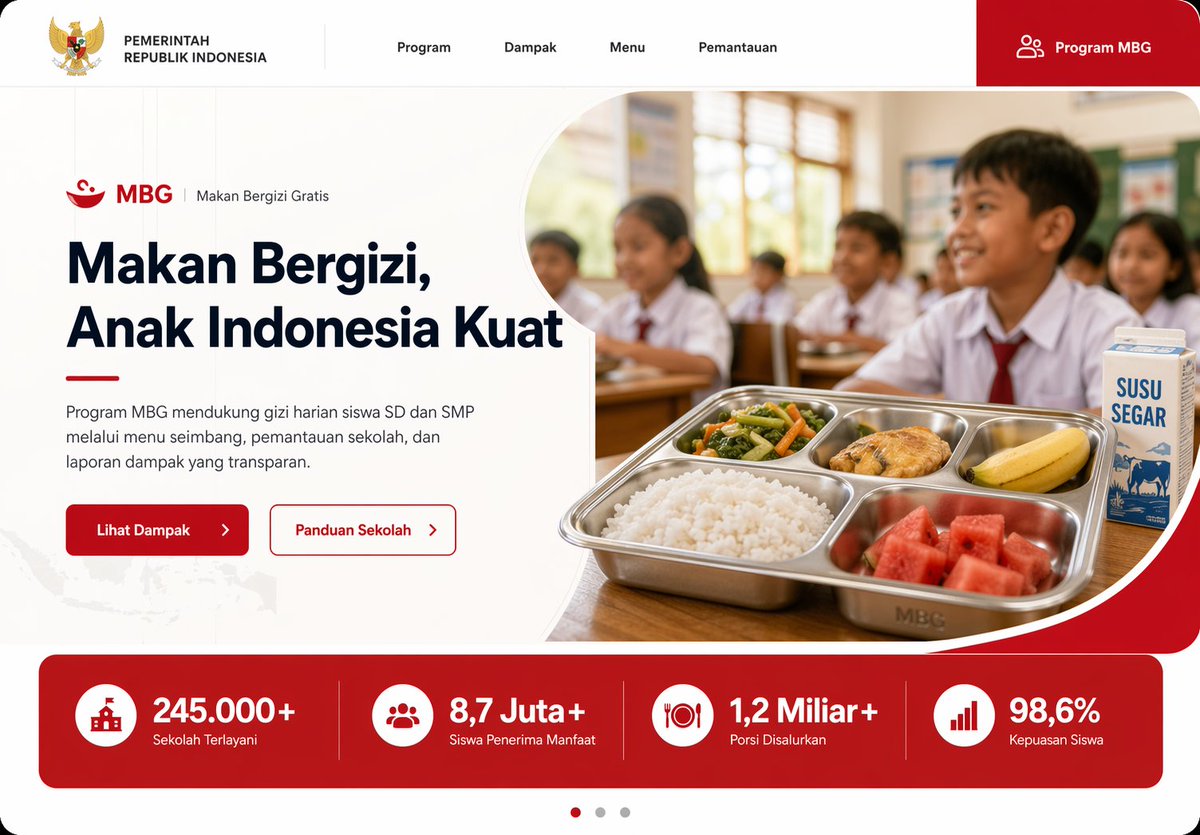
Generate a sleek, production-ready landing page UI for Indonesia's MBG school meal program, featuring modern design, real stats, and authentic classroom imagery.
PROMPT · EN
为印尼政府项目创建一个现代化的落地页 UI 模型,采用简洁、专业的网页设计风格,适配桌面宽屏比例。页面背景为白色,搭配醒目的红色点缀、柔和的圆角设计、细腻的灰色分割线,呈现出精致的 Dribbble 前端展示风格。在页面最上方,构建一个水平导航栏,包含 6 个可见元素:左侧为印尼 Garuda 国徽及文字“PEMERINTAH REPUBLIK INDONESIA”,中间为 4 个菜单项,标签分别为“Program”、“Dampak”、“Menu”和“Pemantauan”,最右侧是一个带有小型人物图标的红色大圆角按钮,标签为“Program MBG”。在下方设计一个双栏布局的首屏区域。左侧显示一行小型程序标签,包含一个红色碗状图标、文字“MBG”、一条垂直分割线以及“Makan Bergizi Gratis”。下方放置一个醒目的大标题,内容为“argheadline text: Makan Bergizi, Anak Indonesia Kuat”,采用深蓝色,跨越 3 行。在下方添加一段印尼语短文:“Program MBG mendukung gizi harian siswa SD dan SMP melalui menu seimbang, pemantauan sekolah, dan laporan dampak yang transparan。”接着并排放置 2 个行动号召按钮:一个带有向右箭头的红色实心按钮,标签为“Lihat Dampak”;以及一个带有红色边框的白色轮廓按钮,标签为“Panduan Sekolah”,同样带有向右箭头。在首屏右侧,放置一张圆角大型照片风格的图片,由弧形白色分割线和红色背景角框定。图片展示了一间印尼小学教室,画面中有 5 名身穿白衣红领带校服的小学生坐在课桌前,窗外透进温暖的日光,景深较浅,具有纪录片式的写实感。在前景的木质课桌上,展示一个不锈钢分格餐盘,内含 5 种食物:白米饭、什锦蔬菜、一块炸鸡、一根香蕉和西瓜块。餐盘旁放置一盒标签为“SUSU SEGAR”的牛奶。在首屏下方,添加一个全宽的红色统计数据栏,包含 4 个等间距的指标卡片,由细垂直线分隔。每个卡片配有一个白色圆形图标和加粗的白色文字。4 个指标分别为:“245.000+”对应标签“Sekolah Terlayani”,“8,7 Juta+”对应标签“Siswa Penerima Manfaat”,“1,2 Miliar+”对应标签“Porsi Disalurkan”,以及“98,6%”对应标签“Kepuasan Siswa”。在底部中心添加一个 3 点式轮播指示器,左侧圆点为红色激活状态,其余 2 个为灰色。在左下角背景中加入淡淡的印尼地图纹理。使用清晰的排版、充裕的留白、高端金融科技/政府网站美学、真实的 UI 比例,打造一个可直接用于生产环境的落地页模型。
Über diesen Prompt
Generate a sleek, production-ready landing page UI for Indonesia's MBG school meal program, featuring modern design, real stats, and authentic classroom imagery. Use it as a Konzeptkunst starting point for GPT Image 2: keep the visual structure and style constraints intact, then swap in your own subject, brand, or scene.
Start by replacing headline text, then keep the camera, composition, and material cues in the same order. This makes the output easier to compare across variations.
So verwendest du diesen Prompt
- Copy the complete prompt from this page.
- Open Sora 2 or a compatible AI design tool that supports text-to-UI generation.
- Optionally, customize the headline by editing the
{argument name="headline text"}variable. - Paste the prompt and generate the UI mockup.
- Review the output and refine colors or layout if your tool allows iterative adjustments.


