GPT Image 2AI-Prompt

AI Men's Style Diagnosis Infographic — Sora 2 Prompt

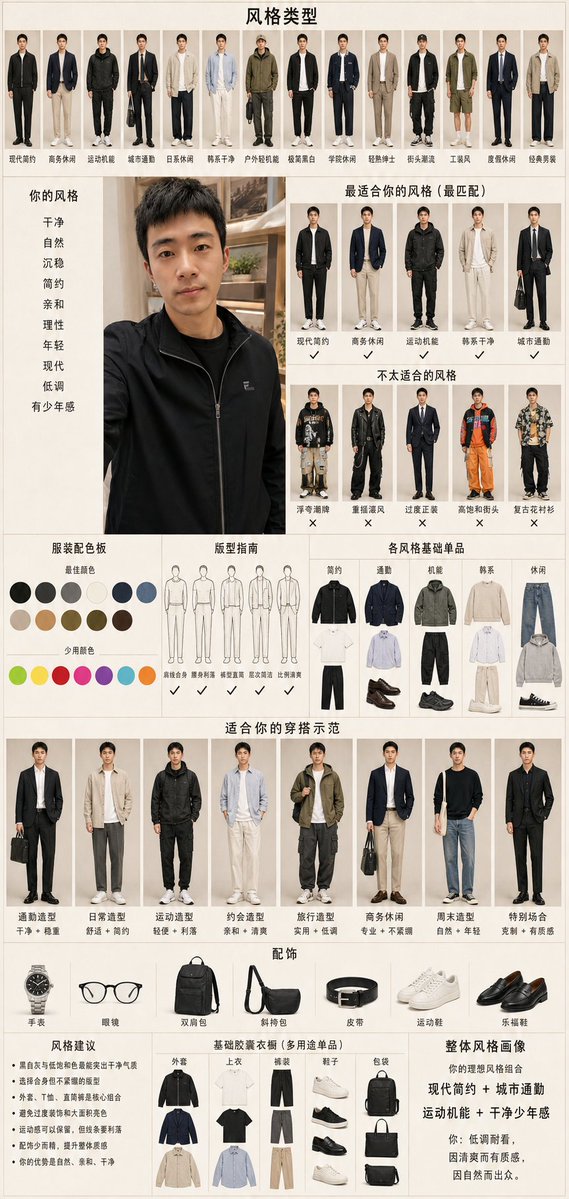
Create a detailed Chinese-language personal style infographic for men, analyzing a selfie to provide style types, color palettes, wardrobe essentials, and outfit suggestions.
AI Men's Style Diagnosis Infographic — Sora 2 Prompt
PROMPT · EN
type
垂直版个人男士风格诊断信息图海报
language
海报上的中文文本
overall_style
简洁的小红书时尚顾问报告风格,米色纸张背景,细网格线,编辑目录排版,写实全身穿搭剪影,中性光影,整洁排版,高信息密度
canvas
orientation
portrait
aspect_ratio
9:16
background
暖米白色,带有细微纹理
title
{argument name="headline text" default="风格类型"}
source_photo_panel
position
left center
content
{argument name="subject description" default="一位留着黑色短发、身穿黑色拉链夹克的东亚年轻男性"}的大型休闲自拍肖像,面部采用柔和的矩形模糊处理,背景为室内书架
adjacent_style_keywords
title
你的风格
count
9
labels
item 1
干净
item 2
自然
item 3
沉稳
item 4
简约
item 5
亲和
item 6
理性
item 7
年轻
item 8
现代
item 9
低调
item 10
有少年感
layout
sections
item 1
title
风格类型
position
top full width
count
14
description
14 个小型全身男士穿搭原型,每个下方配有中文标签
labels
item 1
现代简约
item 2
商务休闲
item 3
运动机能
item 4
城市通勤
item 5
日系休闲
item 6
韩系干净
item 7
户外轻机能
item 8
极简黑白
item 9
学院休闲
item 10
轻熟绅士
item 11
韩系通勤
item 12
工装风
item 13
皮质休闲
item 14
经典男装
item 2
title
最适合你的风格(最匹配)
position
upper right
count
5
description
5 个推荐的全身穿搭缩略图,下方带有勾选标记
labels
item 1
现代简约
item 2
商务休闲
item 3
运动机能
item 4
韩系干净
item 5
城市通勤
item 3
title
不太适合的风格
position
middle right
count
5
description
5 个不推荐的穿搭缩略图,下方带有叉号标记
labels
item 1
潮奢街牌
item 2
重摇滚风
item 3
过度正装
item 4
高饱和街头
item 5
复古花衬衫
item 4
title
服装配色板
position
middle left
count
19
description
配色板包含 12 个主要中性/深色色块和 7 个点缀色色块
labels
item 1
黑色
item 2
深灰
item 3
灰色
item 4
米白
item 5
海军蓝
item 6
深蓝
item 7
浅卡其
item 8
驼色
item 9
棕色
item 10
军绿
item 11
深棕
item 12
咖啡色
item 13
少量颜色:荧光绿
item 14
亮黄
item 15
珊瑚红
item 16
洋红
item 17
紫色
item 18
青色
item 19
橙色
item 5
title
版型指南
position
middle center
count
6
description
6 个简单的男士轮廓线条图及建议
labels
item 1
清瘦合身
item 2
肩部利落
item 3
线条直筒
item 4
宽松适度
item 5
比例清爽
item 6
避免臃肿
item 6
title
各风格基础单品
position
middle right
count
5
description
5 列胶囊衣橱单品,每列展示上装、下装、鞋履和配饰
labels
item 1
简约
item 2
通勤
item 3
机能
item 4
韩系
item 5
休闲
item 7
title
适合你的穿搭示范
position
lower middle full width
count
8
description
8 个适合该对象的全身穿搭示例,每个配有风格名称和简短特征描述
labels
item 1
通勤造型
item 2
日常造型
item 3
运动造型
item 4
约会造型
item 5
旅行造型
item 6
商务休闲
item 7
周末造型
item 8
特别场合
item 8
title
配饰
position
lower left-middle
count
7
description
7 个配饰产品图标横向排列
labels
item 1
手表
item 2
眼镜
item 3
双肩包
item 4
斜挎包
item 5
皮带
item 6
运动鞋
item 7
乐福鞋
item 9
title
风格建议
position
bottom left
count
6
description
6 条中文造型建议要点
labels
item 1
黑白灰与低饱和色最能突出干净气质
item 2
选择合身但不紧绷的版型
item 3
外套、T恤、直筒裤是核心组合
item 4
避免过度装饰和大面积亮色
item 5
运动感可以保留,但线条要利落
item 6
配饰少而精,提升整体质感
item 10
title
基础胶囊衣橱(多用途单品)
position
bottom center
count
6
description
6 类衣橱必备单品,以小型产品剪影形式展示
labels
item 1
外套
item 2
上衣
item 3
裤装
item 4
鞋子
item 5
包袋
item 6
配饰
item 11
title
整体风格画像
position
bottom right
count
1
description
总结文本块,描述理想的个人风格组合
labels
item 1
你的理想风格组合:现代简约 + 城市通勤 + 运动机能 + 干净少年感;你:低调耐看,因清爽而有质感,因自然而出众。
visual_requirements
使用写实的男士时尚模特剪影,准确的服装比例,整齐的对齐方式,统一的米色边框,小巧的中文标题,在指定位置使用勾选和叉号,除报告布局外不要有多余的杂乱元素。使图片看起来像是一份由自拍照生成的综合个人时尚风格分析报告。
customization
preferred_style
{argument name="preferred style" default="现代简约城市通勤,兼具运动机能细节"}
color_mood
{argument name="color mood" default="低饱和中性色:黑色、灰色、海军蓝、米色、军绿、棕色"}
summary_quote
{argument name="summary quote" default="低调耐看,因清爽而有质感,因自然而出众。"}

Über diesen Prompt

Create a detailed Chinese-language personal style infographic for men, analyzing a selfie to provide style types, color palettes, wardrobe essentials, and outfit suggestions. Use it as a Konzeptkunst starting point for GPT Image 2: keep the visual structure and style constraints intact, then swap in your own subject, brand, or scene.

This prompt is organized as structured JSON with fields such as type, language, overall style, canvas, source photo panel, layout, and visual requirements. Keeping that hierarchy helps the model separate the subject, layout, interface elements, and detail constraints.

Start with small changes to subject, scene, camera, and color, then generate a few variations to compare composition and detail without turning the page copy into keyword stuffing.

So verwendest du diesen Prompt

  1. Copy the entire prompt JSON block into your AI model's text input.
  2. Select Sora 2 (or a compatible image generator that handles dense, structured layouts).
  3. Edit the variables: replace the default headline text with your preferred title and subject description with a description of the person's photo.
  4. Generate the image and review the output.
  5. If needed, tweak style keywords or labels to better match your desired aesthetic.
FAQ

Mehr von GPT Image 2

Alle ansehen

Schneller erstellen mit Sora2Hub-Prompts.

Nutze kuratierte Prompt-Seiten als suchbare Einstiege und starte direkt mit dem passenden Modellkontext.

Prompts entdecken