
Sora2 Hub
Sora2 Hub
  • Prompt-Bibliothek
  • Preise
  • Galerie
Sora2 Hub
Sora2 Hub
Sora2 Hub

Sora2 Hub

Professionelle KI-Kreationsplattform, betrieben von Sora 2, Veo 3.1 und Nano Banana Pro. Erstellen Sie atemberaubende Videos und Bilder in Studioqualität mit erweiterter Steuerung, HD-Qualität und ohne Wasserzeichen.

Email:support@sora2hub.org

KI-Videogenerator

  • Text zu Video
  • Bild zu Video
  • Veo 3.1
  • Sora 2
  • Kling 3.0
  • Kling 2.6
  • Kling 2.5
  • Runway
  • Wan 2.6
  • Seedance 2.0
  • Hailuo 2.3
  • Grok Imagine
  • HappyHorse-1.0

KI-Bildgenerator

  • Text zu Bild
  • Bild zu Bild
  • Nano Banana Pro
  • Nano Banana
  • 4o Image
  • Flux Kontext
  • Z Image
  • Seedream 4.5
  • Seedream 5.0 Lite
  • Nano Banana 2
  • GPT Image 2
  • KI-Bildvergrößerer

KI-Effekte

  • KI-Altersfilter
  • KI-Geschlechtertausch
  • KI-Kuss
  • KI-Umarmung
  • Ghibli-Bild
  • KI-Meerjungfrau-Filter
  • KI-Körperschütteln
  • Lächeln-Filter
  • KI-Fett
  • Actionfigur

Produkt

  • Funktionen
  • Showcases
  • Preise

Unternehmen

  • Über uns
  • Kontakt

© 2025 • Sora2 Hub ORG Alle Rechte vorbehalten.

  • Datenschutzrichtlinie
  • Nutzungsbedingungen
  • Rückerstattungsrichtlinie
  1. Startseite
  2. /
  3. Prompts
  4. /
  5. GPT Image 2
  6. /
  7. Ghibli-Style Museum — Anime Background Prompt
GPT Image 2AI-Prompt

Ghibli-Style Museum — Anime Background Prompt

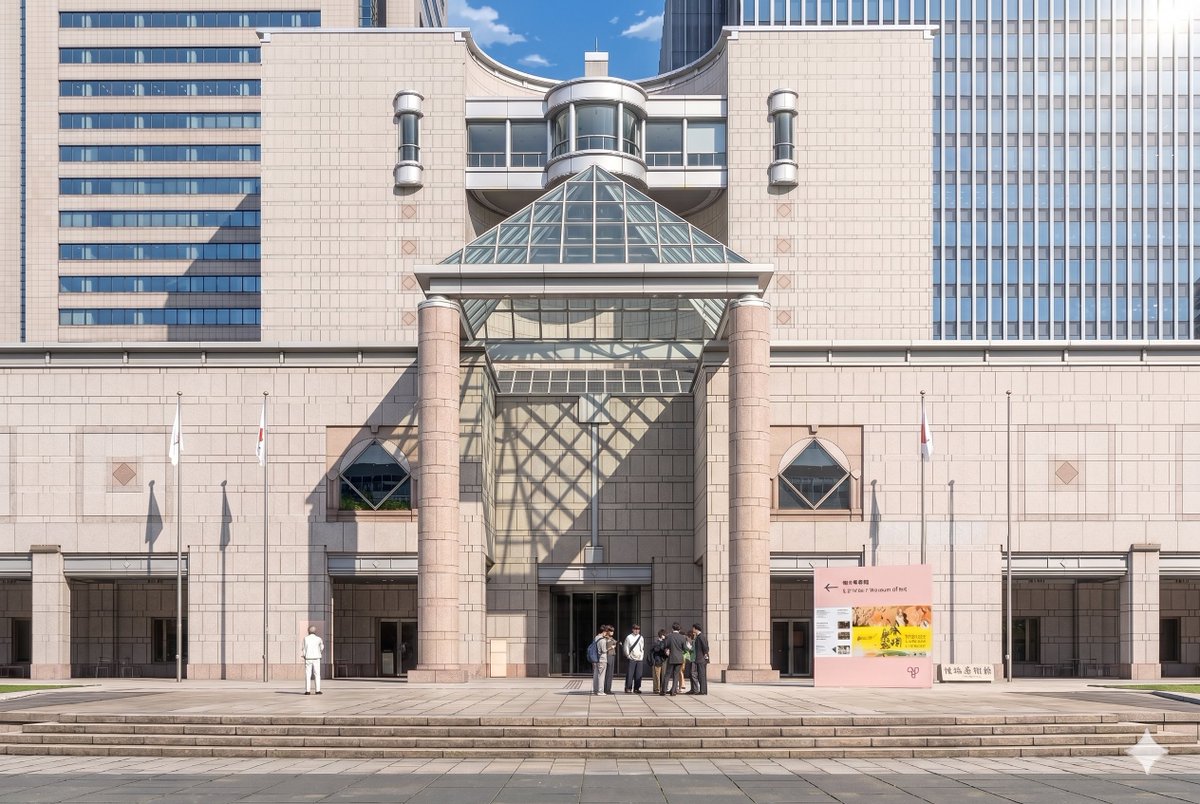
Transform a museum photo into a detailed, cinematic anime background with soft cel-shading, dramatic sunlight, and stylized crowds.
Ghibli-Style Museum — Anime Background Prompt
PROMPT · EN
使用提供的参考照片,将博物馆外立面及正面构图重绘为精致的剧场版动漫背景插画。保持建筑结构、标识、3 根旗杆、宽阔台阶及整体布局的一致性,但将图像从写实摄影转换为高细节的手绘动漫电影风格,要求线条清晰、采用柔和的赛璐璐阴影、淡雅的石材色调以及清澈的氛围光影。在右上角添加戏剧性的阳光,使玻璃金字塔在中央墙面及入口左侧投下大面积的几何网格阴影。将人物简化并风格化为动漫背景角色,保留 2 组可见人群:左侧 1 个单独的人物,以及入口中右侧 7 人组成的小型群体。在保持晴朗蓝天白昼氛围的同时,使画面呈现出优雅、精致且具有电影感的视觉效果。

Über diesen Prompt

Transform a museum photo into a detailed, cinematic anime background with soft cel-shading, dramatic sunlight, and stylized crowds. Use it as a Konzeptkunst starting point for GPT Image 2: keep the visual structure and style constraints intact, then swap in your own subject, brand, or scene.

Start with small changes to subject, scene, camera, and color, then generate a few variations to compare composition and detail without turning the page copy into keyword stuffing.

So verwendest du diesen Prompt

  1. Copy the entire prompt text provided.
  2. Choose a capable AI model like Sora 2 or a compatible image generator.
  3. Paste the prompt and upload your reference photo of the museum.
  4. You can tweak details like crowd size or sunlight angle in the prompt text.
  5. Generate and refine until you achieve the desired cinematic anime look.

FAQ

Dakiny

@Dakiny→

Veröffentlicht
30. Apr. 2026
Originalsprache
EN
Modell
GPT Image 2
Kategorie
Konzeptkunst
GPT Image 2Konzeptkunstgpt-image-2twitter
Aufrufe
111
Kopien
10
Likes
4

Teilen

Mehr von GPT Image 2

Alle ansehen
Photorealistic Fashion Magazine Cover — Sora 2 Prompt

Photorealistic Fashion Magazine Cover — Sora 2 Prompt

@aichof21
Luxury Tennis Fashion Poster — Bold Studio Shoot Sora Prompt

Luxury Tennis Fashion Poster — Bold Studio Shoot Sora Prompt

@blueski68251660
Sacred Dragon Dome Ceiling Mural — Sora 2 Prompt

Sacred Dragon Dome Ceiling Mural — Sora 2 Prompt

@KanaWorks_AI

Schneller erstellen mit Sora2Hub-Prompts.

Nutze kuratierte Prompt-Seiten als suchbare Einstiege und starte direkt mit dem passenden Modellkontext.

Prompts entdecken

