
Sora2 Hub
Sora2 Hub
  • Prompt-Bibliothek
  • Preise
  • Galerie
Sora2 Hub
Sora2 Hub
Sora2 Hub

Sora2 Hub

Professionelle KI-Kreationsplattform, betrieben von Sora 2, Veo 3.1 und Nano Banana Pro. Erstellen Sie atemberaubende Videos und Bilder in Studioqualität mit erweiterter Steuerung, HD-Qualität und ohne Wasserzeichen.

Email:support@sora2hub.org

KI-Videogenerator

  • Text zu Video
  • Bild zu Video
  • Veo 3.1
  • Sora 2
  • Kling 3.0
  • Kling 2.6
  • Kling 2.5
  • Runway
  • Wan 2.6
  • Seedance 2.0
  • Hailuo 2.3
  • Grok Imagine
  • HappyHorse-1.0

KI-Bildgenerator

  • Text zu Bild
  • Bild zu Bild
  • Nano Banana Pro
  • Nano Banana
  • 4o Image
  • Flux Kontext
  • Z Image
  • Seedream 4.5
  • Seedream 5.0 Lite
  • Nano Banana 2
  • GPT Image 2
  • KI-Bildvergrößerer

KI-Effekte

  • KI-Altersfilter
  • KI-Geschlechtertausch
  • KI-Kuss
  • KI-Umarmung
  • Ghibli-Bild
  • KI-Meerjungfrau-Filter
  • KI-Körperschütteln
  • Lächeln-Filter
  • KI-Fett
  • Actionfigur

Produkt

  • Funktionen
  • Showcases
  • Preise

Unternehmen

  • Über uns
  • Kontakt

© 2025 • Sora2 Hub ORG Alle Rechte vorbehalten.

  • Datenschutzrichtlinie
  • Nutzungsbedingungen
  • Rückerstattungsrichtlinie
  1. Startseite
  2. /
  3. Prompts
  4. /
  5. GPT Image 2
  6. /
  7. Vintage Ice Trade Triptych — Detailed Educational Poster Prompt
GPT Image 2AI-Prompt

Vintage Ice Trade Triptych — Detailed Educational Poster Prompt

Create a stunning 19th-century storybook-style triptych poster showing how ice was cut, shipped, and served across the globe before refrigeration.
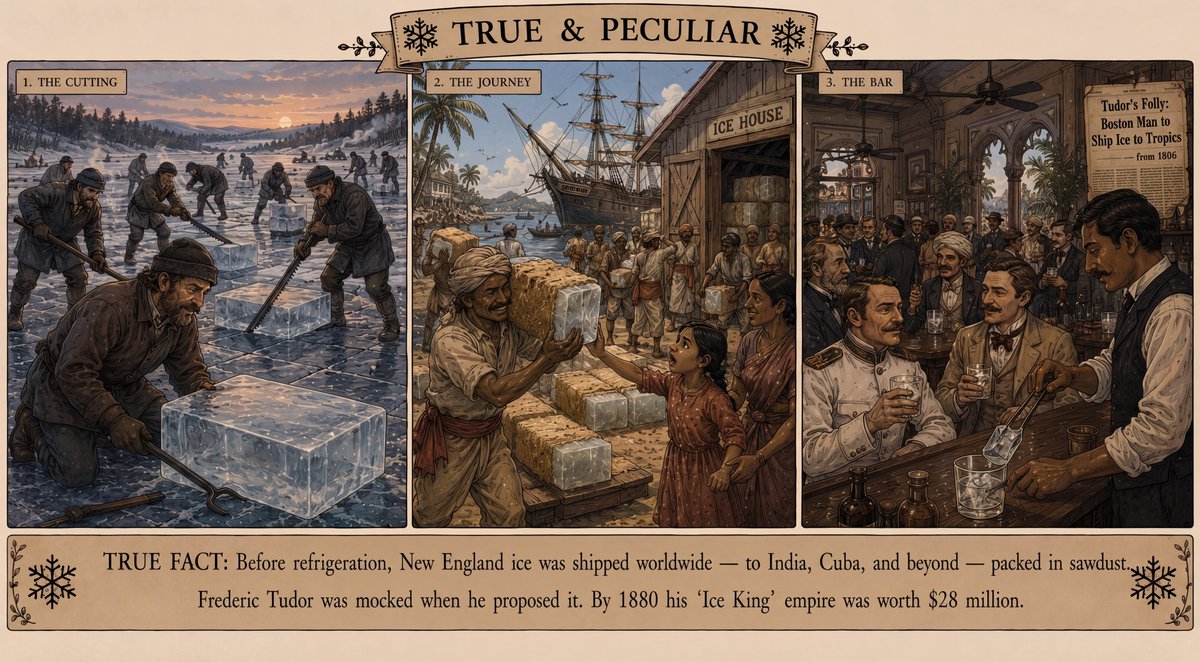
Vintage Ice Trade Triptych — Detailed Educational Poster Prompt
PROMPT · EN
type
复古插画风格教育三联画海报
title
{argument name="main title" default="TRUE & PECULIAR"}
overall_style
高度精细的 19 世纪故事书版画和手绘平版印刷风格,棕褐色羊皮纸背景,华丽的黑色墨水边框,逼真的历史细节,温暖柔和的棕色、冰蓝色,褪色的奶油色纸张,编辑类历史杂志插画,连贯的冰块主题贯穿始终
layout
canvas
宽幅横向海报,中间横跨三个带边框的大画幅,顶部中心设有装饰性丝带横幅,配有小型雪花图标和装饰性花纹,底部设有横跨全宽的事实说明框
panel_count
3
sections
item 1
title
1. 切割
position
左侧三分之一
scene
日落时分的新英格兰冰封湖面,许多身着厚衣的工人在冰面上切割出网格,从中取出巨大的透明冰块,背景为积雪覆盖的松树林和低矮山丘,前景中一名工人跪在一块巨大的透明冰块旁,手持铁制冰钳和长锯,冷色调的蓝色阴影与橙色的天空余晖形成对比
visible_people
约 13 名身穿深色冬装、戴着帽子、手套和靴子的采冰工人
item 2
title
2. 运输
position
中间三分之一
scene
19 世纪初繁忙的热带港口,一艘高大的帆船停泊在标有“ICE HOUSE”的木制冰库旁,周围有棕榈树、木桶、麻袋、板条箱,码头工人在卸货并搬运覆盖着锯末的冰块,当地商人和居民正在接收冰块,阳光明媚,码头气氛热烈
visible_people
约 18 名码头工人、水手、商人和城镇居民
item 3
title
3. 酒吧
position
右侧三分之一
scene
优雅的殖民风格热带酒吧内部,配有雕花拱门、吊扇、酒瓶、玻璃杯、棕榈树,墙上贴着报纸风格的海报,写着“Tudor's Folly: Boston Man to Ship Ice to Tropics — from 1806”;身穿马甲的调酒师使用金属冰钳将透明冰块放入玻璃杯中,衣着考究的顾客正在享用鸡尾酒
visible_people
约 12 名顾客和一名调酒师
text
top_banner
{argument name="main title" default="TRUE & PECULIAR"}
panel_labels
item 1
1. 切割
item 2
2. 运输
item 3
3. 酒吧
bottom_fact
{argument name="fact text" default="真实事实:在制冷技术出现之前,新英格兰的冰块被运往世界各地——包括印度、古巴等地——并用锯末包裹。弗雷德里克·都铎(Frederic Tudor)提出这一想法时曾遭到嘲笑。到 1880 年,他的“冰王”帝国价值已达 2800 万美元。"}
wall_poster
{argument name="wall poster text" default="Tudor's Folly: Boston Man to Ship Ice to Tropics — from 1806"}
decorative_elements
snowflakes
四个显眼的黑色雪花图标,两个位于顶部标题两侧,两个位于底部事实说明框的角落
borders
带有陈旧墨水感的黑色细矩形边框,卷曲的丝带标题牌,左上角和右上角有小型植物装饰花纹
bottom_box
带有装饰性藤蔓和雪花符号的奶油色羊皮纸牌匾
composition_requirements
使三个画幅在视觉上连贯,形成一张完整的海报;强调冰块从切割、运输到供应的叙事过程;使用清晰易读的英文排版;包含众多身着历史服装的人物,但保持其比例较小,作为冰块贸易故事的背景;保留古董插画的质感和密集的细线条细节

Über diesen Prompt

Create a stunning 19th-century storybook-style triptych poster showing how ice was cut, shipped, and served across the globe before refrigeration. Use it as a Konzeptkunst starting point for GPT Image 2: keep the visual structure and style constraints intact, then swap in your own subject, brand, or scene.

This prompt is organized as structured JSON with fields such as type, title, overall style, layout, text, decorative elements, and composition requirements. Keeping that hierarchy helps the model separate the subject, layout, interface elements, and detail constraints.

Start with small changes to subject, scene, camera, and color, then generate a few variations to compare composition and detail without turning the page copy into keyword stuffing.

So verwendest du diesen Prompt

  1. Copy the full prompt JSON into your AI image generator (e.g., Sora 2, DALL-E, or Midjourney).
  2. Select your preferred model and set output to a wide landscape aspect ratio for best results.
  3. Customize the main title, fact text, and wall poster text variables with your own wording or historical quotes.
  4. Generate the image and review all three panels for consistency in style, color palette, and historical detail.
  5. Refine by adjusting the overall style or scene descriptions if you want a different era or color tone.


FAQ

TRASCARTÓN

@Busty_male→

Veröffentlicht
15. Mai 2026
Originalsprache
EN
Modell
GPT Image 2
Kategorie
Konzeptkunst
GPT Image 2Konzeptkunstgpt-image-2twitter
Aufrufe
54
Kopien
6
Likes
2

Teilen

Mehr von GPT Image 2

Alle ansehen
Japanese Cinematic Poster Prompt — 4-Panel Agency Ad

Japanese Cinematic Poster Prompt — 4-Panel Agency Ad

@kantamizutamari
Cyberpunk AI Launch Banner — Cinematic Neon Poster Prompt

Cyberpunk AI Launch Banner — Cinematic Neon Poster Prompt

@ObieriI
Luxury Tennis Fashion Poster — Bold Studio Shoot Sora Prompt

Luxury Tennis Fashion Poster — Bold Studio Shoot Sora Prompt

@blueski68251660

Schneller erstellen mit Sora2Hub-Prompts.

Nutze kuratierte Prompt-Seiten als suchbare Einstiege und starte direkt mit dem passenden Modellkontext.

Prompts entdecken
