
GPT Image 2AI-Prompt
Photo-Realistic Eye Close-Up — Sora 2 Prompt
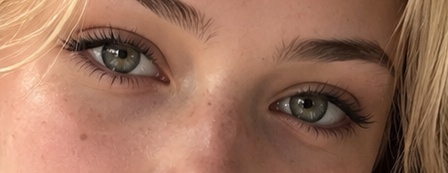
Generate a hyper-realistic cropped portrait of a woman's eyes with lifelike skin pores, lashes, and warm natural light.
PROMPT · EN
创作一张极具照片级逼真感的特写肖像,紧凑裁剪至年轻女性面部的上半部分,仅展示双眼、眉毛、鼻梁、上脸颊以及边缘的发丝。她拥有一双 argeye color: 淡灰绿色 的眼睛,直视镜头,具有自然的非对称眼睑、细节丰富的虹膜及眼神光、浓密深色的上睫毛,以及清晰可见但稀疏的下睫毛。她的皮肤真实,带有毛孔、淡淡的雀斑、小痣、桃粉色的脸颊纹理、细微的眼下阴影,以及鼻梁上的自然光泽。她的 arghair color: 浅金色 发丝在左右边缘自然垂落,眉毛浓密且呈自然的深金色,妆容极简,仅使用柔和的棕色睫毛膏,呈现出略微晕染的睫毛质感。使用温暖的自然日光,浅景深,微距镜头构图,高分辨率皮肤细节,真实的色彩分级,无文字,无配饰,不显示完整面部,横向比例。
Über diesen Prompt
Generate a hyper-realistic cropped portrait of a woman's eyes with lifelike skin pores, lashes, and warm natural light. Use it as a Konzeptkunst starting point for GPT Image 2: keep the visual structure and style constraints intact, then swap in your own subject, brand, or scene.
Start by replacing eye color and hair color, then keep the camera, composition, and material cues in the same order. This makes the output easier to compare across variations.
So verwendest du diesen Prompt
- Copy the full prompt text into your preferred AI image generator.
- Select a high-resolution model such as Sora 2 or a comparable photorealism-focused generator.
- Customize the {eye color} and {hair color} variables to match your desired look.
- Generate the image in landscape orientation and review details like skin texture and iris highlights.
- Refine or re-roll if needed, adjusting lighting or depth of field parameters.


