Sora2 Hub
Sora2 Hub
  • Prompt-Bibliothek
  • Preise
  • Galerie
Sora2 Hub
Sora2 Hub
Sora2 Hub

Sora2 Hub

Professionelle KI-Kreationsplattform, betrieben von Sora 2, Veo 3.1 und Nano Banana Pro. Erstellen Sie atemberaubende Videos und Bilder in Studioqualität mit erweiterter Steuerung, HD-Qualität und ohne Wasserzeichen.

Email:support@sora2hub.org

KI-Videogenerator

  • Text zu Video
  • Bild zu Video
  • Veo 3.1
  • Sora 2
  • Kling 3.0
  • Kling 2.6
  • Kling 2.5
  • Runway
  • Wan 2.6
  • Seedance 2.0
  • Hailuo 2.3
  • Grok Imagine
  • HappyHorse-1.0
  • HappyHorse 1.1
  • Kling 3.0 Turbo
  • Volcengine Video-to-Video Lip Sync
  • OmniHuman 1.5
  • Grok Imagine Video 1.5
  • Gemini Omni
  • Wan 2.7 Video
  • Seedance 2.0 Mini

KI-Bildgenerator

  • Text zu Bild
  • Bild zu Bild
  • Nano Banana Pro
  • Nano Banana
  • 4o Image
  • Flux Kontext
  • Z Image
  • Seedream 4.5
  • Seedream 5.0 Lite
  • Nano Banana 2
  • GPT Image 2
  • KI-Bildvergrößerer
  • Seedream 5.0 Pro
  • Nano Banana 2 Lite
  • Qwen Image 2.0

KI-Effekte

  • KI-Altersfilter
  • KI-Geschlechtertausch
  • KI-Kuss
  • KI-Umarmung
  • Ghibli-Bild
  • KI-Meerjungfrau-Filter
  • KI-Körperschütteln
  • Lächeln-Filter
  • KI-Fett
  • Actionfigur

Produkt

  • Funktionen
  • Showcases
  • Preise

Unternehmen

  • Über uns
  • Kontakt

© 2025 • Sora2 Hub ORG Alle Rechte vorbehalten.

  • Datenschutzrichtlinie
  • Nutzungsbedingungen
  • Rückerstattungsrichtlinie
  1. Startseite
  2. /
  3. Prompts
  4. /
  5. GPT Image 2
  6. /
  7. MacBook Neo Technical Exploded View — Sora 2 Prompt
GPT Image 2AI-Prompt

MacBook Neo Technical Exploded View — Sora 2 Prompt

Generate a hand-drawn technical overview infographic of a laptop, complete with labeled internal components, material specs, and data flow diagrams.
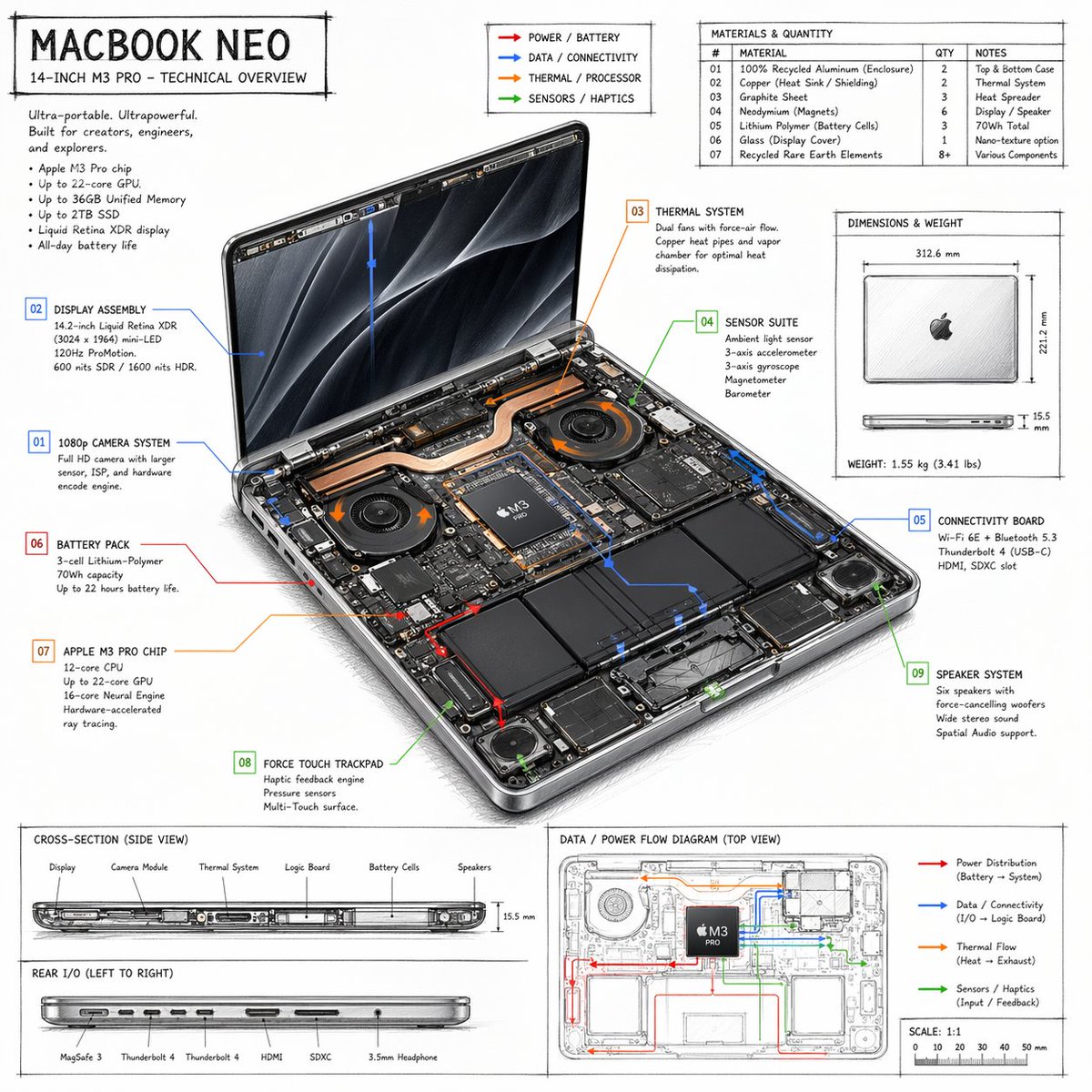
MacBook Neo Technical Exploded View — Sora 2 Prompt
PROMPT · EN
type
技术概览信息图
style
{argument name="visual style" default="手绘技术草图,排版简洁"}
product
name
{argument name="product name" default="MACBOOK NEO"}
subtitle
14 英寸 {argument name="processor model" default="M3 PRO"} - 技术概览
layout
centerpiece
description
打开的笔记本电脑等轴视图,展示了双风扇、铜质散热管、电池单元和逻辑项目等内部硬件组件
callouts_count
9
callout_labels
item 1
01 1080p 摄像头系统
item 2
02 显示屏组件
item 3
03 散热系统
item 4
04 传感器套件
item 5
05 连接项目
item 6
06 电池组
item 7
07 {argument name="main component" default="APPLE M3 PRO 芯片"}
item 8
08 Force Touch 触控板
item 9
09 扬声器系统
sections
item 1
title
标题文本
position
左上
content
营销宣传语及 5 点规格列表
item 2
title
图例
position
中上
content
4 个颜色编码箭头,指示 {argument name="accent colors" default="红色、蓝色、橙色、绿色"} 的电源、数据、热量和传感器流向线
item 3
title
材质与数量
position
右上
type
表格
rows_count
7
columns
item 1
#
item 2
材质
item 3
数量
item 4
备注
item 4
title
尺寸与重量
position
中右
content
闭合状态下笔记本电脑的俯视图和侧视图,标注测量数据
item 5
title
横截面(侧视图)
position
左下(上半部分)
content
侧面轮廓展示内部组件布局,带有 6 个标签
item 6
title
后端 I/O(从左至右)
position
左下(下半部分)
content
侧面轮廓展示 6 个端口
item 7
title
数据 / 电源流向图(俯视图)
position
右下
content
带有彩色流向线、图例和比例尺的线框俯视图

Über diesen Prompt

Generate a hand-drawn technical overview infographic of a laptop, complete with labeled internal components, material specs, and data flow diagrams. Use it as a Konzeptkunst starting point for GPT Image 2: keep the visual structure and style constraints intact, then swap in your own subject, brand, or scene.

This prompt is organized as structured JSON with fields such as type, style, product, and layout. Keeping that hierarchy helps the model separate the subject, layout, interface elements, and detail constraints.

Start with small changes to subject, scene, camera, and color, then generate a few variations to compare composition and detail without turning the page copy into keyword stuffing.

So verwendest du diesen Prompt

  1. Copy the JSON prompt block.
  2. Paste it into an AI model like Sora 2 that supports structured prompts.
  3. Edit the "default" values in curly braces {} to customize the product name, processor, or accent colors.
  4. Submit the prompt to generate a detailed technical blueprint-style image.
  5. Use the resulting infographic for presentations, design mockups, or technical documentation.
FAQ

Ethan

@BirdiePage71493→

Veröffentlicht
25. Apr. 2026
Originalsprache
EN
Modell
GPT Image 2
Kategorie
Konzeptkunst
GPT Image 2Konzeptkunstgpt-image-2twitter
Aufrufe
1.7K
Kopien
183
Likes
69

Teilen

Mehr von GPT Image 2

Alle ansehen
Futuristic Google Search Ad — AI Prompt

Futuristic Google Search Ad — AI Prompt

@AiWithTariq
Cyberpunk AI Launch Banner — Cinematic Neon Poster Prompt

Cyberpunk AI Launch Banner — Cinematic Neon Poster Prompt

@ObieriI
Cozy Anime Cat Holiday Bedroom — Sora 2 Prompt

Cozy Anime Cat Holiday Bedroom — Sora 2 Prompt

@miya_space

Schneller erstellen mit Sora2Hub-Prompts.

Nutze kuratierte Prompt-Seiten als suchbare Einstiege und starte direkt mit dem passenden Modellkontext.

Prompts entdecken