
GPT Image 2AI-Prompt
Pixel RPG Item Grid — Sora 2 Prompt
Generate a nostalgic 10x10 grid of 100 unique pixel-art RPG items, organized by category and rendered in classic SNES/GBA style.
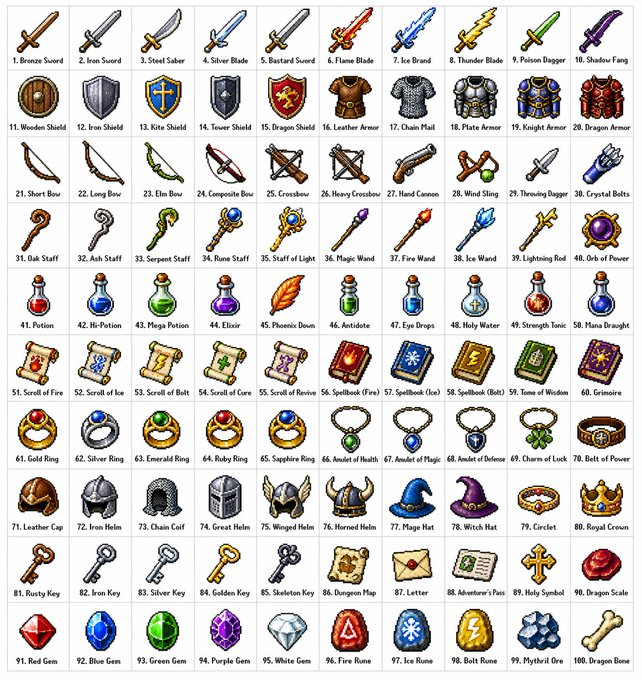
PROMPT · EN
创建一个 arggrid size: 10x10 的网格,其中包含 argitem count: 100 种不同的奇幻角色扮演游戏 (RPG) 物品,风格为 argart style: 经典像素艺术风格(16 位或 32 位精灵图风格,类似于 SNES/GBA 时代的日式 RPG)。每个物品应单独占据一个方形格子,并在下方配有清晰简短的标签。网格应整齐地排列在白色背景上。确保每个物品在视觉上都是独特的,且每个标签拼写正确。使用清晰的像素边缘、每个精灵图有限的调色板,并使用细微的抖动效果来表现阴影。请使用以下行主题:第 1 行:剑与刀刃;第 2 行:盾牌与盔甲;第 3 行:弓、弩与远程武器;第 4 行:法杖、魔杖与魔法器具;第 5 行:药水、灵药与瓶子;第 6 行:卷轴、魔导书与法术书;第 7 行:戒指、护身符与附魔饰品;第 8 行:头盔、王冠与头饰;第 9 行:钥匙、遗物与任务物品;第 10 行:宝石、符文与制作材料。将每个格子显示为干净背景方块上居中的物品精灵图,以经典库存图标的形式呈现——类似于你在奇幻 RPG 菜单中看到的样子。保持整体风格的一致性和连贯性,让人联想到备受喜爱的复古奇幻 RPG——既迷人又精致,即使在小尺寸下也清晰可见。
Über diesen Prompt
Generate a nostalgic 10x10 grid of 100 unique pixel-art RPG items, organized by category and rendered in classic SNES/GBA style. Use it as a Konzeptkunst starting point for GPT Image 2: keep the visual structure and style constraints intact, then swap in your own subject, brand, or scene.
Start by replacing grid size, item count, and art style, then keep the camera, composition, and material cues in the same order. This makes the output easier to compare across variations.
So verwendest du diesen Prompt
- Copy the entire prompt text.
- Open your preferred AI image generator (e.g., DALL·E 3, Midjourney, Stable Diffusion).
- Paste the prompt into the input field. Adjust any bracketed variables if desired (grid size, item count, art style).
- Generate the image. For best results, use a model that excels at detailed pixel art.
- If needed, regenerate with slight adjustments to fine-tune the output.


