Sora2 Hub
Sora2 Hub
  • Prompt-Bibliothek
  • Preise
  • Galerie
Sora2 Hub
Sora2 Hub
Sora2 Hub

Sora2 Hub

Professionelle KI-Kreationsplattform, betrieben von Sora 2, Veo 3.1 und Nano Banana Pro. Erstellen Sie atemberaubende Videos und Bilder in Studioqualität mit erweiterter Steuerung, HD-Qualität und ohne Wasserzeichen.

Email:support@sora2hub.org

KI-Videogenerator

  • Text zu Video
  • Bild zu Video
  • Veo 3.1
  • Sora 2
  • Kling 3.0
  • Kling 2.6
  • Kling 2.5
  • Runway
  • Wan 2.6
  • Seedance 2.0
  • Hailuo 2.3
  • Grok Imagine
  • HappyHorse-1.0
  • HappyHorse 1.1
  • Kling 3.0 Turbo
  • Volcengine Video-to-Video Lip Sync
  • OmniHuman 1.5
  • Grok Imagine Video 1.5
  • Gemini Omni
  • Wan 2.7 Video
  • Seedance 2.0 Mini

KI-Bildgenerator

  • Text zu Bild
  • Bild zu Bild
  • Nano Banana Pro
  • Nano Banana
  • 4o Image
  • Flux Kontext
  • Z Image
  • Seedream 4.5
  • Seedream 5.0 Lite
  • Nano Banana 2
  • GPT Image 2
  • KI-Bildvergrößerer
  • Seedream 5.0 Pro
  • Nano Banana 2 Lite
  • Qwen Image 2.0

KI-Effekte

  • KI-Altersfilter
  • KI-Geschlechtertausch
  • KI-Kuss
  • KI-Umarmung
  • Ghibli-Bild
  • KI-Meerjungfrau-Filter
  • KI-Körperschütteln
  • Lächeln-Filter
  • KI-Fett
  • Actionfigur

Produkt

  • Funktionen
  • Showcases
  • Preise

Unternehmen

  • Über uns
  • Kontakt

© 2025 • Sora2 Hub ORG Alle Rechte vorbehalten.

  • Datenschutzrichtlinie
  • Nutzungsbedingungen
  • Rückerstattungsrichtlinie
  1. Startseite
  2. /
  3. Prompts
  4. /
  5. GPT Image 2
  6. /
  7. Vintage Creature Concept Art Sheet — Sora 2 Prompt
GPT Image 2AI-Prompt

Vintage Creature Concept Art Sheet — Sora 2 Prompt

Create a detailed, vintage-style reference sheet for an animal or creature, complete with orthographic views, expressions, habitat sketches, and item inventories.
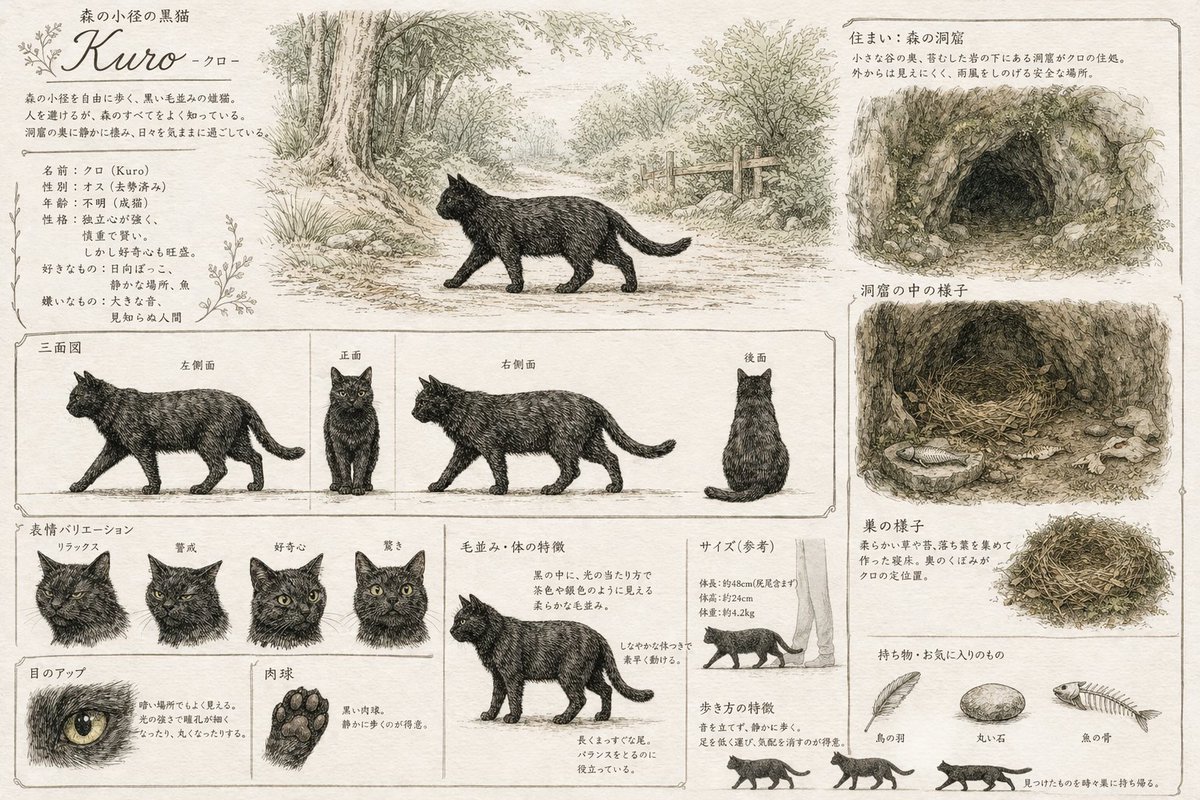
Vintage Creature Concept Art Sheet — Sora 2 Prompt
PROMPT · EN
type
creature concept art reference sheet
style
{argument name="art style" default="vintage pencil sketch with light watercolor wash on parchment paper"}
subject
name
{argument name="creature name" default="Kuro"}
species
{argument name="creature species" default="black cat"}
layout
sections
item 1
title
森の小径の黒猫 Kuro -クロ-
position
top-left
description
Profile text block with botanical flourishes
item 2
title
Main Illustration
position
top-center
description
Cat walking on a forest path
item 3
title
住まい:森の洞窟
position
top-right
description
Exterior view of a {argument name="habitat type" default="forest cave"}
item 4
title
洞窟の中の様子
position
mid-right
description
Interior view showing a nest and a fish
item 5
title
三面図
position
middle
count
4
labels
item 1
左側面
item 2
正面
item 3
右側面
item 4
後面
description
Orthographic views with horizontal alignment lines
item 6
title
表情バリエーション
position
bottom-left
count
4
labels
item 1
リラックス
item 2
警戒
item 3
好奇心
item 4
驚き
item 7
title
Details
position
bottom-left
count
2
labels
item 1
目のアップ
item 2
肉球
description
Close-ups of one eye and one paw pad
item 8
title
毛並み・体の特徴
position
bottom-center
count
1
description
Full body anatomy breakdown
item 9
title
サイズ(参考)
position
bottom-right
count
1
description
Scale reference next to human legs
item 10
title
歩き方の特徴
position
bottom-right
count
3
description
Small walking cycle silhouettes
item 11
title
巣の様子
position
bottom-right
count
1
description
Detailed nest sketch
item 12
title
持ち物・お気に入りのもの
position
bottom-right
count
3
labels
item 1
鳥の羽
item 2
丸い石
item 3
魚の骨
description
Collection of {argument name="favorite items" default="bird feather, round stone, fish bone"}

Über diesen Prompt

Create a detailed, vintage-style reference sheet for an animal or creature, complete with orthographic views, expressions, habitat sketches, and item inventories. Use it as a Konzeptkunst starting point for GPT Image 2: keep the visual structure and style constraints intact, then swap in your own subject, brand, or scene.

This prompt is organized as structured JSON with fields such as type, style, subject, and layout. Keeping that hierarchy helps the model separate the subject, layout, interface elements, and detail constraints.

Start with small changes to subject, scene, camera, and color, then generate a few variations to compare composition and detail without turning the page copy into keyword stuffing.

So verwendest du diesen Prompt

  1. Copy the prompt template and paste it into your Sora 2 interface.
  2. Replace the default values in the {argument} tags (e.g., creature name, art style, habitat) to customize your character.
  3. Choose Sora 2 as your AI model for high-quality, detailed image generation.
  4. Review the generated sheet and tweak the prompt variables if you want adjustments to the layout or details.

FAQ

ray@ゲーム心形流

@prompts→

Veröffentlicht
30. Apr. 2026
Originalsprache
EN
Modell
GPT Image 2
Kategorie
Konzeptkunst
GPT Image 2Konzeptkunstgpt-image-2gptimage2api promptsgptimage2apien
Aufrufe
685
Kopien
41
Likes
30

Teilen

Mehr von GPT Image 2

Alle ansehen
Minimalist Mother's Day Wallpaper — Sora 2 Prompt with Calligraphy & Carnations

Minimalist Mother's Day Wallpaper — Sora 2 Prompt with Calligraphy & Carnations

@EdimakorJP
Dynamic Nike Ad Poster — Sora 2 Prompt with Sydney Sweeney

Dynamic Nike Ad Poster — Sora 2 Prompt with Sydney Sweeney

@im_shahid7
Sacred Dragon Dome Ceiling Mural — Sora 2 Prompt

Sacred Dragon Dome Ceiling Mural — Sora 2 Prompt

@KanaWorks_AI

Schneller erstellen mit Sora2Hub-Prompts.

Nutze kuratierte Prompt-Seiten als suchbare Einstiege und starte direkt mit dem passenden Modellkontext.

Prompts entdecken