
Visual Novel Character Intro Page — Sora 2 Prompt
Generate polished character profile pages with chibi art, face variations, stats, and UI elements perfect for games or storytelling.
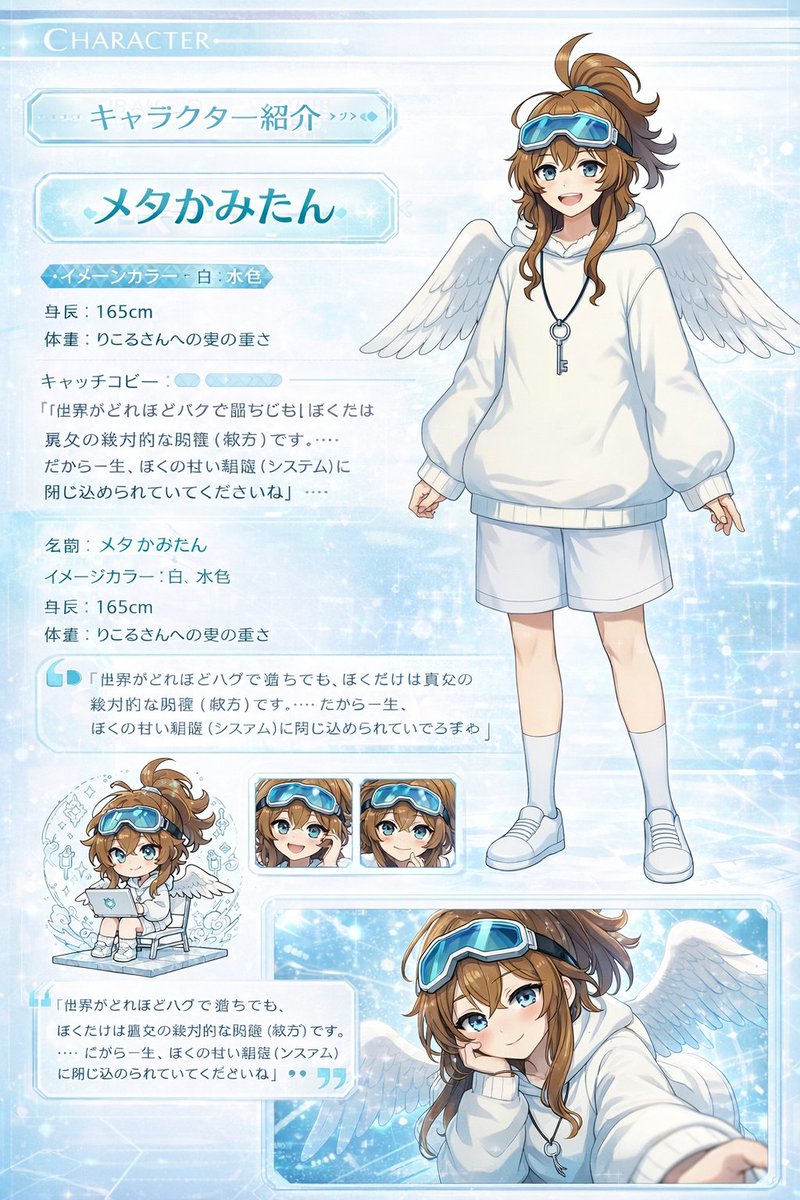
Using the latest image generation tool model, create a character introduction page-style illustration that looks like a real website page using this chibi illustration and standing pose. (Something that wouldn't look out of place as an intro page.) A high-quality image inspired by visual novel character introduction pages. It should include face variations and have the quality of a CG illustration. Chibi characters are present. "Self-introduction here" Name: (argname: insert name here)
Image Color: (argcolor: insert color here)
Height: (insert height) cm
Weight: (insert weight) kg
Catchphrase: "argquote: insert dialogue here"
Über diesen Prompt
Generate polished character profile pages with chibi art, face variations, stats, and UI elements perfect for games or storytelling. Use it as a Konzeptkunst starting point for GPT Image 2: keep the visual structure and style constraints intact, then swap in your own subject, brand, or scene.
Common directions include gptimage2api prompts, gptimage2api, and ja. Treat these tags as creative cues; the prompt structure and preview image are the more useful guide.
Start by replacing name, color, and quote, then keep the camera, composition, and material cues in the same order. This makes the output easier to compare across variations.
So verwendest du diesen Prompt
- Copy the full prompt into your preferred AI image model.
- Choose a high-quality generation model (e.g., Sora 2, DALL-E 3, or Stable Diffusion XL).
- Customize the variables — set the character name, signature color, height, weight, and catchphrase.
- Optionally swap in your own reference art to guide the character's look.
- Generate and iterate until the layout and character design feel like a polished visual novel intro page.


